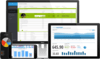
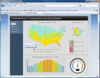
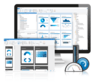
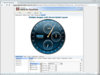
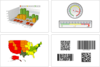
Silverlight Gauge control. With Infragistics xamWebGauge Silverlight Gauge control you can build relevant business scorecard-style applications and rich, informative dashboards leveraging Silverlight's rich media platform. Present users with crystal clear renditions of key performance indicators (KPI) empowering them to make decisions and take action. Cleanly separate design and development tasks with a declarative XAML user interface, allowing development to happen in parallel as designers style the gauge. Astonish your users with the many engaging new possibilities.
Publisher: Nevron Primary Category: Instrumentation Product Type: Component / Add-In / ASP.NET AJAX (ATLAS) / .NET Class / Web Part
Advanced data visualization for your SharPoint Dashboards, KPIs and Scorecards. Nevron Gauge for SharePoint is an advanced web part, which delivers a complete set of radial and linear gauges, numeric displays and state indicators which are driven by pivot data aggregation. This allows the creation of complex gauges, KPIs, Scorecards and Dashboards, that are tightly integrated with your data, to be done visually and directly in SharePoint environment.
Enhance standard Microsoft SharePoint lookup functionality. Cross-Site Lookup Column helps you get data from any site within a site collection. The component includes the ability to search via lookup lists. This function provides substring matching in the selected column and is very useful for large lists (over 50-100 items). It supports the conversion of a standard 'Lookup' column to a 'ArtfulBits Cross-Site Lookup Column” and vice versa (it allows editing content of Cross-Site Lookup columns in a Datasheet view).
Add due date flags to your SharePoint pages. Follow-Up Column enables due date flags similar to those seen in Microsoft Outlook to be added to SharePoint messages, meeting request, tasks, events, etc. The component derives from the Date and Time column so you can filter and sort values in that column. Follow-Up column includes several flags with dates, such as Today, Tomorrow, This Week, Next Week or can be associated with custom date.
Add a progress bar to your SharePoint lists. Progress Column provides users with the ability to make SharePoint lists more visual by displaying numerical data using a percentage-based progress bar. Progress Column is typically used when an application performs tasks such as project progress or sales activity. Users of an application might consider an application non-informative if there is no visual cue. By using Progress Column in your Microsoft SharePoint lists, you can provide the user with rich and live information related to the status of values in your lists.
Track, organize and group SharePoint list items by marking them with colored indicators. Category Column allows tracking, organizing and grouping of SharePoint list items. The component uses the Microsoft Outlook approach for element categorization. It includes a simple way to change indicator color and comes with advanced tooltips that can provide more information. Category Column leverages the Microsoft SharePoint "Choice" column and enables filtering and sorting of values in the column by standard actions. Category Column supports single and multiple choices, allows fill-in values and a different rendering in list view.
Add Key Performance Indicators (KPI) to your SharePoint systems. KPI (Key Performance Indicator) Column provides SharePoint users with the ability to define and measure progress toward predefined goals and display current status by using easy-to-understand graphical indicators. The column automatically calculates the results, and displays one of 3 indicators (OK, Warning, or Problem).
Add Gauges to your SharePoint applications. Dundas Gauge for SharePoint perfect for users who require the real-time monitoring of KPIs and other critical data. It features comprehensive gauges, complete with data analysis abilities. While utilized to represent data that simply can't be shown effectively in a chart format, Dundas Gauge for SharePoint is particularly effective as part of an interactive digital dashboard application. Also, with Dundas Gauge for SharePoint, you get the option of either MOSS 2007 or Windows SharePoint Server (WSS) installations.
Publisher: ComponentArt Primary Category: User Interface Collections Product Type: Component / ASP.NET WebForms / ASP.NET AJAX (ATLAS) / Silverlight / AJAX
The complete framework for building next generation WPF, AJAX and Silverlight Rich Internet Applications. ComponentArt UI Framework for .NET includes ComponentArt Win.UI for WPF, ComponentArt SOA.UI for .NET, ComponentArt Web.UI for ASP.NET MVC, ComponentArt Web.UI for Silverlight and ComponentArt Web.UI for ASP.NET AJAX. ComponentArt SOA.UI for .NET is a framework for building web services specialized to serve the user interface tier. It enables full server-side code reuse between ASP.NET AJAX and Silverlight front ends. ComponentArt Web.UI for Silverlight offers user interfaces to Silverlight-based Rich Internet Applications. All Web.UI for Silverlight controls ship with five professionally-design built-in themes. ComponentArt Web.UI for ASP.NET AJAX offers client-side richness and user interface performance. Now offering second generation web service binding through SOA.UI, ComponentArt Web.UI delivers full server-side code reuse with Silverlight applications. ComponentArt components are designed for and have been tested with all modern browsers. C# Source Code and 1 Year Subscription included.
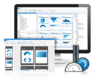
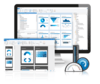
Lightweight mobile user interface controls and vibrant data visualization controls optimized for Microsoft Windows Phone 7 devices. Infragistics NetAdvantage for Windows Phone gives you rich, innovative mobile UI controls to build high-end mobile user experiences for Microsoft Windows Phone 7. The controls are high performance with eye-catching data visualizations, mobile form factor optimization, touch gesture support, and alignment with Metro usability guidelines. Infragistics NetAdvantage for Windows Phone is a lightweight toolset for building mobile user experiences, interactive data visualizations and mobile dashboards based on the NetAdvantage for Silverlight Data Visualization controls. Infragistics controls give you a shared XAML experience from desktop to Web to mobile so your users have the same real-time experience “on the phone” as they would expect from a desktop application. NetAdvantage for Windows Phone controls deepen your toolbox with the high performance charts, bullet graphs, gauges, barcodes, barcode readers, sliders, windows, message boxes and more that you need to get started today in creating your own rich and vivid Microsoft Windows Phone 7 applications. NetAdvantage for Windows Phone includes an annual subscription to developer support, source code, all updates and upgrades, documentation and samples.