
Official Supplier
As official and authorized distributors, we supply you with legitimate licenses directly from 200+ software publishers.
See all our Brands.
Input and data validation components implement the functionality to manage data entry and check it for specified criteria.
What is WPF? WPF stands for Windows Presentation Foundation and is part of the Microsoft .NET Framework that helps you create Windows based forms inside your application on Windows based PCs and servers. (When Microsoft were developing WPF it was also known as project Avalon). The WPF technology can be viewed as the next step on from Windows Forms or WinForms by Microsoft and provides support for vector graphics, as such WPF apps can produce a better look and feel, particularly for high-definition imaging and graphics applications, than traditional Windows Forms. WPF is not aimed at Web site & Intranet developers as Microsoft has another .NET Technology called Silverlight. WPF is aimed at desktop app developers.
What is a WPF Control? A WPF control is a reusable software component that you can add you your WPF form to enable the user to control the application, enter data and display data on their screen at run-time. A WPF control is a piece of code that has been pre-built by another WPF developer or third party WPF controls creator that can be easily added to your WPF based app to extend the functionality fast. For example, you will find complex Gantt scheduling WPF controls on our Web site for you to add resource scheduling, planning and timetabling functionality to your WPF program, without you needing to develop and support all those basic WPF scheduling controls.
What is a WPF Component? WPF components are different from WPF controls in that they can be non-visual and can to be running hidden in the background of your app. WPF controls are a subset of WPF components, so all WPF controls are also WPF components, but not all WPF components are visible to the user. For example, you can get a WPF data compression component that runs in the background compressing and decompressing the size of data files using common data compression techniques such as ZIP, but this WPF component and its activity is not visible to the user.
In this filtered view of our complete .NET component product catalog, you will find a WPF controls gallery and also some WPF components that you can download, compare, review, try and buy, to add to your WPF app. The Windows Presentation Foundation area of the market is rapidly expanding, so if you wish to find all the latest WPF News about third party WPF products, then subscribe to our WPF News RSS feed to keep up to date.
Microsoft Visual C++ 2005 (MS Visual C++ 2005) allows Visual C++ 2005 programmers to rapidly create Windows applications for their end users. Visual C++ 2005 developers can extend the standard functionality available inside the Visual C++ 2005 IDE with a variety of Visual C++ 2005 add-ins and Visual C++ 2005 tools. The extensibility of Visual C++ 2005 is one of the main reasons it has proved to be popular with developers, as Visual C++ 2005 software engineers can find Visual C++ 2005 downloads from other companies or other VC++ developers to act as a Visual C++ 2005 extension to their Visual C++ 2005 IDE or Visual C++ 2005 app.
The versatility of Visual C++ 2005 also extends to various forms of Visual C++ 2005 software components. Visual C++ 2005 controls can be used to create feature rich Visual C++ 2005 user interfaces on forms and Web pages inside Visual C++ 2005 apps. These Visual C++ 2005 UI controls are augmented by non-visual Visual C++ 2005 components or Visual C++ 2005 libraries or Visual C++ 2005 Class libraries that can help a developer add many hidden features in Visual C++ 2005 applications running in the background. These non-visual components are most commonly available as a Visual C++ 2005 library or Visual C++ 2005 Class library.
An example of a visible Visual C++ 2005 control is BCGControlBar Professional, a Visual C++ 2005 Class Library that allows you to create an MS Office Ribbon style or look and feel to your latest Visual C++ 2005 project UI. A non-visible Visual C++ 2005 Class Library component example is a Visual C++ 2005 compatible product call IP*Works! C++ Edition that allows you to send emails via SMTP and POP or to transfer files reliably using HTTP or FTP Internet protocols from within your Visual C++ 2005 program.
The Visual C++ 2005 software products listed in this Visual C++ 2005 product gallery will allow you to save a lot of time and effort in creating your new Visual C++ 2005 app. Whether you are looking for a Visual C++ 2005 plug-in or Visual C++ 2005 utility, or you are looking for a Visual C++ 2005 control or a Visual C++ 2005 component, you will be able to find a wide variety of Visual C++ 2005 tools to help you finish your project faster.
We also have other Visual C++ product galleries for: Visual C++ 2010, Visual C++ 2008, Visual C++ .NET and Visual C++ compatible products.

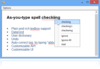
Description: As-you-type and dialog spell checking for WPF applications. RapidSpell WPF can be added to any application to provide a fully independent and highly customizable spell checking control. RapidSpell WPF can also be used in non GUI contexts using its spell ... Read more
As official and authorized distributors, we supply you with legitimate licenses directly from 200+ software publishers.
See all our Brands.
Over 1,600,000 licenses delivered to Developers, SysAdmins, Corporations, Governments & Resellers, worldwide.
Read more about us.
Tel: (888) 850 9911
Fax: +1 770 250 6199


