Use managed metadata to drive navigation, discovery and reusability of content. Knowledge Management Suite for Microsoft SharePoint makes it easy to manage tags, to tag content and to use tags for knowledge browsing, navigation, content discovery and search. It was developed using the SharePoint Server Enterprise Metadata Management API, and no legacy or other external systems are used. You may include any external data source without any restrictions using Business Data List Connectors.
Connect to Office 365, SharePoint 2010 and Azure. Cloud Connector for Microsoft SharePoint 2010 and Office 365 takes your local data and distributes it to cloud-based or hosted SharePoint systems. Content stored on almost any corporate data source (databases, files, ERP / CRM / ECMS) and in applications (Dynamics, SharePoint, Active Directory, SAP) is replicated to cloud based native SharePoint lists via secure Web services. Cloud-to-cloud connections e.g. to Azure, Twitter, Facebook, Google etc. are also supported.
Create professional Help Systems and Manuals from HTML or Word. Whether you are converting from RoboHelp or creating new projects, Doc-To-Help empowers you to create HTML or Microsoft Word content and convert it to virtually every popular Help file format or printed documentation. Doc-To-Help Enterprise can produce help files in popular formats including HTML Help, Cross-Platform HTML-based Help, JavaHelp, WinHelp, Visual Studio .NET-style Help, and printed documentation. Since Doc-To-Help Enterprise uses a simple style markup to create Help systems, you have the freedom to use any editor. Doc-To-Help Enterprise supports Windows 7, Vista and the 2010 Microsoft Office System including seamless integration with Word 2010. Doc-To-Help Enterprise now offers integration with SharePoint which allows you to upload your content to a SharePoint library and take advantage of SharePoint’s management and workflow features. Doc-To-Help Enterprise also includes exclusive features such as one-click RoboHelp project conversions. Doc-To-Help for Enterprise includes updates and upgrades for 1 year. Platinum Support including 1 year of unlimited phone support also available.
Publisher: Nevron Primary Category: Product Suites Product Type: Component / Add-In / ASP.NET AJAX (ATLAS) / .NET Class / Web Part
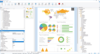
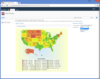
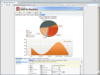
Create digital dashboards and reports in SharePoint. Nevron Data Visualization technology for Microsoft SharePoint Server is designed to provide exceptional reporting and dashboarding features to SharePoint IT professionals. Nevron SharePoint Vision is a turn-key solution for every SharePoint IT professional that wants to create advanced digital dashboards and reports in SharePoint - quickly, on budget and on time.
Publisher: Nevron Primary Category: Instrumentation Product Type: Component / Add-In / ASP.NET AJAX (ATLAS) / .NET Class / Web Part
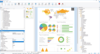
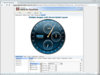
Advanced data visualization for your SharPoint Dashboards, KPIs and Scorecards. Nevron Gauge for SharePoint is an advanced web part, which delivers a complete set of radial and linear gauges, numeric displays and state indicators which are driven by pivot data aggregation. This allows the creation of complex gauges, KPIs, Scorecards and Dashboards, that are tightly integrated with your data, to be done visually and directly in SharePoint environment.
Publisher: Nevron Primary Category: Charting and Graphing Product Type: Add-In / ASP.NET AJAX (ATLAS) / .NET Class / Web Part
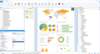
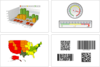
Deliver advanced charting solutions to the SharePoint environment. Nevron Chart for SharePoint is an advanced chart web part, which delivers a complete set of 2D and 3D charting types, highly customizable axes, advanced data analysis features, tight data integration and visual effects to your SharePoint sites. It combines the Nevron Charting engine for ASP.NET together with the elegant Nevron Pivot Data Aggregation engine. This allows Nevron Chart for SharePoint users to create complex pivot charts visually and directly in the SharePoint environment.
A SharePoint Web part that manages item-level permission. SharePoint Permission Workflow offers a productive way for IT administrators to manage item-level permissions among all the users and user groups by streamlining the whole process.With SharePoint Permission Workflow, item-level permissions are able to be automatically assigned to selected users and user groups for all items in a SharePoint list at one time. Meanwhile, administrators are also empowered to apply item-level permissions for the existing items within a list with only one click.
Publisher: SharePointBoost Primary Category: Network Administration Product Type: Component / Application / ASP.NET WebForms / ASP.NET AJAX (ATLAS) / Web Part
The SharePoint List Collection web part can congregate lists from different SharePoint sites into one single view. In the view, you can work with the data and then export it to a spreadsheet.To create a SharePoint list collection web part, firstly, you should select a site, a list in the site and a list view of the list.Then choose list columns to collect data, select or input new column names for original ones so these columns will be aggregated and displayed in the SharePoint list collection web part. Repeating above actions, you can get SharePoint combined lists.
Publisher: SharePointBoost Primary Category: System Administration Product Type: Component / Application / ASP.NET WebForms / ASP.NET AJAX (ATLAS) / Web Part
Assign item-level permissions to users and user groups for all items in a SharePoint list. SharePoint Item Permission Batch offers SharePoint Administrators a convenient place to add or remove custom permission settings for all the items within a SharePoint list simultaneously. In additions, IT administrators are empowered to restore the default permission settings for all the items within a list at one time, which will further alleviate their workload and accelerate the speed of an organization’s daily operation as well. Moreover, SharePoint Item Permission Batch enables administrators to specify certain users and user groups that will be assigned custom permissions by setting complex conditions based on administrators’ various consideration.
Publisher: SharePointBoost Primary Category: Product Suites Product Type: Component / Application / ASP.NET WebForms / ASP.NET AJAX (ATLAS) / Web Part
All-in-one SharePoint permissions management solution. SharePoint Permissions Boost is a suite of all three SharePointBoost permission tools: Column/View Permission, Permission Workflow, and Item Permission Batch. SharePoint Column/View Permission allows administrators to manage access to all list content by setting field-level and view-level permission settings. SharePoint Permission Workflow assigns item-level permissions to users and user-groups as items are created or modified, and can retroactively apply permissions for previously existing items within a SharePoint list. SharePoint Item Permission Batch enables administrators to quickly and easily remove all custom permission settings within a SharePoint list and restore defaults for specified users or user-groups in bulk.