by Syncfusion - Product Type: Component / ASP.NET WebForms / ASP.NET AJAX (ATLAS) / ASP.NET MVC / .NET WinForms / .NET WPF / Silverlight / 100% Managed Code
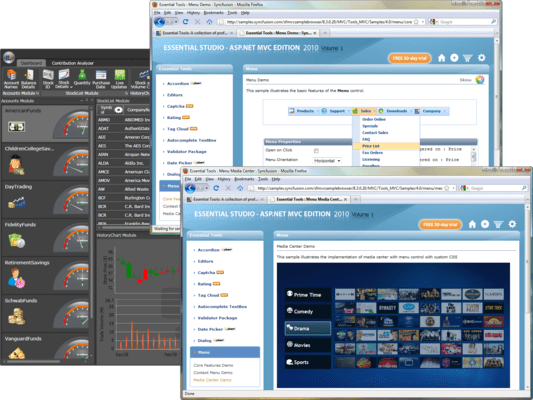
A rich set of UI controls to let you create rich, interactive applications. Syncfusion Essential Tools is an extensive collection of nearly 80 user-interface components. You can easily create robust and usable application interfaces such as those emulating Visual Studio.NET and Microsoft Office. All the editor controls have been architected to provide a simple and feature-rich means for capturing data input, validating, and displaying appropriate formatting. Syncfusion Essential Tools includes components for Windows Forms, WPF, Silverlight, ASP.NET and ASP.NET MVC technologies.

Our regular prices are shown below. Please logon to see your discounted prices.
| Add to Cart | $ 805.50 | 1 Developer License - with 1 Year Subscription | Download (595.0 MB) | |
| Add to Cart | $ 364.50 | 1 Developer Annual Subscription Renewal License (for subscriptions soon to expire or up to 30 days past expiration | Verify | Download (29 KB) |
| Add to Cart | $ 604.13 | 1 Developer Reinstatement of Lapsed Subscription License (for subscriptions lapsed longer than 30 days up to one year) | Verify | Download (29 KB) |
| Add to Cart | $ 1,165.50 | 1 Developer License with Source Code - with 1 Year Subscription | Download (595.0 MB) | |
| Add to Cart | $ 526.50 | 1 Developer Annual Subscription Renewal License (for subscriptions soon to expire or up to 30 days past expiration) with Source Code | Verify | Download (29 KB) |
| Add to Cart | $ 874.13 | 1 Developer Reinstatement of Lapsed Subscription License (for subscriptions lapsed longer than 30 days up to one year) with Source Code | Verify | Download (29 KB) |
| Add to Cart | $ 18,000.00 | Site License - with 1 Year Subscription - Allows upto 500 Developers at a single address | Verify | Download (595.1 MB) |
| Add to Cart | $ 7,200.00 | Site Annual Subscription Renewal License (for subscriptions soon to expire or up to 30 days past expiration) - Allows upto 500 Developers at a single address | Verify | Download (29 KB) |
| Add to Cart | $ 16,200.00 | Site Reinstatement of Lapsed Subscription License (for subscriptions lapsed longer than 30 days up to one year) - Allows upto 500 Developers at a single address | Verify | Download (29 KB) |
| Add to Cart | $ 27,000.00 | Site License with Source Code - with 1 Year Subscription - Allows upto 500 Developers at a single address | Verify | Download (595.1 MB) |
| Add to Cart | $ 10,800.00 | Site Annual Subscription Renewal (for subscriptions soon to expire or up to 30 days past expiration) with Source Code - Allows upto 500 Developers at a single address | Verify | Download (29 KB) |
| Add to Cart | $ 24,300.00 | Site Reinstatement of Lapsed Subscription (for subscriptions lapsed longer than 30 days up to one year) with Source Code - Allows upto 500 Developers at a single address | Verify | Download (29 KB) |
Our prices include ComponentSource technical support and, for most downloadable products, an online backup and a FREE upgrade to the new version if it is released within 30 days of your purchase. All sales are made on our standard Terms and Conditions and subject to our Return Policy. Please contact us if you require any licensing option not listed, including volume licensing and previous versions.
Our regular prices are shown above. Please logon to see your discounted prices.
Please note: Syncfusion Essential Tools includes Windows Forms, WPF, Silverlight, ASP.NET MVC and ASP.NET components.
What’s new in Essential Tools 2012 Volume 1?
Syncfusion Essential Tools for Silverlight Ribbon Control
The ribbon control enables developers to add an Office-like ribbon interface to Silverlight applications. It also ships with several Office themes.
Syncfusion Essential Tools for Silverlight Tabs
The TabControlAdv control enables users to display the content of multiple pages within a limited area. It ships with a rich feature set, including multiple tab-strip placements, automatic text rotation on vertical placements, drag-and-drop tab items, item-header images with multiple alignments, in-place editing of headers, tab-list context menus, and scrolling support.
Syncfusion Essential Tools for Silverlight Group Bar
The group bar is a UI for grouping a collection of commands within categories. It displays these categories within collapsible panels. The group bar lets you recreate the popular Microsoft Outlook bar interface in applications. Each panel in a group bar can host a number of commands or any other control, such as a calendar.
Syncfusion Essential Tools for Silverlight Checked List Box
The check list box control is a list box with check boxes. It includes list box items and allows multiple items to be selected.
Syncfusion Essential Tools for Silverlight Editors
All editor controls have been architected to provide a simple and powerful means for capturing data input, and validating and displaying data with the appropriate formatting. They include the integer text box, double text box, AutoComplete, masked text box, percent text box, currency text box, numeric up-down, and domain up-down controls.
Syncfusion Essential Tools for Silverlight Date-Time Edit
The date-time edit control enables users to capture date-time input in a Silverlight application. It ships with a variety of built-in features, including custom date-time formats, different cultures, a built-in calendar to navigate through dates, empty date options, and customizable carets.
Syncfusion Essential Tools for Silverlight Range Slider
Range Slider is a slider control with two thumbs showing a selected range. It lets users input two values, typically an upper and a lower bound for two thumbs, thus providing enhanced feature support for a standard slider control.
Syncfusion Essential Tools for Silverlight Panels
The fish-eye panel is a toolbar-like control that magnifies a child element when the pointer hovers over it.
Syncfusion Essential Tools for Silverlight Skin Manager
The Silverlight Skin Manager framework provides a convenient way to apply a consistent visual appearance across the application. Skin Manager applies skin for both the Syncfusion and Silverlight Framework controls.
Syncfusion Essential Tools for Silverlight Brush Selector
The brush selector control is a UI control similar to the color picker control used in graphics software. It has a sub-control, named Brush Edit, with similar properties.
Syncfusion Essential Tools for Silverlight Docking Manager
The docking manager control lets you add Visual Studio-like docking functionality to applications.
Syncfusion Essential Tools for Silverlight Tree View
The TreeViewAdv control implements a tree UI with advanced customization capabilities. Its feature set includes dragging and dropping, multi-node selection, and in-line editing support. It supports adding images--such as left, right, expand, and collapse images. It also provides built-in support for sorting and searching tree nodes.
Syncfusion Essential Tools for Silverlight Taskbar
A taskbar is similar to a group bar in its ability to host a collection of grouped command items. The look and feel, however, is closer to the Windows XP Taskbar. Just like the group bar, taskbar boxes can be expanded and collapsed.
Syncfusion Essential Tools for Silverlight Uploading Files
The file upload control is used to upload multiple files simultaneously. With the auto-upload feature, file uploading can be performed automatically upon selection, eliminating the need to click the Upload button. Other features of this control include asynchronous file uploading, a thumbnail view of uploaded images, size limits on files to be uploaded, and restrictions on file types.
Syncfusion Essential Tools for Silverlight Calendar Edit
The calendar edit control implements a classic calendar control with certain advanced features. Any date ranging from year 0 to year 9999 A.D. can be displayed. The control displays a calendar that users can utilize to navigate to any day of any year.
Syncfusion Essential Tools for Silverlight Heat Map
A heat map is a graphical representation of data where the values taken by a variable in a two-dimensional map are represented as colors.
Syncfusion Essential Tools for Silverlight Menu Package
The Menu package contains three controls--menu, toolbar, and context menu controls. These controls enable users to choose from a list of commands or options.
Syncfusion Essential Tools for Silverlight HTML Host
The HTML host acts as a container for hosting HTML content inside a Silverlight environment. It has the ability to navigate to any Web URL, parse HTML tags, and display them in Silverlight.
Syncfusion Essential Tools for Silverlight Color Picker
The color picker control provides a rich visual interface for color selection. The structure of the control represents a palette with ToolTip support and a More Colors option.
Syncfusion Essential Tools for WPF Docking Manager
The Docking Manager is an advanced container control that automatically lays out its children within docked panels, just as seen in Visual Studio .NET. This element can be used in XAML, just as easily as it is used in grid or canvas elements. The attached properties can be used to specify the dock state and position of the child elements. End-users can then fully customize the user interface by dragging the dock panels to different locations within the container, floating and arranging them within tabs in the dock panel, or hiding the dock panel. The dock panels can also operate in AutoHide mode.
Syncfusion Essential Tools for WPF Document Container
The Document Container framework supports both multiple document interfaces (MDIs) and tabbed document interfaces (TDIs). Though MDI is not supported in the 3.5 framework, the document container has the ability to develop MDI applications in WPF. It can load any type of content, such as flow documents and any UI elements. It also ships with sophisticated default window switching styles such as Vista Flip and Visual Studio.
Syncfusion Essential Tools for WPF Editors
Create professional, user-friendly data editing forms using several of the advanced editors available in Essential Tools. These editors are a comprehensive collection of controls that can be used in creating data-entry forms. All editor controls have been architected to provide a simple and powerful means for capturing data input, as well as validating and displaying data input with the appropriate formatting. They also ship with support for data binding, templates, and styles, to change the appearance of the control.
Syncfusion Essential Tools for WPF Taskbar
The TaskBar control is similar to the group bar control in that it can host a collection of grouped command items. The look and feel, however, is closer to the Windows taskbar. Besides command items, any custom control can be placed inside the taskbar. Just like the group bar, taskbar boxes can be expanded and collapsed.
Syncfusion Essential Tools for WPF Tab Control
TabControlExt is a control that can define multiple pages for the same area of a window. It contains the TabItemExt control, which is used to define tab items with different visual styles such as One Note Type, Visual Studio and Office. When a tab-item header is selected, the corresponding tab item’s data will be displayed.
Syncfusion Essential Tools for WPF Vector Images
Vector images are collections of many scalable individual objects; rather than using pixels, these objects use mathematical relationships and equations between connecting points and paths to describe an image. This is why they always render at the highest quality.
Syncfusion Essential Tools for WPF Range Slider
Range Slider is a slider control with two thumbs that show a selected range. It lets users input two values, typically an upper and a lower bound for two thumbs, thus providing enhanced feature support for the standard slider control.
Syncfusion Essential Tools for WPF Check List Box
The Check List Box control implements a classic list box with added check boxes, allowing multiple items to be selected.
Syncfusion Essential Tools for WPF Ribbon
A ribbon is a collection of controls and behaviors that together implement the latest Office-style menus and toolbars in an application. It is designed to make commands more accessible. Commands can be easily organized into logical groups, which are rendered under tabs. Some tabs can also be displayed on a need-only basis.
Syncfusion Essential Tools for WPF Tree View
The TreeViewAdv control implements a tree UI with advanced customization capabilities. Advanced features such as drag-and-drop, multi-node selection, and inline editing support are also available. It also has a feature for adding images, and it contains the built-in ability to perform item sorting on a tree view.
Syncfusion Essential Tools for WPF Groupbar
The GroupBar control is a user interface element that groups a collection of commands within categories and displays those commands within collapsible panels. It lets you recreate the popular Microsoft Outlook bar interface in your application. Each panel in a group bar can host a number of commands or any other control, such as a calendar.
Syncfusion Essential Tools for WPF Gallery
A gallery is a useful control for displaying categorized collections of objects as thumbnail views. It also comes with built-in animation when laying out child items.
Syncfusion Essential Tools for WPF Tab Splitter
The Tab Splitter control is similar to the Visual Studio-style split view for tabbed groups.
Syncfusion Essential Tools for WPF Notify Icon
The Notify Icon control supports different animations and shapes. It allows an icon to be added in the notification tray of a system with different animation and shape formats.
Syncfusion Essential Tools for WPF Tile View
The Tile View control for WPF is capable of hosting tile view items. The main feature of these items is their capacity to host any kind of content. Also, they are draggable, so they can be rearranged.
Syncfusion Essential Tools for ASP.NET Docking Package
The Docking Package comes with a Snap control that enables dynamic positioning of ASP.NET content in Web pages with options for moving, docking, floating, and expand and collapse operations with complete support for rich transition effects.
Syncfusion Essential Tools for ASP.NET Menu Package
The menu control comes with professional-looking built-in skins and a customizable application programming interface (API). Built-in support for orientation, data binding, and ActiveX overlay are provided. The menus can also be used in the Context Menu mode.
Syncfusion Essential Tools for ASP.NET Notification Package
The Notification Package includes controls that notify the user about events with regard to a process. These controls and their features are discussed in this section.
Syncfusion Essential Tools for ASP.NET Tab Package
In ASP.NET Essential Tools, user-friendly, tabbed interfaces can be created using the TabStrip and Multipage controls to create professional Web pages.
Syncfusion Essential Tools for ASP.NET Tree Package
The Tree Package comes with a high performance TreeView control with AJAX support and built-in styles. The object model of the tree is highly refined to let you customize the appearance of every single element and node of the tree.
Syncfusion Essential Tools for ASP.NET Editor Package
The Editor Package is a comprehensive collection of controls most commonly used in creating data-entry forms. All editor controls have been architecture to provide a simple and powerful means to capture the input data, validate and display them in the appropriate format. The controls also support complete data binding, internationalization, and localization.
Syncfusion Essential Tools for ASP.NET Navigation Package
The Navigation package includes a Groupbar control that lets you implement Outlook Bar or Windows task bar like functionality. It serves as a container that can host a collection of controls where every such control represents a standard command.
Syncfusion Essential Tools for ASP.NET Splitter Package
Splitter control includes the Splitter Bar and Sliding Panes that allow users to divide the Web page into distinct areas and resize the panes. It offers comprehensive design-time support and client-side functionalities.
Syncfusion Essential Tools for ASP.NET Toolbar Package
The Toolbar control offers comprehensive design-time support with rich features including, different toolbar layouts, draggable toolbars, support for image and text, and drop-down menus.
Syncfusion Essential Tools for Windows Forms Office Controls
Essential Tools includes Office controls to design your applications with the theme of the Microsoft Office user interfaces.
Syncfusion Essential Tools for Windows Forms Docking Package
The Docking Package consists of the Essential Tools docking windows architecture. It allows users to add Visual Studio.NET-type controls that can be docked to Windows Forms applications. Any control can be set as a docking window. Docking layouts can be hosted within forms, user controls, or any derivative of the container-control type. An advanced designer allows users to harness full WYSIWYG (What You See Is What You Get) configuration of a docked layout.
Syncfusion Essential Tools for Windows Forms Ribbon Control
The RibbonControl functions like the Microsoft Ribbon Control and serves as an optimal alternative for menus, task panes, and tool strips.
Syncfusion Essential Tools for Windows Forms Super Accelerator
The Super Accelerator component is used to accelerate the click event of items by using a single key stroke without the pointer hovering over it.
Syncfusion Essential Tools for Windows Forms Tabbed MDI Package
The Tabbed MDI (Multiple Document Interface) package provides a new Tabbed MDI layout mode (as an alternative to the default 'Cascade' and 'Tiled' modes) popularized by VS.NET. This framework was built with great consideration for ease of use. You do not have to modify your existing MDI applications in any way to enable Tabbed MDI mode. With a single method call, you can switch between Tabbed and regular MDI layout modes. Syncfusion's Tabbed MDI framework will retain the MDI scheme when in tabbed mode. The child forms will still be MDI children of the parent (they will not be moved into a tab control; this results in loss of MDI functionality like merged menus, or switching using 'CTRL-?'), thereby enhancing your applications without interfering with the general MDI scheme. The Tabbed MDI framework provides users with the exact functionality and appearance of VS.NET tabbed child windows.
Syncfusion Essential Tools for Windows Forms MultiColumnTreeView
MultiColumnTreeView is an advanced treeview control with multiple columns. This control displays the contents in the form of tree with additional columns displaying related data for the tree nodes.With its robust features, it gives a visually appealing tree structure. It supports almost all the features of the treeview control like settings images, check box and option buttons, help text capabilities, Gutter space, Indent Space, advanced drag-and-drop UI support, context-menu association, gradient backgrounds and multiple border styles, etc.,
Syncfusion Essential Tools for Windows Forms Editor Package
The Editor package is a comprehensive collection of controls most commonly used in creating data entry forms. All editor controls have been architected to provide a simple and powerful means for capturing data input, validating, and displaying appropriate formatting. They also support data binding, internationalization, and localization. Web Forms and ASP.NET versions of some data editors are also included in this package.
Syncfusion Essential Tools for Windows Forms Command Bars
The Command Bars package includes the Command Bars framework. Command bars implement the framework support that is required for creating Visual Studio.NET-type dockable or floatable menus and toolbars. A command bar, in itself, provides only the dockable host; it is up to the user to implement the menu or toolbar that imparts the command bar its functionality. The Essential Tools Menus Package uses the command bars framework for creating XP menus and toolbars.
Syncfusion Essential Tools for Windows Forms Layout Manager
The Layout Manager package provides a comprehensive set of layout managers that manage advanced layouts on a form. The layout management support of Windows Forms such as docking, anchoring, and padding is adequate for many layout management needs. However, your complex layout management needs can be met by the following layout managers that provide full design-time support.
Syncfusion Essential Tools for Windows Forms Menu Package
The Essential Tools Menu Package comes with the Windows Menus framework, which provides users with the latest Office and Windows style as well as functionality for menus, toolbars, and context menus.
Syncfusion Essential Tools for Windows Forms Super ToolTip
The Super ToolTip control enables users to provide ToolTip information. It is composed of three sections, namely a header, body, and footer.
Syncfusion Essential Tools for Windows Forms Scroller Frame
The Scroller Frame control offers the ability to include horizontal and vertical scroll bars with an Office-style to any scrollable control. The control comes with three different styles that offer context menu support. The scroll bars can be displayed with a size gripper. The distance for scrolling up, down, right, and left can also be defined.
Syncfusion Essential Tools for Windows Forms Mini-Toolbar
The MiniToolBar is a custom toolbar that includes tools for fast and easy access. The Essential Tools MiniToolbar can host a wide range of controls ranging from buttons to panels.
Syncfusion Essential Tools for Windows Forms Tree Package
The Tree package provides an advanced Tree View control with numerous appearance options, extensive customization capabilities, and a data-bound mode that supports data binding by taking a relational data source with rows and columns (Data Set, Data View, Array List) and grouping the rows based on one or more specified fields.
Syncfusion Essential Tools for Windows Forms Navigation Package
The Navigation package includes controls such as group bars, group views, and TaskBars. These are primarily used for implementing command lists where each command is represented by an image or text. The group bar implements a tab-type container that can serve as a host for a collection of group views or other Windows Forms controls. The group view is an extensively customizable list-type control capable of cloning the above listed popular command interfaces. The TaskBar may be used for displaying standard command items or as a container that can host several other controls.
Syncfusion Essential Tools for Windows Forms Notification Package
The Notification package consists of controls providing visual feedback to the user regarding the status of application events. Common applications of the Notification package include enhanced progress bars, splash screens, and customized message boxes with animations.
Syncfusion Essential Tools for Windows Forms Wizard Package
The Wizard Package provides controls that use the Wizard interface (a series of tabs laid out with next, back, and other buttons) popularized by many Windows-based applications. The Wizard control lets users quickly create such applications.
Syncfusion Essential Tools for ASP.NET MVC Editors
The Editors are a comprehensive collection of controls, most commonly used in creating data-entry forms. All editor controls have been architected to provide a simple yet powerful means to capture the input data, and to validate and display them in the appropriate format.
Syncfusion Essential Tools for ASP.NET MVC Rich Text Editor
The Rich Text Editor in Essential Tools for ASP.NET MVC is a WYSIWYG (What You See Is What You Get) editor that enables end-users to visually edit and compose HTML content. Common content formatting options found in word processors are supported, such as indenting, inserting lists, cutting, copying, and pasting.
Syncfusion Essential Tools for ASP.NET MVC Date Picker
The Date Picker control allows end-users to select a date, visually, through a calendar interface.
Syncfusion Essential Tools for ASP.NET MVC Tabs
Tabs can be used to create professional tabbed interfaces for Web pages. This control is extremely light weight, and tab switching is done entirely on the client side.
Syncfusion Essential Tools for ASP.NET MVC AutoComplete Text Box
The AutoComplete Text Box control allows you to specify custom IEnumerable data that will be used as a dictionary. This control has a fully customizable data list, and it supports templates for drop-down menus.
Syncfusion Essential Tools for ASP.NET MVC Slider
Essential Tools for ASP.NET MVC also includes a Slider control to visually select values within a given range.
Syncfusion Essential Tools for ASP.NET MVC Waiting Popup
The Essential Tools WaitingPopup control for MVC supports displaying a pop-up indicator over a target area to prevent an end-user from interacting with the target area when loading. The pop-up indicator has a wide application of Ajax posts. It can also be used to disable a target control.
Publisher
Primary Category
Related Products
Related Categories