ActiveX Components (ActiveX Controls, COM Objects & OLE Objects)
Microsoft first introduced the term ActiveX in 1996 when they launched a downloadable user interface control or software component that could be used by Internet Explorer to give more interactive or active content on a Web page to the reader. ActiveX controls were a re-branded subset of OLE custom controls (OCX) or OLE controls (OCXes) that were streamlined for downloading over the Internet and that could be digitally signed for security and authentication reasons. These ActiveX downloads were also tagged or marked as being safe for scripting and safe for initialization, to help give users confidence in using them in ActiveX Internet apps, as they were less likely to start making unauthorized actions on their systems. ActiveX controls also supported threading models, such as Apartment Model Threading, to try and improve performance in a multi-user or multi-process environment.
OLE controls (OCX's) or Object Linking and Embedding controls were themselves the successor to VBX controls first introduced by Microsoft to help programmers extend the functionality and features of their Visual Basic program by buying and reusing a VBX control built by another programmer or company, with expertise in a specific area. VBXes were limited to 16 bit usage for example on Windows 3.x, OCXes were available for both 16 bit or 32 bit architectures and began being widely used as people adopted Windows 95, although most people tended to use VBXes on 16-bit systems and OCX controls or OLE components on 32-bit systems for performance reasons. OLE itself was based on earlier work by Microsoft in their Office products to allow data to be exchanged and reused as objects inside other documents or files, such as embedding an Excel spreadsheet in a Word document and updating the content of that Excel spreadsheet for display using Dynamic Data Exchange (DDE). Hence the term OLE document, that is still in use today.
OLE was part of the Microsoft COM or Component Object Model, that enabled programmers to reuse software components and services in a logical and object oriented manner. COM was extended and expanded over the years to include DCOM, the Distributed Component Object Model that allowed programmers to call OLE objects or COM objects situated on other computers or servers. COM+ was added to support transaction services using technologies such as Microsoft Transaction Server (MTS) and this first appeared when Windows 2000 was launched to better support distributed transactions in more complex applications, where higher performance and throughput was required. COM has gradually become a common term used to refer to: COM, DCOM, COM+, OLE and ActiveX technologies in general.
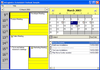
ActiveX components can be created in a variety of object oriented programming languages, but are most commonly created using C++ and the Microsoft Foundation Class (MFC), such as: MFC 4.0, MFC 4.2 and MFC 6.0. When VB 5 was released in became possible for a Visual Basic programmer to create an ActiveX component for reuse by other people and whilst most programmers claim that the best ActiveX components were written in Visual C++ or by utilizing the ActiveX Template Library, it did not stop some entrepreneurial developers from Janus Systems writing one of the bestselling ActiveX UI controls of all time in VB5 and VB6, called Janus GridEx, a VB6 ActiveX, that gives the look and feel of the Microsoft Outlook UI inside your app.
ActiveX components and ActiveX controls come with a variety of file extensions such as: .exe, .dll and .ocx and these denote a certain type of usage either in-process as part of your program or app (an ActiveX DLL), or out-of-process as a standalone executable (an ActiveX Exe), as an ActiveX control or OCX control mainly used as a UI control on a form or page. Downloadable ActiveX controls are also packaged as .cab files or Cabinet files. These CAB files are packages of files compressed to take up less space and hence can be downloaded more efficiently over the Internet.
In this ActiveX Component gallery you will find a variety of commercial products that are ActiveX objects or ActiveX controls that people sometime refer to as VB controls or as a VB object, as they are often used within Visual Basic. You will find ActiveX Windows components that allow you to carry out visuals tasks, such as an ActiveX UI control for displaying video or images, an ActiveX image control or a non-Visual ActiveX upload component that will allow you to push a file up onto a server over the Internet using HTTP or FTP protocols.
Perform real-time validation of email addresses for authenticity. InaEmailCheck determines the validity of an email address by first checking the syntax, then the mail domain, mail servers, and finally the mailbox. Cut down on fraud by insuring that web site visitors register with accurate email information. InaEmailCheck is Internet-ready for use on an Internet Information Server and is also MTS-compliant, allowing it to be used in a distributed application environment.
Support multiple screen resolutions by automatically resizing items on your form. THBResize is an ActiveX component that you can use to control the sizing and appearance of your applications. When you resize your for, all controls will change their size and position according to the form size. You can even limit the form size to a preset minimum and maximum resolution, preventing the user from making a form too small to display all controls, or so large that scarcely populated forms make the application look too bare.
Publisher: SBS Development Primary Category: SQL Product Type: Component / ActiveX DLL / DLL
Execute SQL queries on ADO Recordsets as if they existed as Tables in a Database. Query-A-Recordset lets you perform SQL Joins between Recordsets or Group and Aggregate fields in a Recordset. You can perform full SQL queries on any ADO Recordsets and return the results to your application. No more complex filter and find routines. No more expensive round trips to the Server to obtain a subset of data that already exists.
Collection of .NET and ActiveX components for internet communications. Seekford Solutions Platinum Subscription offers you the ability to use every ActiveX and .NET product they have available. You get free upgrades, revisions and any new products released while you have an active subscription. You also get free prioritized technical support. Each subscription lasts one year and is renewable.
Give your desktop or web application the ability to query WHOIS information for domains. WHOIS Wizard is an ActiveX component that provides WHOIS functionality. WHOIS servers hold DNS record information. Using WHOIS Wizard, you can get all the DNS records for a particular domain. Find out who owns the name and the DNS servers it uses. Multiple instances of WHOIS wizard can be created to talk to multiple WHOIS servers at a time.
Diagnose Internet congestion caused by slow routers and distance in hops to the server. Trace Route Wizard allows a programmer to trace the route a packet must take to get to any specified address (IP or FQDN). Fully ActiveX compliant, Trace Route Wizard also is setup to be used excellently in ASP scripted pages, or any ActiveX compliant scriptable languages. You also get an immense amount of information regarding each Hop and also supports multiple attempts per hop. It has the functionality of TracerT.exe.
Make your application easier to use with ToolTips that really stand out. ToolTip Wizard makes it easy to add Tooltips that enhance your user interface as well as making your program easier to understand. With ToolTip Wizard your ToolTips can have the standard MessageBox icons, Bold Titles and multi-line text and can be displayed in a Balloon shape. This component works with any ActiveX container as well as ActiveX scriptable languages such as VBScript.
Add TCP socket communications plus SSL channel encryption to your applications. SSL Socket Wizard allows you to easily communicate to a remote server using the TCP protocol and also adds the ability to use Secure Socket Layer protection to the channel. With easy to use methods, very little network knowledge is needed. Event driven operation is also supported. Networks and the Internet are becoming not only a nice thing to have but are now a necessity and your applications need to be able to communicate over them.
Maintain exact time in your applications using the Simple Network Time Protocol. SNTP Wizard is an ActiveX component that uses special time servers which may be connected to atomic or radio frequency clock. The local computer can have its time set or just get a timestamp. It utilizes the SNTP Protocol in such a manner so that developers do not need to understand the underlying way that SNTP works. Multiple instances of SNTP wizard can be created to talk to multiple SNTP servers at a time.
Give your applications the ability to send email. SMTP Wizard SSL is an ActiveX component that enables you to build a message, add files to it, and send it through a mail server. Your project can send out email notifications, error reports, customer responses, and much more. This control works with any ActiveX container and even works in ActiveX scriptable languages such as VBScript.