Codejock Syntax Edit Visual C++ MFC
Advanced syntax highlighting and editing component for developers.
- Includes syntax colorization and customizable text editing features.
- Supports line numbers, bookmarks, breakpoints, and color schemes.
- Integrate powerful Visual Studio style text editor control in applications.

Prices from:
| Available in | |
|---|---|
| Codejock Toolkit Pro | Loading |
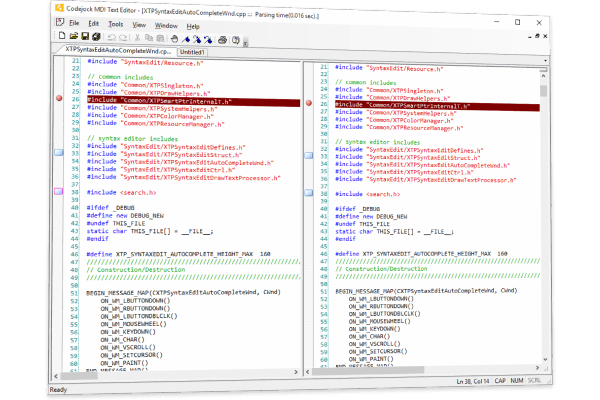
Visual Studio Style Editor Control
Provides an editor control modeled after Visual Studio with familiar features and user experience.
Syntax Colorization
Supports customizable syntax highlighting to differentiate language keywords, comments, strings, and other elements, enhancing code readability.
Text Block Grouping
Allows grouping and manipulation of text blocks enabling efficient editing and navigation within code or text content.
Line Numbering
Displays line numbers alongside code, aiding developers in tracking and referencing specific lines quickly.
Bookmarks and Breakpoints
Enables setting bookmarks and breakpoints within the code editor, essential features for debugging and navigation.
Pre-Defined Color Schemes
Includes multiple built-in color schemes that can be customized to match user preferences or application themes.
Font Customization
Supports changing font types and sizes to improve visual comfort and accommodate various user requirements.
Product Compatibility
Review the details below to ensure this product is supported within your environment.
Component Type
- Static Link Library
- C++ / MFC Class Library
- Windows DLL
About Codejock Software
Codejock Software, founded in 1998 and based in Morrice, Michigan, specializes in reusable software components that accelerate the development of graphical user interfaces for Windows applications. With a focus on Microsoft Visual Studio platforms, it is known for its wide range of user interface libraries and controls that deliver modern visual styles and flexible functionality to application developers. Codejock Software stands out for its commitment to customer support, regular updates, and source code availability, making it a trusted choice among corporations and independent developers alike for creating polished, efficient Windows applications.
Learn more about Codejock SoftwareExplore Codejock Software products

As official and authorized distributors since 2003, ComponentSource supplies you with legitimate licenses directly from Codejock Software.