ComponentOne ASP.NET Core Dashboard Layout
Flexible dashboard layout component with flow direction control.
- Arranges dashboard tiles in horizontal or vertical flows.
- Supports drag, resize, maximize, and hide tile features.
- Integrates charts, grids, and custom controls as tiles.

Prices from:
| Available in | |
|---|---|
| ComponentOne Studio ASP.NET MVC | Loading |
| ComponentOne Studio Enterprise | Loading |
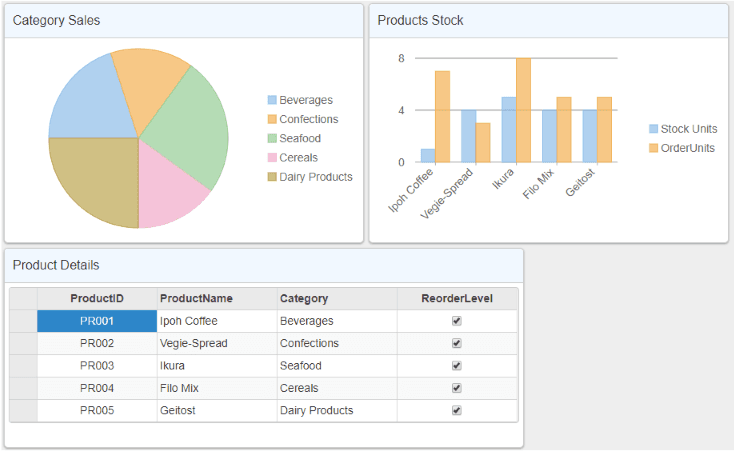
Flow Layout with Direction Control
Arrange dashboard tiles in a specified flow direction, either left to right, right to left, top to bottom, or bottom to top. This is configured via the FlowDirection property, enabling flexible layout designs according to application needs.
Automatic Tile Wrapping
When the dashboard width or height reaches its limit, tiles automatically wrap to the next row or column, maintaining a clean and organized layout without manual positioning.
Interactive Tile Features
Tiles within the dashboard can be dragged, resized, hidden, or maximized by users to customize their view. These interactive features enhance user experience and adaptability.
Integration of Various Controls
Flow tiles can embed charts, grids, and other controls such as FlexPie, FlexChart, and FlexGrid, allowing developers to compose rich data presentations within the dashboard layout.
FlowTile Class for Tile Representation
Each tile in the layout is represented by a FlowTile class instance, providing properties to set size, header text, and control content, facilitating tile customization.
Support for Server-Side Projects
Designed for ASP.NET Core applications, the Dashboard Layout integrates smoothly with server-side data models, supporting common workflows for enterprise web app development.
Configurable via Fluent API and Tag Helpers
Developers configure the dashboard layout using the DashboardLayoutBuilder AttachFlowLayout method or markup with tag helpers, making the integration simple and consistent with ASP.NET Core conventions.
Responsive and Mobile Friendly
With built-in support for responsive layouts and touch interactions, the dashboard adapts to different screen sizes and input modes, ensuring usability across devices.
Product Compatibility
Review the details below to ensure this product is supported within your environment.
Component Type
- .NET
.NET Version
- .NET 10 LTS
- .NET 9 STS
- .NET 8 LTS
- .NET 6 LTS
.NET Platform
- ASP.NET Core Assembly
IDE Support
- Visual Studio
How to Buy
Available as part of ComponentOne ASP.NET MVC Edition, and ComponentOne Studio Enterprise.

- Included40+ ASP.NET MVC & Core Controls
- Not included40+ ASP.NET WebForms Controls
- Not included120+ WinForms Controls
- Not included100+ WPF Controls
- Not included30+ WinUI & .NET MAUI Controls
- Not included19+ Blazor Components
- Not includedData Services/Web API
- Not included80+ JavaScript Controls
- Enterprise Controls
- Not includedFinancialChart
- Not includedFlexSheet
- Not includedFlexPivot/OLAP
- Not includedFlexReport Designer
- Not includedReportViewer
- Additional Features
- Not includedIntelliSpell
- Not included2200+ Icons/Images

- Included40+ ASP.NET MVC & Core Controls
- Included40+ ASP.NET WebForms Controls
- Included120+ WinForms Controls
- Included100+ WPF Controls
- Included30+ WinUI & .NET MAUI Controls
- Included19+ Blazor Components
- IncludedData Services/Web API
- Included80+ JavaScript Controls
- Enterprise Controls
- IncludedFinancialChart
- IncludedFlexSheet
- IncludedFlexPivot/OLAP
- IncludedFlexReport Designer
- IncludedReportViewer
- Additional Features
- IncludedIntelliSpell
- Included2200+ Icons/Images
About MESCIUS
MESCIUS, formerly known as GrapeCity, is a leading developer-focused brand established in Japan, with a history spanning over 30 years. It is recognized for its extensive suite of software components, including reporting frameworks, spreadsheet libraries, and Japanese market-oriented input controls. Popular products such as ActiveReports, SPREAD, InputMan, and ComponentOne support both .NET and JavaScript ecosystems and are widely used in business-critical applications. MESCIUS offers distinctive advantages such as proven reliability, comprehensive Japanese localization, and strong technical support, making it a trusted choice for IT professionals and software developers building complex and localized systems.

As official and authorized distributors since 1996, ComponentSource supplies you with legitimate licenses directly from MESCIUS.