ComponentOne ASP.NET MVC DataConnectors
Integrate data sources into ASP.NET MVC applications.
- Access and analyze multiple data sources through one unified interface.
- Connect using standard ADO.NET or Entity Framework technologies.
- Integrate with Dynamics 365, Salesforce, QuickBooks, Google Analytics, Snowflake, and more.

Prices from:
| Available in | |
|---|---|
| ComponentOne Studio Enterprise | Loading |
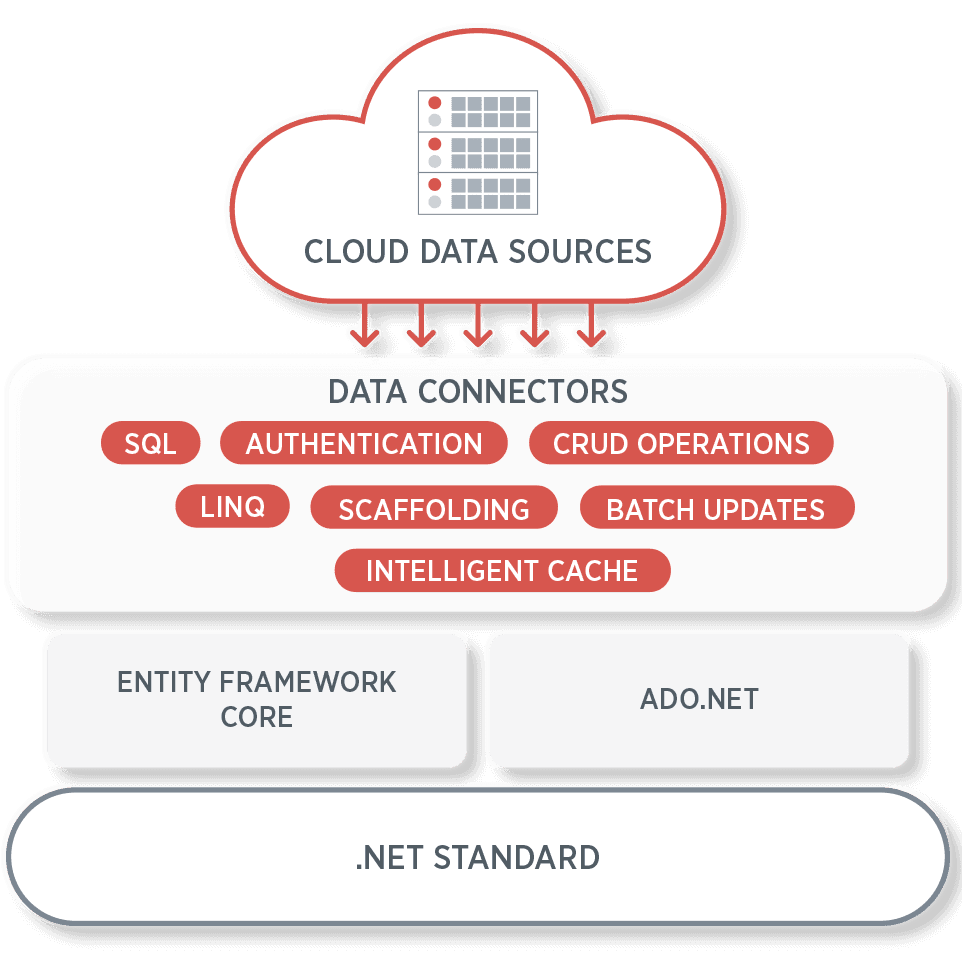
Standardized Data Connectivity
DataConnectors utilize the ADO.NET interface, allowing easy connection to multiple cloud services such as Microsoft Dynamics 365, Salesforce, QuickBooks Online, and Google Analytics without the need for custom integration logic.
Support for Popular Cloud Services
Out-of-the-box connectors provide direct access to essential cloud platforms, enabling retrieval and manipulation of business data related to sales, marketing, finance, and analytics within ASP.NET MVC applications.
Integration with Analytical Controls
Designed to integrate with ComponentOne analytics controls (e.g., pivot/OLAP) for advanced data visualization.
Simplified Authentication Handling
Built-in support manages OAuth and other security protocols required by cloud services, streamlining the process of establishing secure and reliable connections from web applications.
Flexible Data Querying
Developers can execute optimized SQL-like queries on remote data sources, enabling selective data retrieval and efficient handling of large datasets directly in ASP.NET MVC projects.
Cross-Platform Compatibility
Implemented with .NET Standard, these connectors support a wide range of .NET platforms and frameworks, including .NET Framework, .NET Core, .NET 5, and Blazor, ensuring broad applicability.
Enhanced Developer Productivity
Pre-built connectors reduce integration time and coding effort, allowing developers to focus on UI and business logic rather than on data access complexities.
Robust Documentation and Samples
Comprehensive documentation, code samples, and demos are provided to facilitate quick adoption and mastery of DataConnectors within ASP.NET MVC development environments.
Product Compatibility
Review the details below to ensure this product is supported within your environment.
Component Type
- .NET
.NET Version
- .NET 4.8 or earlier
.NET Platform
- ASP.NET MVC
IDE Support
- Visual Studio
How to Buy
Available as part of ComponentOne ASP.NET MVC Edition, and ComponentOne Studio Enterprise.

- Included40+ ASP.NET MVC & Core Controls
- Not included40+ ASP.NET WebForms Controls
- Not included120+ WinForms Controls
- Not included100+ WPF Controls
- Not included30+ WinUI & .NET MAUI Controls
- Not included19+ Blazor Components
- Not includedData Services/Web API
- Not included80+ JavaScript Controls
- Enterprise Controls
- Not includedFinancialChart
- Not includedFlexSheet
- Not includedFlexPivot/OLAP
- Not includedFlexReport Designer
- Not includedReportViewer
- Additional Features
- Not includedIntelliSpell
- Not included2200+ Icons/Images

- Included40+ ASP.NET MVC & Core Controls
- Included40+ ASP.NET WebForms Controls
- Included120+ WinForms Controls
- Included100+ WPF Controls
- Included30+ WinUI & .NET MAUI Controls
- Included19+ Blazor Components
- IncludedData Services/Web API
- Included80+ JavaScript Controls
- Enterprise Controls
- IncludedFinancialChart
- IncludedFlexSheet
- IncludedFlexPivot/OLAP
- IncludedFlexReport Designer
- IncludedReportViewer
- Additional Features
- IncludedIntelliSpell
- Included2200+ Icons/Images
About MESCIUS
MESCIUS, formerly known as GrapeCity, is a leading developer-focused brand established in Japan, with a history spanning over 30 years. It is recognized for its extensive suite of software components, including reporting frameworks, spreadsheet libraries, and Japanese market-oriented input controls. Popular products such as ActiveReports, SPREAD, InputMan, and ComponentOne support both .NET and JavaScript ecosystems and are widely used in business-critical applications. MESCIUS offers distinctive advantages such as proven reliability, comprehensive Japanese localization, and strong technical support, making it a trusted choice for IT professionals and software developers building complex and localized systems.

As official and authorized distributors since 1996, ComponentSource supplies you with legitimate licenses directly from MESCIUS.