ComponentOne ASP.NET MVC FlexMap
Display interactive GeoJSON maps in ASP.NET MVC applications.
- Supports rendering GeoJSON geographical data with customizable layers.
- Enables creation of point, bubble, and choropleth maps with color scales.
- Includes interactive zooming, panning, legends, and data tooltips.

Prices from:
| Available in | |
|---|---|
| ComponentOne Studio ASP.NET MVC | Loading |
| ComponentOne Studio Enterprise | Loading |
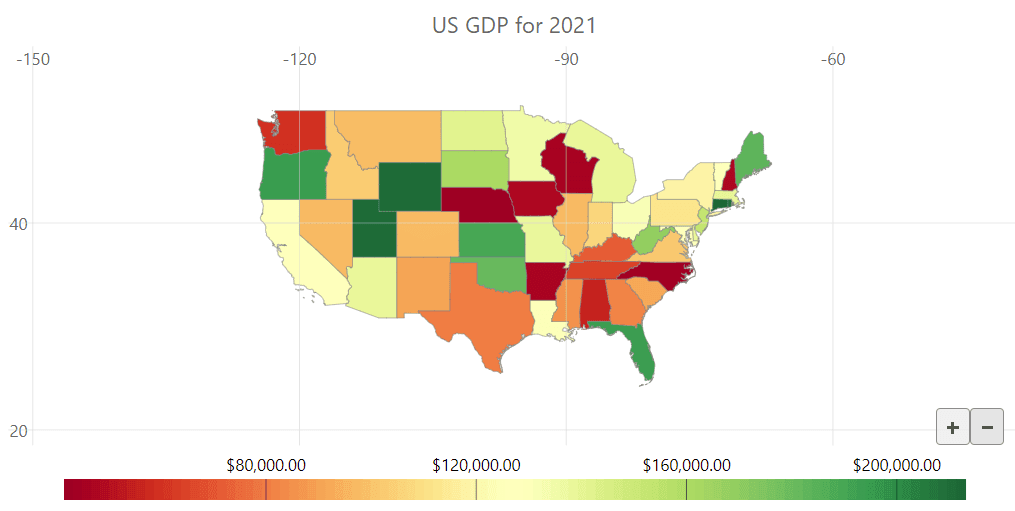
Display GeoJSON Maps
FlexMap can render maps defined in GeoJSON format, allowing geographic features like countries, states, and cities to be displayed directly. Developers can bind maps to GeoJSON URLs and map properties such as latitude and longitude for accurate visualization.
Create Point and Bubble Maps
Use the ScatterMapLayer to plot data points at specified geographic coordinates. Points can vary in size to represent different values, enabling bubble maps that help users compare spatial data effectively.
Build Color-Coded Choropleth Maps
Choropleth maps visualize data by coloring geographic regions based on quantitative values. FlexMap supports multiple built-in color palettes and custom scales, providing legends to explain the color meanings.
Interactive Zoom and Pan Controls
Users can smoothly zoom and pan using mouse, touch gestures, or dedicated buttons, allowing detailed exploration of map data within web applications.
Integrate Legends for Data Interpretation
Legends can be added to maps and positioned flexibly to clarify the meaning of colors and symbols used in different map layers, enhancing user comprehension.
Display Tooltips on Data Points
Flexible tooltips show additional information when hovering over points or regions. Content can be customized to present contextual data dynamically, improving interactivity.
Manage Multiple Map Layers
FlexMap allows layering of different map types and data sources, such as base geographic maps combined with scatter points or choropleth overlays, facilitating complex geographical analyses.
Support for Gridlines
Add gridlines showing latitude and longitude coordinates at configurable intervals. These help users orient themselves and evaluate map locations precisely.
Product Compatibility
Review the details below to ensure this product is supported within your environment.
Component Type
- .NET
.NET Version
- .NET 4.8 or earlier
.NET Platform
- ASP.NET MVC
IDE Support
- Visual Studio
How to Buy
Available as part of ComponentOne ASP.NET MVC Edition, and ComponentOne Studio Enterprise.

- Included40+ ASP.NET MVC & Core Controls
- Not included40+ ASP.NET WebForms Controls
- Not included120+ WinForms Controls
- Not included100+ WPF Controls
- Not included30+ WinUI & .NET MAUI Controls
- Not included19+ Blazor Components
- Not includedData Services/Web API
- Not included80+ JavaScript Controls
- Enterprise Controls
- Not includedFinancialChart
- Not includedFlexSheet
- Not includedFlexPivot/OLAP
- Not includedFlexReport Designer
- Not includedReportViewer
- Additional Features
- Not includedIntelliSpell
- Not included2200+ Icons/Images

- Included40+ ASP.NET MVC & Core Controls
- Included40+ ASP.NET WebForms Controls
- Included120+ WinForms Controls
- Included100+ WPF Controls
- Included30+ WinUI & .NET MAUI Controls
- Included19+ Blazor Components
- IncludedData Services/Web API
- Included80+ JavaScript Controls
- Enterprise Controls
- IncludedFinancialChart
- IncludedFlexSheet
- IncludedFlexPivot/OLAP
- IncludedFlexReport Designer
- IncludedReportViewer
- Additional Features
- IncludedIntelliSpell
- Included2200+ Icons/Images
About MESCIUS
MESCIUS, formerly known as GrapeCity, is a leading developer-focused brand established in Japan, with a history spanning over 30 years. It is recognized for its extensive suite of software components, including reporting frameworks, spreadsheet libraries, and Japanese market-oriented input controls. Popular products such as ActiveReports, SPREAD, InputMan, and ComponentOne support both .NET and JavaScript ecosystems and are widely used in business-critical applications. MESCIUS offers distinctive advantages such as proven reliability, comprehensive Japanese localization, and strong technical support, making it a trusted choice for IT professionals and software developers building complex and localized systems.

As official and authorized distributors since 1996, ComponentSource supplies you with legitimate licenses directly from MESCIUS.