ComponentOne ASP.NET MVC FlexSheet
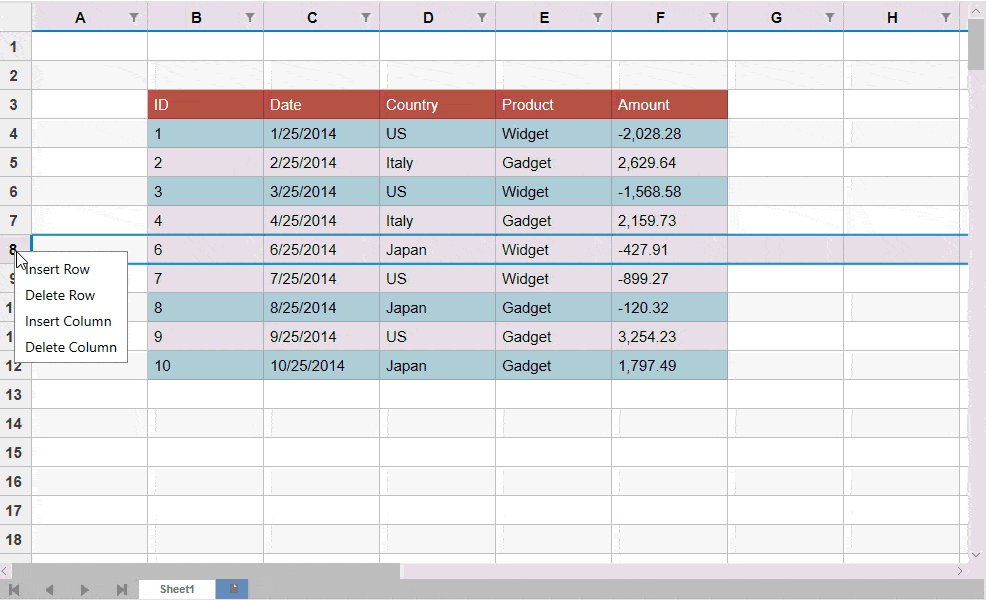
Deliver Excel-like spreadsheet capabilities in ASP.NET MVC applications.
- Bind FlexSheet to data sources or work with unbound data.
- Import, edit, and export Excel files in your ASP.NET MVC app.
- Use built-in formulas and manage multiple worksheets easily.

Prices from:
| Available in | |
|---|---|
| ComponentOne Studio Enterprise | Loading |
Data Binding and Unbound Modes
FlexSheet can be bound to external JSON data sources or used in an unbound mode, giving developers flexibility in how they manage spreadsheet data within their applications.
Excel File Import and Export
Load existing Excel files or workbooks into FlexSheet, modify data, and save changes back to Excel files either remotely or on the client side, enabling seamless Excel interactions.
Formula Support and Evaluation
Use nearly 100 built-in formulas covering mathematical, logical, text, aggregate, date, lookup, reference, and financial calculations. The formula bar enables easy editing and entry similar to Microsoft Excel.
Multiple Worksheet Management
Work with multiple worksheets within a single FlexSheet instance, allowing for complex spreadsheet scenarios and organization similar to Excel workbooks.
Cell Formatting and Styling
Apply various cell styles, formats, and text alignment options directly within FlexSheet to enhance readability and presentation of spreadsheet data.
Filtering, Sorting, and Autofill
Users can filter and sort data with intuitive controls and autofill capabilities to quickly populate cells based on patterns or series.
Integration with ASP.NET MVC
FlexSheet integrates into ASP.NET MVC projects using HTML helpers and standard MVC patterns. Developers can configure the control within Razor views, connect it to controllers for data operations, and manage required scripts and styles to enable full spreadsheet functionality within web applications.
Lightweight and Extensible Design
Built on the lightweight FlexGrid control, FlexSheet offers a performance-optimized spreadsheet experience with extensibility for custom application needs.
Product Compatibility
Review the details below to ensure this product is supported within your environment.
Component Type
- .NET
.NET Version
- .NET 4.8 or earlier
.NET Platform
- ASP.NET MVC
IDE Support
- Visual Studio
How to Buy
Available as part of ComponentOne Studio Enterprise.

- Included40+ ASP.NET MVC & Core Controls
- Included40+ ASP.NET WebForms Controls
- Included120+ WinForms Controls
- Included100+ WPF Controls
- Included30+ WinUI & .NET MAUI Controls
- Included19+ Blazor Components
- IncludedData Services/Web API
- Included80+ JavaScript Controls
- Enterprise Controls
- IncludedFinancialChart
- IncludedFlexSheet
- IncludedFlexPivot/OLAP
- IncludedFlexReport Designer
- IncludedReportViewer
- Additional Features
- IncludedIntelliSpell
- Included2200+ Icons/Images
About MESCIUS
MESCIUS, formerly known as GrapeCity, is a leading developer-focused brand established in Japan, with a history spanning over 30 years. It is recognized for its extensive suite of software components, including reporting frameworks, spreadsheet libraries, and Japanese market-oriented input controls. Popular products such as ActiveReports, SPREAD, InputMan, and ComponentOne support both .NET and JavaScript ecosystems and are widely used in business-critical applications. MESCIUS offers distinctive advantages such as proven reliability, comprehensive Japanese localization, and strong technical support, making it a trusted choice for IT professionals and software developers building complex and localized systems.

As official and authorized distributors since 1996, ComponentSource supplies you with legitimate licenses directly from MESCIUS.