ComponentOne ASP.NET MVC OLAP Pivot Grid
Excel-like pivot tables and analysis for ASP.NET MVC applications.
- Supports drag-and-drop pivot panels like Microsoft Excel.
- Handles millions of records with a fast in-memory engine.
- Connects to Microsoft SSAS cubes and various data sources.

Prices from:
| Available in | |
|---|---|
| ComponentOne Studio Enterprise | Loading |
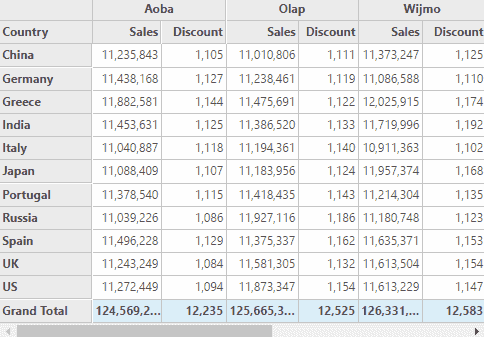
Excel-Like Pivot Panel Interface
Users can intuitively drag and drop fields to create pivot views representing rows, columns, values, and filters, benefiting from a familiar and user-friendly layout modeled after Microsoft Excel pivot tables.
Advanced Data Aggregation and Summaries
The pivot grid aggregates and summarizes data across grouped rows and columns, supporting multiple value fields to compare different metrics within the same dimension efficiently.
Slicer Component for Dynamic Filtering
An interactive slicer UI lets users quickly filter pivot data via clickable buttons that clearly indicate the applied filtering states, enhancing data exploration and discovery.
Integration with Microsoft SSAS Cubes
It connects to Microsoft SQL Server Analysis Services (SSAS) cubes, supporting both online and local cube data sources without requiring additional server APIs.
Comprehensive Data Source Support
Beyond SSAS, the OLAP Pivot Grid supports binding to local data, business object collections, SQL databases, and web services through ComponentOne Data Engine Services, enabling versatile data connectivity.
PivotGrid Customization and Export
Developers can customize the grid's appearance using styles and owner-draw cells, and easily export the pivot data to Excel while preserving formatting and layout.
Built-In Save and Load Views
The control provides functionality to save and load pivot views allowing end-users to quickly return to saved analyses, boosting productivity and user experience.
Asynchronous Processing for UI Responsiveness
Background processing with progress indication enables multiple analytical operations simultaneously without blocking the user interface, improving responsiveness and user interaction.
Product Compatibility
Review the details below to ensure this product is supported within your environment.
Component Type
- .NET
.NET Version
- .NET 4.8 or earlier
.NET Platform
- ASP.NET MVC
IDE Support
- Visual Studio
How to Buy
Available as part of ComponentOne Studio Enterprise.

- Included40+ ASP.NET MVC & Core Controls
- Included40+ ASP.NET WebForms Controls
- Included120+ WinForms Controls
- Included100+ WPF Controls
- Included30+ WinUI & .NET MAUI Controls
- Included19+ Blazor Components
- IncludedData Services/Web API
- Included80+ JavaScript Controls
- Enterprise Controls
- IncludedFinancialChart
- IncludedFlexSheet
- IncludedFlexPivot/OLAP
- IncludedFlexReport Designer
- IncludedReportViewer
- Additional Features
- IncludedIntelliSpell
- Included2200+ Icons/Images
About MESCIUS
MESCIUS, formerly known as GrapeCity, is a leading developer-focused brand established in Japan, with a history spanning over 30 years. It is recognized for its extensive suite of software components, including reporting frameworks, spreadsheet libraries, and Japanese market-oriented input controls. Popular products such as ActiveReports, SPREAD, InputMan, and ComponentOne support both .NET and JavaScript ecosystems and are widely used in business-critical applications. MESCIUS offers distinctive advantages such as proven reliability, comprehensive Japanese localization, and strong technical support, making it a trusted choice for IT professionals and software developers building complex and localized systems.

As official and authorized distributors since 1996, ComponentSource supplies you with legitimate licenses directly from MESCIUS.