ComponentOne ASP.NET MVC Project Templates
Create ASP.NET MVC apps faster with ready-made project templates.
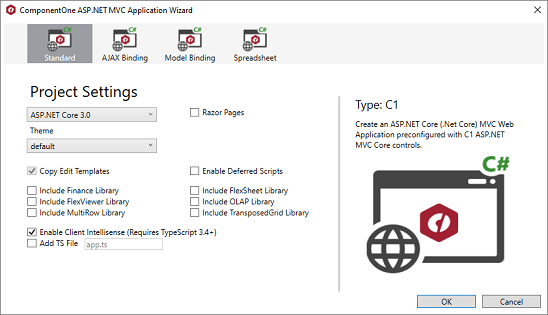
- Choose from four project types including Standard, Ajax Binding, Model Binding, and Spreadsheet.
- Templates come pre-configured with C1 ASP.NET MVC controls to simplify UI integration.
- Built-in themes support quick styling and customization for modern web applications.

Prices from:
| Available in | |
|---|---|
| ComponentOne Studio Enterprise | Loading |
Multiple Project Types
Choose from Standard, Ajax Binding, Model Binding, or Spreadsheet templates to fit specific development scenarios, each pre-configured to demonstrate different control usages and data interaction techniques.
Pre-Configured UI Controls
Each template includes C1 ASP.NET MVC controls integrated into the project, enabling developers to leverage powerful data grids, spreadsheet controls, and other components with minimal setup.
Responsive Ajax Binding
The Ajax Binding template demonstrates how to implement responsive data grids using AJAX, improving user experience by updating content dynamically without full page reloads.
Model Binding Support
Model Binding template provides samples of binding data directly from models to UI controls, streamlining data management and synchronization in MVC applications.
Spreadsheet Control Integration
The spreadsheet template includes FlexSheet control with sample data classes and views, facilitating development of business applications requiring spreadsheet functionality.
Professional Themes Included
Includes professionally designed themes which can be selected during project creation or applied manually, offering modern visual styles and consistent UI experiences.
Easy Theming and Custom Styles
Supports CSS styling to customize the appearance further, enabling developers to adapt control visuals to brand guidelines or specific design requirements.
Seamless Visual Studio Integration
Templates are accessible directly within Visual Studio’s New Project dialog, simplifying project start-up and ensuring correct configuration settings out of the box.
Comprehensive Documentation and Samples
Developers benefit from extensive guides and sample code that explain control usage, binding techniques, and theme application to accelerate learning and development.
Product Compatibility
Review the details below to ensure this product is supported within your environment.
Component Type
- .NET
.NET Version
- .NET 4.8 or earlier
.NET Platform
- ASP.NET MVC
IDE Support
- Visual Studio
How to Buy
Available as part of ComponentOne ASP.NET MVC Edition, and ComponentOne Studio Enterprise.

- Included40+ ASP.NET MVC & Core Controls
- Not included40+ ASP.NET WebForms Controls
- Not included120+ WinForms Controls
- Not included100+ WPF Controls
- Not included30+ WinUI & .NET MAUI Controls
- Not included19+ Blazor Components
- Not includedData Services/Web API
- Not included80+ JavaScript Controls
- Enterprise Controls
- Not includedFinancialChart
- Not includedFlexSheet
- Not includedFlexPivot/OLAP
- Not includedFlexReport Designer
- Not includedReportViewer
- Additional Features
- Not includedIntelliSpell
- Not included2200+ Icons/Images

- Included40+ ASP.NET MVC & Core Controls
- Included40+ ASP.NET WebForms Controls
- Included120+ WinForms Controls
- Included100+ WPF Controls
- Included30+ WinUI & .NET MAUI Controls
- Included19+ Blazor Components
- IncludedData Services/Web API
- Included80+ JavaScript Controls
- Enterprise Controls
- IncludedFinancialChart
- IncludedFlexSheet
- IncludedFlexPivot/OLAP
- IncludedFlexReport Designer
- IncludedReportViewer
- Additional Features
- IncludedIntelliSpell
- Included2200+ Icons/Images
About MESCIUS
MESCIUS, formerly known as GrapeCity, is a leading developer-focused brand established in Japan, with a history spanning over 30 years. It is recognized for its extensive suite of software components, including reporting frameworks, spreadsheet libraries, and Japanese market-oriented input controls. Popular products such as ActiveReports, SPREAD, InputMan, and ComponentOne support both .NET and JavaScript ecosystems and are widely used in business-critical applications. MESCIUS offers distinctive advantages such as proven reliability, comprehensive Japanese localization, and strong technical support, making it a trusted choice for IT professionals and software developers building complex and localized systems.

As official and authorized distributors since 1996, ComponentSource supplies you with legitimate licenses directly from MESCIUS.