ComponentOne UWP Bitmap
Flexible bitmap processing component for image loading and editing.
- Supports multiple image formats including PNG, JPEG, TIFF, and more.
- Offers access to bitmap data and supports image transformations and effects in UWP apps.
- Provides asynchronous loading and saving with various export options.

Prices from:
| Available in | |
|---|---|
| ComponentOne WinUI and MAUI Edition | Loading |
| ComponentOne Studio Enterprise | Loading |
Multi-Format Image Loading
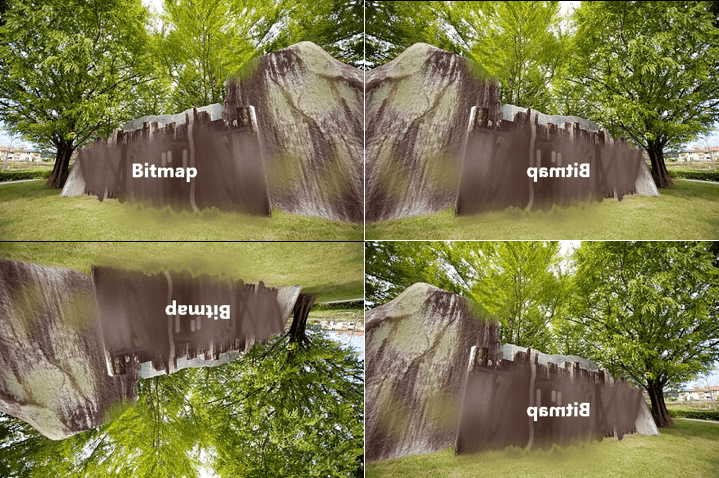
ComponentOne UWP Bitmap supports loading images from formats including BMP, PNG, JPEG, JPEG-XR, TIFF, ICO, and single-frame GIF, offering broad compatibility with common image sources.
Pixel-Level Image Processing
Developers can access and modify bitmap data at the pixel level, enabling detailed image transformations such as clipping, cropping, rotation, scaling, and other custom effects.
Asynchronous Loading and Saving
The component provides asynchronous methods for loading and saving images to supported formats and streams, helping maintain application responsiveness during intensive processing tasks.
Integration with UWP Capabilities
The Bitmap component works with native UWP features to apply transformations and Direct2D effects on images, and can be used in conjunction with XAML workflows to display and manipulate image content.
Image Metadata Access
Image properties such as pixel width, pixel height, pixel format, and resolution (DPI) are accessible through the C1Bitmap API to support precise image processing and management.
Flexible Image Saving Options
Images can be saved to StorageFile, IOutputStream, or System.IO.Stream using general Save methods or format-specific SaveAs encoders to accommodate different output requirements.
Conversion to Platform Bitmap Types
Supports conversion between the internal bitmap object and platform-specific types such as WriteableBitmap or SoftwareBitmap, facilitating integration with UWP XAML controls and rendering contexts.
Product Compatibility
Review the details below to ensure this product is supported within your environment.
Component Type
- Windows UWP Control
IDE Support
- Visual Studio
How to Buy
UWP is no longer supported by MESCIUS however you can get the controls as part of ComponentOne WinUI & MAUI Edition, or ComponentOne Studio Enterprise.

- Included30+ WinUI & .NET MAUI Controls
- Not included120+ WinForms Controls
- Not included100+ WPF Controls
- Not included40+ ASP.NET MVC & Core Controls
- Not included40+ ASP.NET WebForms Controls
- Not included19+ Blazor Components
- Not includedData Services/Web API
- Not included80+ JavaScript Controls
- Enterprise Controls
- Not includedFinancialChart
- Not includedFlexSheet
- Not includedFlexPivot/OLAP
- Not includedFlexReport Designer
- Not includedReportViewer
- Additional Features
- Not includedIntelliSpell
- Not included2200+ Icons/Images

- Included30+ WinUI & .NET MAUI Controls
- Included120+ WinForms Controls
- Included100+ WPF Controls
- Included40+ ASP.NET MVC & Core Controls
- Included40+ ASP.NET WebForms Controls
- Included19+ Blazor Components
- IncludedData Services/Web API
- Included80+ JavaScript Controls
- Enterprise Controls
- IncludedFinancialChart
- IncludedFlexSheet
- IncludedFlexPivot/OLAP
- IncludedFlexReport Designer
- IncludedReportViewer
- Additional Features
- IncludedIntelliSpell
- Included2200+ Icons/Images
About MESCIUS
MESCIUS, formerly known as GrapeCity, is a leading developer-focused brand established in Japan, with a history spanning over 30 years. It is recognized for its extensive suite of software components, including reporting frameworks, spreadsheet libraries, and Japanese market-oriented input controls. Popular products such as ActiveReports, SPREAD, InputMan, and ComponentOne support both .NET and JavaScript ecosystems and are widely used in business-critical applications. MESCIUS offers distinctive advantages such as proven reliability, comprehensive Japanese localization, and strong technical support, making it a trusted choice for IT professionals and software developers building complex and localized systems.

As official and authorized distributors since 1996, ComponentSource supplies you with legitimate licenses directly from MESCIUS.