ComponentOne UWP Data Editors
Versatile UWP components for data input and editing.
- Includes multiple input editors supporting various data types.
- Easily binds to data models and collections for streamlined forms.
- Supports validation and customization for consistent UI design.

Prices from:
| Available in | |
|---|---|
| ComponentOne WinUI and MAUI Edition | Loading |
| ComponentOne Studio Enterprise | Loading |
Date and Time Editors
Provides specialized controls for selecting and editing dates and times. These editors support formatted input and validation to ensure accurate temporal data entry.
ColorPicker Control
Allows users to select colors through an interactive interface. The control supports different color models and can be integrated into design or configuration workflows.
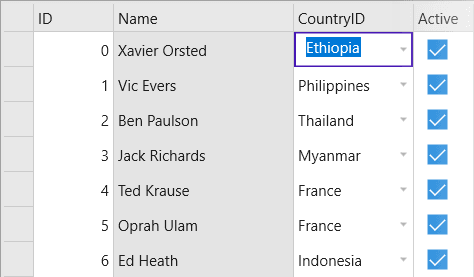
DropDown and Hierarchical Combo Support
The DropDown control can host any UI as drop-down content, allowing developers to design fully customized editors. It enables configuration of the displayed header value and can incorporate controls such as C1TreeView to create a hierarchical combo box.
Expression Editor Component
Enables users to build and evaluate expressions within the application interface. It supports syntax highlighting and structured expression input scenarios.
Input and Masked Editors
Includes text and numeric input controls with support for formatted and masked entry. These editors help enforce consistent data formats.
MultiSelect Control
Allows selection of multiple items from a list through a compact interface. This is useful for tagging, filtering, and category selection scenarios.
Range Slider Component
Provides a dual-thumb slider for selecting a numeric range. It supports bounded input scenarios such as filtering or threshold configuration.
RichTextBox Editor
Delivers rich text editing capabilities including formatted text, styling, and content manipulation within UWP applications.
On-Screen InputPanel
Offers a customizable on-screen keyboard component that facilitates text entry in touch-enabled UWP applications.
Product Compatibility
Review the details below to ensure this product is supported within your environment.
Component Type
- Windows UWP Control
IDE Support
- Visual Studio
How to Buy
UWP is no longer supported by MESCIUS however you can get the controls as part of ComponentOne WinUI & MAUI Edition, or ComponentOne Studio Enterprise.

- Included30+ WinUI & .NET MAUI Controls
- Not included120+ WinForms Controls
- Not included100+ WPF Controls
- Not included40+ ASP.NET MVC & Core Controls
- Not included40+ ASP.NET WebForms Controls
- Not included19+ Blazor Components
- Not includedData Services/Web API
- Not included80+ JavaScript Controls
- Enterprise Controls
- Not includedFinancialChart
- Not includedFlexSheet
- Not includedFlexPivot/OLAP
- Not includedFlexReport Designer
- Not includedReportViewer
- Additional Features
- Not includedIntelliSpell
- Not included2200+ Icons/Images

- Included30+ WinUI & .NET MAUI Controls
- Included120+ WinForms Controls
- Included100+ WPF Controls
- Included40+ ASP.NET MVC & Core Controls
- Included40+ ASP.NET WebForms Controls
- Included19+ Blazor Components
- IncludedData Services/Web API
- Included80+ JavaScript Controls
- Enterprise Controls
- IncludedFinancialChart
- IncludedFlexSheet
- IncludedFlexPivot/OLAP
- IncludedFlexReport Designer
- IncludedReportViewer
- Additional Features
- IncludedIntelliSpell
- Included2200+ Icons/Images
About MESCIUS
MESCIUS, formerly known as GrapeCity, is a leading developer-focused brand established in Japan, with a history spanning over 30 years. It is recognized for its extensive suite of software components, including reporting frameworks, spreadsheet libraries, and Japanese market-oriented input controls. Popular products such as ActiveReports, SPREAD, InputMan, and ComponentOne support both .NET and JavaScript ecosystems and are widely used in business-critical applications. MESCIUS offers distinctive advantages such as proven reliability, comprehensive Japanese localization, and strong technical support, making it a trusted choice for IT professionals and software developers building complex and localized systems.

As official and authorized distributors since 1996, ComponentSource supplies you with legitimate licenses directly from MESCIUS.