ComponentOne UWP Expression Editor
Create, edit, and evaluate expressions in UWP applications seamlessly.
- Standalone expression editor control for UWP applications.
- Visual Studio-like IntelliSense aids expression writing.
- Over 200 built-in functions with syntax highlighting support.

Prices from:
| Available in | |
|---|---|
| ComponentOne WinUI and MAUI Edition | Loading |
| ComponentOne Studio Enterprise | Loading |
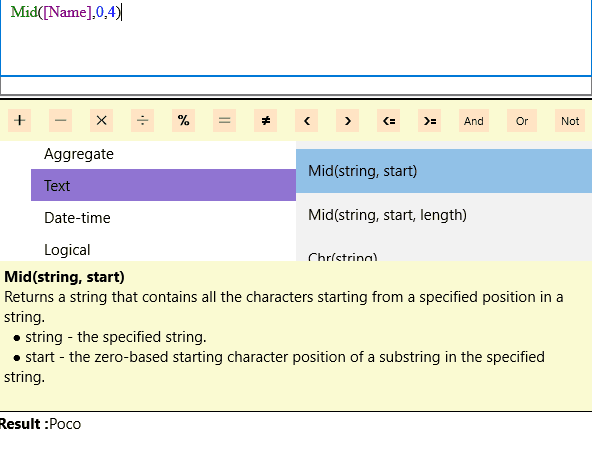
Standalone Control Integration
The editor is a standalone component that integrates easily with any data-bound UWP control, allowing developers to embed expression editing capabilities wherever needed in their applications.
Smart Code Completion
It provides IntelliSense-style code completion that helps users quickly find and insert functions and operators, reducing the need to memorize syntax and improving accuracy.
Syntax Highlighting
Expressions are color-coded for easier comprehension and readability, helping users visually distinguish elements such as functions, operators, and literals.
Extensive Built-in Functions
Includes over 200 built-in functions and operators covering arithmetic, logical, string, date/time, and more, enabling robust expression creation for diverse use cases.
Expression Evaluation
Supports real-time expression evaluation and validation, providing immediate feedback on errors and output values as expressions are edited.
User-Friendly Interface Components
Consists of two primary UI components: an editable expression area and a panel that categorizes and displays available functions and operators for easy browsing.
Integration with Data-Bound Controls
Facilitates dynamic filtering and manipulation of data in controls like grids by allowing users to craft complex expressions that control data visualization and interaction.
Event Handling for Expression Changes
Supports events to handle expression changes, enabling developers to react and update application state or UI accordingly when expressions are modified.
Product Compatibility
Review the details below to ensure this product is supported within your environment.
Component Type
- Windows UWP Control
IDE Support
- Visual Studio
How to Buy
UWP is no longer supported by MESCIUS however you can get the controls as part of ComponentOne WinUI & MAUI Edition, or ComponentOne Studio Enterprise.

- Included30+ WinUI & .NET MAUI Controls
- Not included120+ WinForms Controls
- Not included100+ WPF Controls
- Not included40+ ASP.NET MVC & Core Controls
- Not included40+ ASP.NET WebForms Controls
- Not included19+ Blazor Components
- Not includedData Services/Web API
- Not included80+ JavaScript Controls
- Enterprise Controls
- Not includedFinancialChart
- Not includedFlexSheet
- Not includedFlexPivot/OLAP
- Not includedFlexReport Designer
- Not includedReportViewer
- Additional Features
- Not includedIntelliSpell
- Not included2200+ Icons/Images

- Included30+ WinUI & .NET MAUI Controls
- Included120+ WinForms Controls
- Included100+ WPF Controls
- Included40+ ASP.NET MVC & Core Controls
- Included40+ ASP.NET WebForms Controls
- Included19+ Blazor Components
- IncludedData Services/Web API
- Included80+ JavaScript Controls
- Enterprise Controls
- IncludedFinancialChart
- IncludedFlexSheet
- IncludedFlexPivot/OLAP
- IncludedFlexReport Designer
- IncludedReportViewer
- Additional Features
- IncludedIntelliSpell
- Included2200+ Icons/Images
About MESCIUS
MESCIUS, formerly known as GrapeCity, is a leading developer-focused brand established in Japan, with a history spanning over 30 years. It is recognized for its extensive suite of software components, including reporting frameworks, spreadsheet libraries, and Japanese market-oriented input controls. Popular products such as ActiveReports, SPREAD, InputMan, and ComponentOne support both .NET and JavaScript ecosystems and are widely used in business-critical applications. MESCIUS offers distinctive advantages such as proven reliability, comprehensive Japanese localization, and strong technical support, making it a trusted choice for IT professionals and software developers building complex and localized systems.

As official and authorized distributors since 1996, ComponentSource supplies you with legitimate licenses directly from MESCIUS.