ComponentOne UWP FlexGrid
A traditional data grid reimagined for modern UWP applications.
- Delivers a customizable datagrid optimized for Universal Windows Platform.
- Supports both bound and unbound data presentation modes.
- Incorporates row details templates and built-in printing functionality.

Prices from:
| Available in | |
|---|---|
| ComponentOne WinUI and MAUI Edition | Loading |
| ComponentOne Studio Enterprise | Loading |
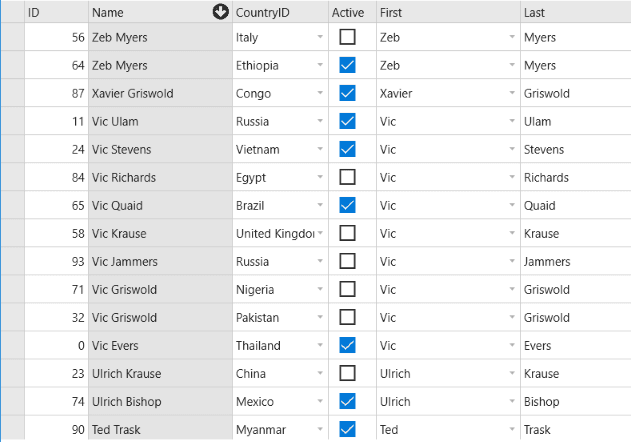
Traditional yet modern data grid
The FlexGrid control provides a familiar tabular interface redesigned to fit modern, touch-based enterprise applications on the UWP platform, balancing legacy grid features with contemporary UI requirements.
Flexible data binding modes
It works natively with C1CollectionView data sources for bound mode while also supporting an unbound mode that allows manual manipulation of rows and columns with intuitive indexing syntax.
Comprehensive cell indexing
Cells can be accessed or set using indices, column names, or column objects, consistent across bound and unbound modes, simplifying data manipulation and retrieval in code.
Customizable row and column headers
Row and column headers support detailed customization, including adjustable widths, multiple header rows, and cell merging, enabling complex hierarchical or grouped data presentations.
Row details templates
Each row can showcase additional information through flexible templates that embed text, UI elements, or data-bound controls without altering grid dimensions, enhancing data visualization and interactivity.
Hierarchical data support
Using row details templates, developers can create nested grids to display grouped or related data hierarchies within the main grid, enriching user insights without navigation away from the grid.
Integrated printing capabilities
FlexGrid includes a Print method with overloads to specify document name, margins, scaling, and page limits, ensuring printed output faithfully reproduces styles, fonts, headers, and images exactly as seen on screen.
Product Compatibility
Review the details below to ensure this product is supported within your environment.
Component Type
- Windows UWP Control
IDE Support
- Visual Studio
How to Buy
UWP is no longer supported by MESCIUS however you can get the controls as part of ComponentOne WinUI & MAUI Edition, or ComponentOne Studio Enterprise.

- Included30+ WinUI & .NET MAUI Controls
- Not included120+ WinForms Controls
- Not included100+ WPF Controls
- Not included40+ ASP.NET MVC & Core Controls
- Not included40+ ASP.NET WebForms Controls
- Not included19+ Blazor Components
- Not includedData Services/Web API
- Not included80+ JavaScript Controls
- Enterprise Controls
- Not includedFinancialChart
- Not includedFlexSheet
- Not includedFlexPivot/OLAP
- Not includedFlexReport Designer
- Not includedReportViewer
- Additional Features
- Not includedIntelliSpell
- Not included2200+ Icons/Images

- Included30+ WinUI & .NET MAUI Controls
- Included120+ WinForms Controls
- Included100+ WPF Controls
- Included40+ ASP.NET MVC & Core Controls
- Included40+ ASP.NET WebForms Controls
- Included19+ Blazor Components
- IncludedData Services/Web API
- Included80+ JavaScript Controls
- Enterprise Controls
- IncludedFinancialChart
- IncludedFlexSheet
- IncludedFlexPivot/OLAP
- IncludedFlexReport Designer
- IncludedReportViewer
- Additional Features
- IncludedIntelliSpell
- Included2200+ Icons/Images
About MESCIUS
MESCIUS, formerly known as GrapeCity, is a leading developer-focused brand established in Japan, with a history spanning over 30 years. It is recognized for its extensive suite of software components, including reporting frameworks, spreadsheet libraries, and Japanese market-oriented input controls. Popular products such as ActiveReports, SPREAD, InputMan, and ComponentOne support both .NET and JavaScript ecosystems and are widely used in business-critical applications. MESCIUS offers distinctive advantages such as proven reliability, comprehensive Japanese localization, and strong technical support, making it a trusted choice for IT professionals and software developers building complex and localized systems.

As official and authorized distributors since 1996, ComponentSource supplies you with legitimate licenses directly from MESCIUS.