ComponentOne UWP Gauges
Customizable UWP gauge components for interactive data visualizations.
- Supports radial and volume gauge types with flexible styling.
- Provides detailed event data for manipulation and key interactions.
- Integrates seamlessly in Universal Windows Platform applications.

Prices from:
| Available in | |
|---|---|
| ComponentOne WinUI and MAUI Edition | Loading |
| ComponentOne Studio Enterprise | Loading |
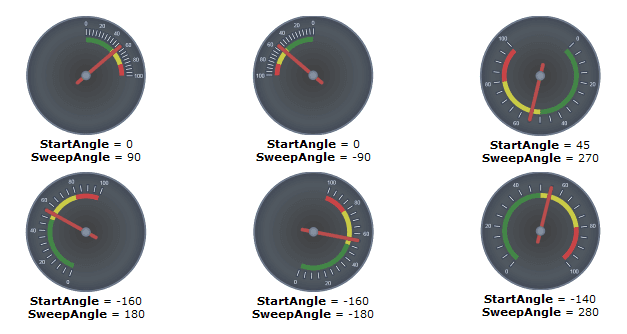
Radial and Volume Gauge Components
Includes specialized gauges such as radial and volume types, suitable for visualizing data ranges and levels in a circular or volume-oriented format within UWP apps.
Extensive Event Handling
Provides detailed event arguments for manipulation and keyboard events, such as ManipulationCompleted and PreviewKeyDown, offering insights into user input dynamics including velocities, positions, and key details.
Touch Manipulation Support
Supports touch-based interaction events with properties that reveal manipulation container, cumulative changes, inertia status, and pointer device type, allowing refined control over gesture handling.
Keyboard Interaction Awareness
Captures keyboard input through events carrying key codes, key press characteristics, and handled status to respond appropriately to user key actions in the gauges.
Customizable Visual Styling
Enables developers to tailor the appearance of gauge elements including pointers and caps, adapting visual thickness, colors, and templates to fit application themes.
Focus and Accessibility Features
Offers properties managing focus visuals and handled events to enhance accessibility and user navigation through keyboard and pointer input methods.
Seamless UWP Integration
Built as native components within the C1.Xaml.Gauge namespace, these gauges integrate naturally into Universal Windows Platform applications, supporting XAML-based development.
Extensible Control Templates
Supports applying and overriding templates on gauge parts such as pointers, enabling customization of the control's structure and look at a granular level.
Product Compatibility
Review the details below to ensure this product is supported within your environment.
Component Type
- Windows UWP Control
IDE Support
- Visual Studio
How to Buy
UWP is no longer supported by MESCIUS however you can get the controls as part of ComponentOne WinUI & MAUI Edition, or ComponentOne Studio Enterprise.

- Included30+ WinUI & .NET MAUI Controls
- Not included120+ WinForms Controls
- Not included100+ WPF Controls
- Not included40+ ASP.NET MVC & Core Controls
- Not included40+ ASP.NET WebForms Controls
- Not included19+ Blazor Components
- Not includedData Services/Web API
- Not included80+ JavaScript Controls
- Enterprise Controls
- Not includedFinancialChart
- Not includedFlexSheet
- Not includedFlexPivot/OLAP
- Not includedFlexReport Designer
- Not includedReportViewer
- Additional Features
- Not includedIntelliSpell
- Not included2200+ Icons/Images

- Included30+ WinUI & .NET MAUI Controls
- Included120+ WinForms Controls
- Included100+ WPF Controls
- Included40+ ASP.NET MVC & Core Controls
- Included40+ ASP.NET WebForms Controls
- Included19+ Blazor Components
- IncludedData Services/Web API
- Included80+ JavaScript Controls
- Enterprise Controls
- IncludedFinancialChart
- IncludedFlexSheet
- IncludedFlexPivot/OLAP
- IncludedFlexReport Designer
- IncludedReportViewer
- Additional Features
- IncludedIntelliSpell
- Included2200+ Icons/Images
About MESCIUS
MESCIUS, formerly known as GrapeCity, is a leading developer-focused brand established in Japan, with a history spanning over 30 years. It is recognized for its extensive suite of software components, including reporting frameworks, spreadsheet libraries, and Japanese market-oriented input controls. Popular products such as ActiveReports, SPREAD, InputMan, and ComponentOne support both .NET and JavaScript ecosystems and are widely used in business-critical applications. MESCIUS offers distinctive advantages such as proven reliability, comprehensive Japanese localization, and strong technical support, making it a trusted choice for IT professionals and software developers building complex and localized systems.

As official and authorized distributors since 1996, ComponentSource supplies you with legitimate licenses directly from MESCIUS.