ComponentOne Web API Cloud Service
Access and manage cloud storage through flexible ASP.NET Core APIs.
- Integrates multiple cloud storage services via a single Web API.
- Enables CRUD operations on files and folders with RESTful calls.
- Supports deployment on IIS, cloud, or self-hosted environments.

Prices from:
| Available in | |
|---|---|
| ComponentOne Studio Data Services Edition | Loading |
| ComponentOne Studio WinForms Data Services Edition | Loading |
| ComponentOne Studio Enterprise | Loading |
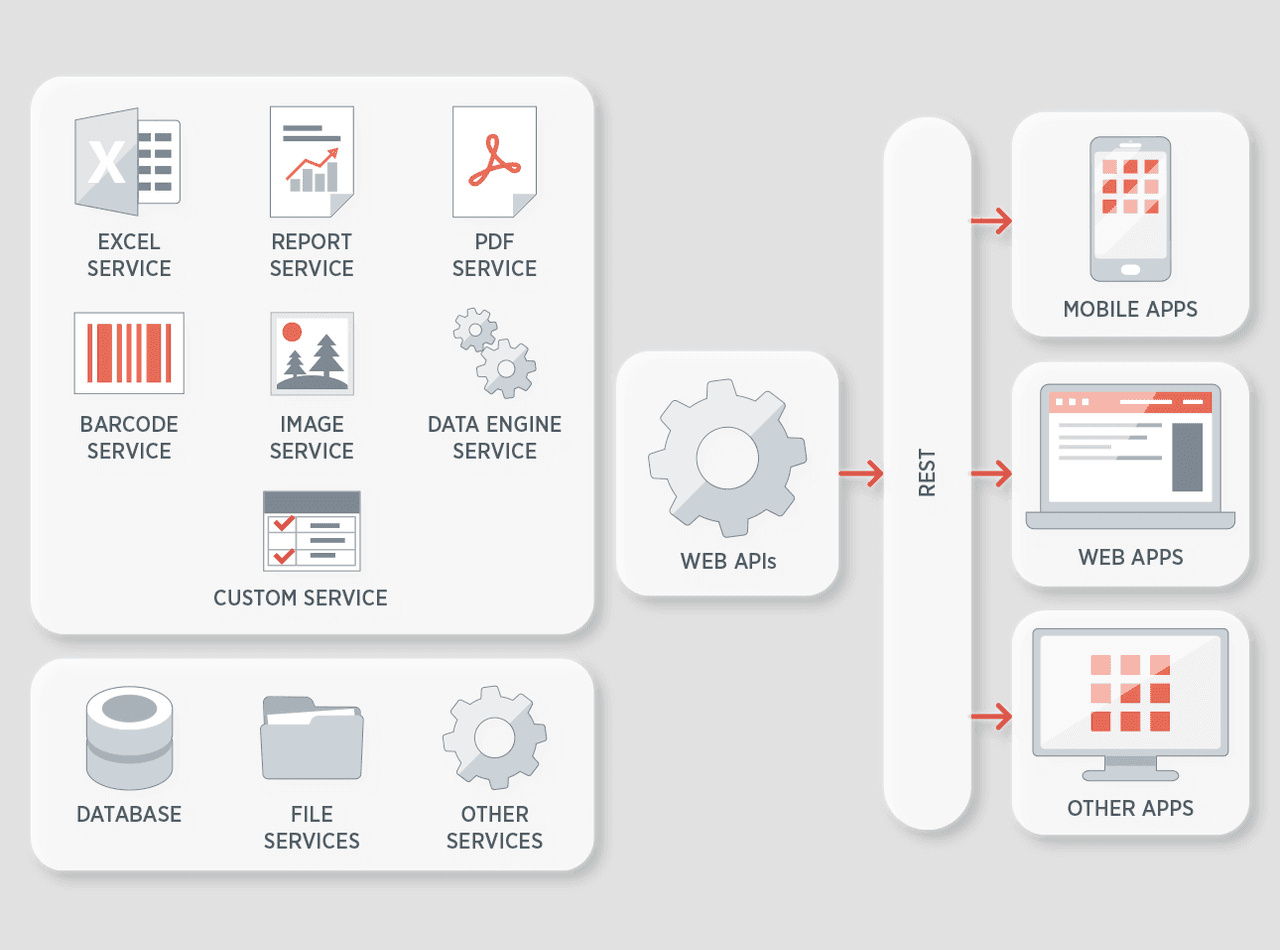
Unified Cloud Storage Access
Provide connectivity to popular cloud storage providers like Google Drive, OneDrive, Azure, Amazon Web Services, and Dropbox through a single Web API.
Comprehensive CRUD Operations
Perform Create, Read, Update, and Delete operations on files and folders stored in cloud services. The API supports RESTful HTTP verbs to manipulate persistent storage efficiently and securely.
RESTful Web Service Creation
Easily build and customize RESTful Web API services using ASP.NET Web API and ASP.NET Core frameworks. Visual Studio project templates help quickly configure and develop service applications deployed over HTTP.
Flexible Deployment Options
Deploy Web API services on Internet Information Services (IIS), cloud hosting platforms, or self-hosted environments. The API supports cross-platform deployment targeting a wide spectrum of client applications.
Integration with File Manager UI
Use the ComponentOne FileManager UI control to embed intuitive Windows Explorer-style file management within applications. This control connects directly to the cloud Web API for file browsing, searching, and operation.
Automation of Data Storage Processes
Automate file management processes by leveraging API capabilities similar to native Cloud SDKs, enabling synchronization and interaction with cloud file systems.
Support for REST Calls and Client Libraries
Utilize the Cloud API with standard RESTful calls or via client libraries for greater flexibility in application development and automation across diverse environments.
Product Compatibility
Review the details below to ensure this product is supported within your environment.
Component Type
- .NET
How to Buy
Available as part of ComponentOne Data Services Edition, ComponentOne WinForms Data Services Edition, and ComponentOne Studio Enterprise.

- IncludedData Services/Web API
- Not included120+ WinForms Controls
- Not included100+ WPF Controls
- Not included30+ WinUI & .NET MAUI Controls
- Not included40+ ASP.NET MVC & Core Controls
- Not included40+ ASP.NET WebForms Controls
- Not included19+ Blazor Components
- Not included80+ JavaScript Controls
- Enterprise Controls
- Not includedFinancialChart
- Not includedFlexSheet
- Not includedFlexPivot/OLAP
- Not includedFlexReport Designer
- Not includedReportViewer
- Additional Features
- Not includedIntelliSpell
- Not included2200+ Icons/Images

- IncludedData Services/Web API
- Included120+ WinForms Controls
- Not included100+ WPF Controls
- Not included30+ WinUI & .NET MAUI Controls
- Not included40+ ASP.NET MVC & Core Controls
- Not included40+ ASP.NET WebForms Controls
- Not included19+ Blazor Components
- Not included80+ JavaScript Controls
- Enterprise Controls
- Not includedFinancialChart
- Not includedFlexSheet
- Not includedFlexPivot/OLAP
- Not includedFlexReport Designer
- Not includedReportViewer
- Additional Features
- Not includedIntelliSpell
- Not included2200+ Icons/Images

- IncludedData Services/Web API
- Included120+ WinForms Controls
- Included100+ WPF Controls
- Included30+ WinUI & .NET MAUI Controls
- Included40+ ASP.NET MVC & Core Controls
- Included40+ ASP.NET WebForms Controls
- Included19+ Blazor Components
- Included80+ JavaScript Controls
- Enterprise Controls
- IncludedFinancialChart
- IncludedFlexSheet
- IncludedFlexPivot/OLAP
- IncludedFlexReport Designer
- IncludedReportViewer
- Additional Features
- IncludedIntelliSpell
- Included2200+ Icons/Images
About MESCIUS
MESCIUS, formerly known as GrapeCity, is a leading developer-focused brand established in Japan, with a history spanning over 30 years. It is recognized for its extensive suite of software components, including reporting frameworks, spreadsheet libraries, and Japanese market-oriented input controls. Popular products such as ActiveReports, SPREAD, InputMan, and ComponentOne support both .NET and JavaScript ecosystems and are widely used in business-critical applications. MESCIUS offers distinctive advantages such as proven reliability, comprehensive Japanese localization, and strong technical support, making it a trusted choice for IT professionals and software developers building complex and localized systems.

As official and authorized distributors since 1996, ComponentSource supplies you with legitimate licenses directly from MESCIUS.