ComponentOne ASP.NET Web Forms BarCode
Generate industry standard barcodes in ASP.NET Web Forms.
- Server-side barcode control for ASP.NET Web Forms projects.
- Supports multiple industry standard linear barcode encodings.
- Customizable properties for layout, size, and display.

Prices from:
| Available in | |
|---|---|
| ComponentOne Studio ASP.NET MVC | Loading |
| ComponentOne Studio Enterprise | Loading |
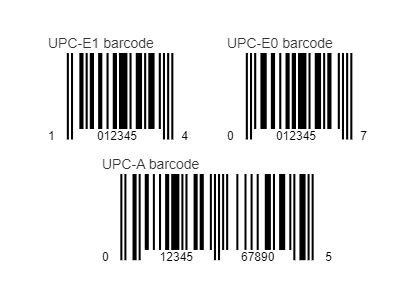
Linear Barcode Generation
Generates linear, one dimensional barcode symbols directly within ASP.NET Web Forms pages. The control renders barcode images based on specified input values, enabling applications to present machine readable data for identification, labeling, and tracking purposes.
Supported Industry Standard Encodings
Implements a range of widely used linear barcode symbologies; Codabar, Code128, Code39, Code93, CodeI2of5, Ean13, Ean8, PostNet, UpcA, and UpcE. These encodings allow applications to comply with common industry requirements and represent numeric or alphanumeric data according to established barcode standards.
Server Side ASP.NET Control
Operates as a server side Web Forms control that participates in the standard ASP.NET page lifecycle. Barcode images are generated on the server, ensuring consistent rendering regardless of the client browser or device.
Markup And Code Configuration
Allows developers to define and configure barcode properties declaratively in ASP.NET markup or programmatically in server side code. This flexibility supports both design time configuration and dynamic runtime updates.
Customizable Visual Properties
Provides properties to adjust visual aspects such as dimensions, colors, margins, and the display of human readable text. These settings enable developers to control how barcode output appears within the layout of a Web Forms page.
Data Binding Support
Supports binding the barcode value to data sources within Web Forms applications. This enables automatic generation of barcode images based on database fields, user input, or other application data.
Design Time Integration
Integrates with the Visual Studio design environment, allowing developers to configure properties through the designer interface. This simplifies setup and promotes consistent use across Web Forms projects.
Image Rendering For Web Pages
Renders barcode output as images that can be embedded directly into ASP.NET Web Forms pages. These images can be displayed on screen or included in printed output generated by the web application.
Product Compatibility
Review the details below to ensure this product is supported within your environment.
Component Type
- .NET
.NET Version
- .NET 4.8 or earlier
.NET Platform
- .NET Class
- ASP.NET
- ASP.NET AJAX
IDE Support
- Visual Studio
How to Buy
Available as part of ComponentOne ASP.NET Web Forms Edition, and ComponentOne Studio Enterprise.

- Included40+ ASP.NET WebForms Controls
- Not included40+ ASP.NET MVC & Core Controls
- Not included120+ WinForms Controls
- Not included100+ WPF Controls
- Not included30+ WinUI & .NET MAUI Controls
- Not included19+ Blazor Components
- Not includedData Services/Web API
- Not included80+ JavaScript Controls
- Enterprise Controls
- Not includedFinancialChart
- Not includedFlexSheet
- Not includedFlexPivot/OLAP
- Not includedFlexReport Designer
- Not includedReportViewer
- Additional Features
- Not includedIntelliSpell
- Not included2200+ Icons/Images

- Included40+ ASP.NET WebForms Controls
- Included40+ ASP.NET MVC & Core Controls
- Included120+ WinForms Controls
- Included100+ WPF Controls
- Included30+ WinUI & .NET MAUI Controls
- Included19+ Blazor Components
- IncludedData Services/Web API
- Included80+ JavaScript Controls
- Enterprise Controls
- IncludedFinancialChart
- IncludedFlexSheet
- IncludedFlexPivot/OLAP
- IncludedFlexReport Designer
- IncludedReportViewer
- Additional Features
- IncludedIntelliSpell
- Included2200+ Icons/Images
About MESCIUS
MESCIUS, formerly known as GrapeCity, is a leading developer-focused brand established in Japan, with a history spanning over 30 years. It is recognized for its extensive suite of software components, including reporting frameworks, spreadsheet libraries, and Japanese market-oriented input controls. Popular products such as ActiveReports, SPREAD, InputMan, and ComponentOne support both .NET and JavaScript ecosystems and are widely used in business-critical applications. MESCIUS offers distinctive advantages such as proven reliability, comprehensive Japanese localization, and strong technical support, making it a trusted choice for IT professionals and software developers building complex and localized systems.

As official and authorized distributors since 1996, ComponentSource supplies you with legitimate licenses directly from MESCIUS.