ComponentOne WinForms CalendarView
WinForms calendar control with multi-month display and rich navigation.
- Supports multi-month views for comprehensive date management.
- Enables contiguous and non-contiguous date selections with keyboard support.
- Offers internationalization with culture and right-to-left settings.

Prices from:
| Available in | |
|---|---|
| ComponentOne Studio WinForms | Loading |
| ComponentOne Studio WinForms Data Services Edition | Loading |
| ComponentOne Studio Enterprise | Loading |
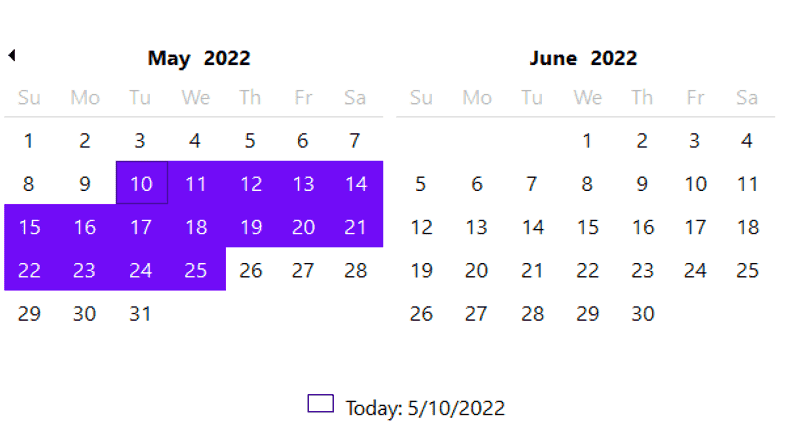
Multi-Month View
Display multiple months simultaneously to provide a broader date range visibility. You can control how many months appear, supporting layouts such as full-year views.
Flexible Date Navigation
Navigate days, months, and years using navigation buttons or keyboard shortcuts. Users can jump quickly between periods.
Date Selection Modes
Supports both contiguous and non-contiguous date range selections via mouse and keyboard, including holding CTRL for multiple discrete dates.
Custom Date Styling
Customize date appearances including bolded dates, disabled dates, selected dates, and more. You can also style calendar elements like titles and navigation buttons to fit application themes.
First Day of Week Configuration
Set any weekday as the start of the week with the FirstDayOfWeek property. This customization aligns calendar presentation with regional or organizational standards.
Internationalization and RTL Support
Adjust culture settings for localized calendar formats and names. Right-to-left (RTL) support ensures compatibility with languages such as Arabic and Hebrew.
DateEdit Control Integration
Includes the DateEdit control, an extension that combines a text editor and drop-down calendar with masking, validation, null value support, and additional calendar systems for compact, flexible date input.
Keyboard and Accessibility Features
Full keyboard navigation and selection support enhance accessibility, enabling users to operate the calendar without a mouse.
Design-time Tools and Smart Tags
Design-time editors and smart tags simplify calendar setup and customization, reducing the amount of code developers must write to achieve complex calendar behaviors.
Display Configuration Options
Fine-tune display features such as showing week numbers, positioning titles and buttons, and highlighting the current date to create tailored and user-friendly calendar controls.
Product Compatibility
Review the details below to ensure this product is supported within your environment.
Component Type
- .NET
.NET Version
- .NET 10 LTS
- .NET 9 STS
- .NET 8 LTS
- .NET 6 LTS
- .NET 4.8 or earlier
.NET Platform
- .NET Assembly
- .NET Class
- .NET WinForms
IDE Support
- Visual Studio
How to Buy
Available as part of ComponentOne WinForms Edition, ComponentOne WinForms Data Services Edition, and ComponentOne Studio Enterprise.

- Included120+ WinForms Controls
- Not included100+ WPF Controls
- Not included30+ WinUI & .NET MAUI Controls
- Not included40+ ASP.NET MVC & Core Controls
- Not included40+ ASP.NET WebForms Controls
- Not included19+ Blazor Components
- Not includedData Services/Web API
- Not included80+ JavaScript Controls
- Enterprise Controls
- Not includedFinancialChart
- Not includedFlexSheet
- Not includedFlexPivot/OLAP
- Not includedFlexReport Designer
- Not includedReportViewer
- Additional Features
- Not includedIntelliSpell
- Not included2200+ Icons/Images

- Included120+ WinForms Controls
- Not included100+ WPF Controls
- Not included30+ WinUI & .NET MAUI Controls
- Not included40+ ASP.NET MVC & Core Controls
- Not included40+ ASP.NET WebForms Controls
- Not included19+ Blazor Components
- IncludedData Services/Web API
- Not included80+ JavaScript Controls
- Enterprise Controls
- Not includedFinancialChart
- Not includedFlexSheet
- Not includedFlexPivot/OLAP
- Not includedFlexReport Designer
- Not includedReportViewer
- Additional Features
- Not includedIntelliSpell
- Not included2200+ Icons/Images

- Included120+ WinForms Controls
- Included100+ WPF Controls
- Included30+ WinUI & .NET MAUI Controls
- Included40+ ASP.NET MVC & Core Controls
- Included40+ ASP.NET WebForms Controls
- Included19+ Blazor Components
- IncludedData Services/Web API
- Included80+ JavaScript Controls
- Enterprise Controls
- IncludedFinancialChart
- IncludedFlexSheet
- IncludedFlexPivot/OLAP
- IncludedFlexReport Designer
- IncludedReportViewer
- Additional Features
- IncludedIntelliSpell
- Included2200+ Icons/Images
About MESCIUS
MESCIUS, formerly known as GrapeCity, is a leading developer-focused brand established in Japan, with a history spanning over 30 years. It is recognized for its extensive suite of software components, including reporting frameworks, spreadsheet libraries, and Japanese market-oriented input controls. Popular products such as ActiveReports, SPREAD, InputMan, and ComponentOne support both .NET and JavaScript ecosystems and are widely used in business-critical applications. MESCIUS offers distinctive advantages such as proven reliability, comprehensive Japanese localization, and strong technical support, making it a trusted choice for IT professionals and software developers building complex and localized systems.

As official and authorized distributors since 1996, ComponentSource supplies you with legitimate licenses directly from MESCIUS.