ComponentOne WinForms Dashboard Layout
Create dynamic WinForms dashboards with customizable layouts.
- Supports three layout modes: flow, grid, and split panels.
- Allows runtime resizing, rearranging, and maximizing containers.
- Enables saving and loading dashboard layouts in XML format.

Prices from:
| Available in | |
|---|---|
| ComponentOne Studio WinForms | Loading |
| ComponentOne Studio WinForms Data Services Edition | Loading |
| ComponentOne Studio Enterprise | Loading |
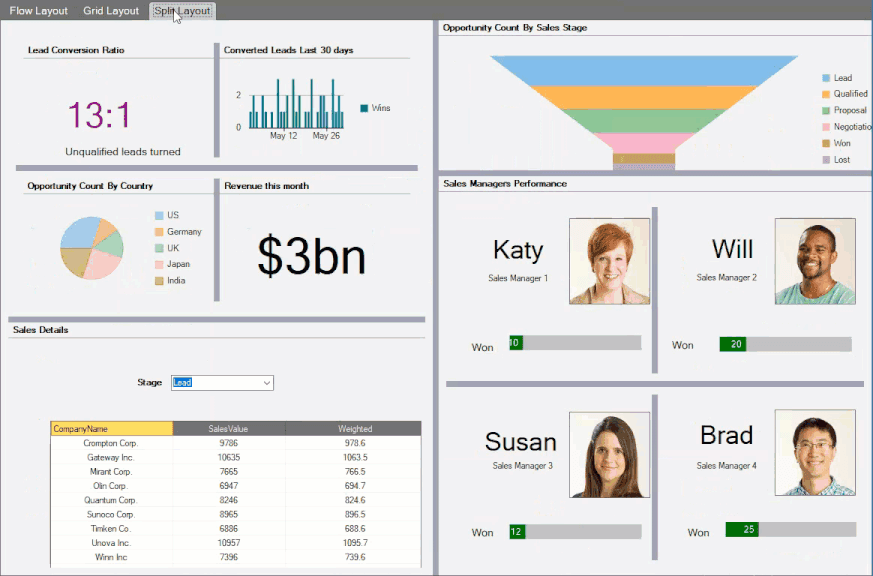
Multiple Layout Types
Offers flow, grid, and split layouts for arranging UI elements. Flow layout arranges containers horizontally or vertically with wrap options; grid layout arranges items in configurable rows and columns supporting cell merging; split layout uses resizable panels separated by splitter bars.
Dynamic Container Management
Each dashboard element is enclosed in a child container which can be resized, repositioned, maximized, or restored at runtime for flexible workspace adaptation. Containers automatically adjust to layout rules when moved or resized.
Resizing Behavior
Resizing containers dynamically rearranges other elements depending on the active layout. In flow layout, items flow naturally with the resized container; grid layout adjusts spanning columns or rows; split layout allows resizing panels using splitter bars with minimum and maximum size constraints.
Drag and Drop Support
Users can intuitively drag child containers to new positions on the dashboard, with automatic rearrangement of other containers following the layout rules.
Customizable Headers and Actions
Each container header supports custom actions such as maximize, hide, reorder, and adding custom icons and buttons, providing control over dashboard elements.
Save and Load Layouts
Dashboard layouts can be serialized to and deserialized from XML files, enabling persistence of user workspace configurations between application sessions.
Integration with Existing Layouts
Existing WinForms containers like C1SplitContainer, FlowLayoutPanel, or TableLayoutPanel can be converted into dashboard layouts with minimal code.
Extensive API and Event Support
Provides classes and events to handle layout customization, container actions, header painting, and synchronization, allowing developers to fully control and extend dashboard behavior.
Styling and Theming
Supports comprehensive styling options and integration with several professional WinForms themes.
Flow Layout Direction and Wrapping
Flow layout supports specifying the direction of flow (left-to-right, top-down, right-to-left, bottom-up) and options to wrap or not wrap content, controlling how child containers are arranged responsively.
Product Compatibility
Review the details below to ensure this product is supported within your environment.
Component Type
- .NET
.NET Version
- .NET 10 LTS
- .NET 9 STS
- .NET 8 LTS
- .NET 6 LTS
- .NET 4.8 or earlier
.NET Platform
- .NET Assembly
- .NET Class
- .NET WinForms
IDE Support
- Visual Studio
How to Buy
Available as part of ComponentOne WinForms Edition, ComponentOne WinForms Data Services Edition, and ComponentOne Studio Enterprise.

- Included120+ WinForms Controls
- Not included100+ WPF Controls
- Not included30+ WinUI & .NET MAUI Controls
- Not included40+ ASP.NET MVC & Core Controls
- Not included40+ ASP.NET WebForms Controls
- Not included19+ Blazor Components
- Not includedData Services/Web API
- Not included80+ JavaScript Controls
- Enterprise Controls
- Not includedFinancialChart
- Not includedFlexSheet
- Not includedFlexPivot/OLAP
- Not includedFlexReport Designer
- Not includedReportViewer
- Additional Features
- Not includedIntelliSpell
- Not included2200+ Icons/Images

- Included120+ WinForms Controls
- Not included100+ WPF Controls
- Not included30+ WinUI & .NET MAUI Controls
- Not included40+ ASP.NET MVC & Core Controls
- Not included40+ ASP.NET WebForms Controls
- Not included19+ Blazor Components
- IncludedData Services/Web API
- Not included80+ JavaScript Controls
- Enterprise Controls
- Not includedFinancialChart
- Not includedFlexSheet
- Not includedFlexPivot/OLAP
- Not includedFlexReport Designer
- Not includedReportViewer
- Additional Features
- Not includedIntelliSpell
- Not included2200+ Icons/Images

- Included120+ WinForms Controls
- Included100+ WPF Controls
- Included30+ WinUI & .NET MAUI Controls
- Included40+ ASP.NET MVC & Core Controls
- Included40+ ASP.NET WebForms Controls
- Included19+ Blazor Components
- IncludedData Services/Web API
- Included80+ JavaScript Controls
- Enterprise Controls
- IncludedFinancialChart
- IncludedFlexSheet
- IncludedFlexPivot/OLAP
- IncludedFlexReport Designer
- IncludedReportViewer
- Additional Features
- IncludedIntelliSpell
- Included2200+ Icons/Images
About MESCIUS
MESCIUS, formerly known as GrapeCity, is a leading developer-focused brand established in Japan, with a history spanning over 30 years. It is recognized for its extensive suite of software components, including reporting frameworks, spreadsheet libraries, and Japanese market-oriented input controls. Popular products such as ActiveReports, SPREAD, InputMan, and ComponentOne support both .NET and JavaScript ecosystems and are widely used in business-critical applications. MESCIUS offers distinctive advantages such as proven reliability, comprehensive Japanese localization, and strong technical support, making it a trusted choice for IT professionals and software developers building complex and localized systems.

As official and authorized distributors since 1996, ComponentSource supplies you with legitimate licenses directly from MESCIUS.