ComponentOne WinForms FlexGrid
Create customizable and hierarchical data grids in WinForms applications.
- Supports hierarchical tree grids and grouping for organized data views.
- Offers multiple built-in visual styles matching Microsoft Office themes.
- Enables column operations, custom styles, and background image settings.

Prices from:
| Available in | |
|---|---|
| ComponentOne Studio WinForms | Loading |
| ComponentOne Studio WinForms Data Services Edition | Loading |
| ComponentOne Studio Enterprise | Loading |
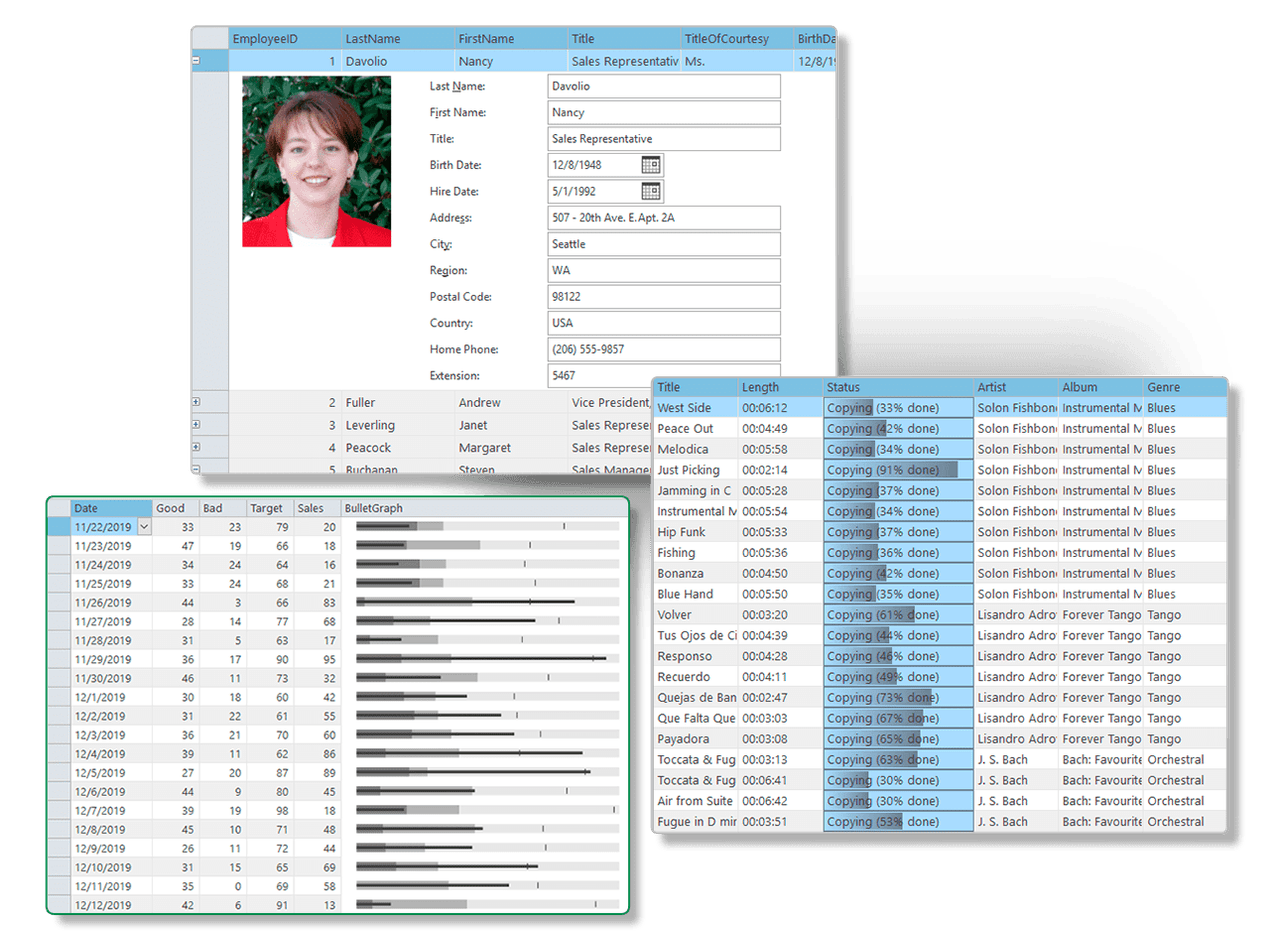
Built-in Visual Styles
FlexGrid includes six built-in visual styles modeled after Microsoft Office themes, accessible via the VisualStyle property. Additionally, it supports Custom and System styles for tailored or system-consistent rendering.
Customizable Styles Collection
It provides a collection of predefined cell styles for different cell types and states. Developers can modify existing styles or add custom ones using the CellStyleCollection to enhance grid readability and presentation.
Alternate Row Styling and Background Images
FlexGrid supports alternate row styles to improve data readability. Developers can also assign background images such as watermarks or logos using BackgroundImage and BackgroundImageLayout properties for visual branding.
Flexible Column Management
The control enables adding, deleting, inserting, and configuring columns both in bound and unbound modes. Data types for columns can be set explicitly, and columns can be fixed or frozen to remain visible during scrolling.
Hierarchical Grouping and Group Panel Integration
It allows grouping rows based on column values to organize data hierarchically. Grouping can be managed programmatically, via a drag-and-drop GroupPanel control, or through runtime context menus for interactive data analysis.
Tree Grid Structure
FlexGrid uniquely supports tree-like hierarchical data display with expandable and collapsible nodes, similar to a TreeView. Nodes organize grouped data with easy navigation and detail visibility.
Node Creation Methods
Nodes in Tree Grid can be created using InsertNode or Subtotal methods in both bound and unbound modes. The IsNode property also allows marking rows as nodes in unbound grids for structural flexibility.
Column Context Menu and User Interaction
A runtime context menu supports quick operations like grouping by a specific column and ungrouping, improving user experience and interactive data manipulation.
Product Compatibility
Review the details below to ensure this product is supported within your environment.
Component Type
- .NET
.NET Version
- .NET 10 LTS
- .NET 9 STS
- .NET 8 LTS
- .NET 6 LTS
- .NET 4.8 or earlier
.NET Platform
- .NET Assembly
- .NET Class
- .NET WinForms
IDE Support
- Visual Studio
How to Buy
Available as part of ComponentOne WinForms Edition, ComponentOne WinForms Data Services Edition, and ComponentOne Studio Enterprise.

- Included120+ WinForms Controls
- Not included100+ WPF Controls
- Not included30+ WinUI & .NET MAUI Controls
- Not included40+ ASP.NET MVC & Core Controls
- Not included40+ ASP.NET WebForms Controls
- Not included19+ Blazor Components
- Not includedData Services/Web API
- Not included80+ JavaScript Controls
- Enterprise Controls
- Not includedFinancialChart
- Not includedFlexSheet
- Not includedFlexPivot/OLAP
- Not includedFlexReport Designer
- Not includedReportViewer
- Additional Features
- Not includedIntelliSpell
- Not included2200+ Icons/Images

- Included120+ WinForms Controls
- Not included100+ WPF Controls
- Not included30+ WinUI & .NET MAUI Controls
- Not included40+ ASP.NET MVC & Core Controls
- Not included40+ ASP.NET WebForms Controls
- Not included19+ Blazor Components
- IncludedData Services/Web API
- Not included80+ JavaScript Controls
- Enterprise Controls
- Not includedFinancialChart
- Not includedFlexSheet
- Not includedFlexPivot/OLAP
- Not includedFlexReport Designer
- Not includedReportViewer
- Additional Features
- Not includedIntelliSpell
- Not included2200+ Icons/Images

- Included120+ WinForms Controls
- Included100+ WPF Controls
- Included30+ WinUI & .NET MAUI Controls
- Included40+ ASP.NET MVC & Core Controls
- Included40+ ASP.NET WebForms Controls
- Included19+ Blazor Components
- IncludedData Services/Web API
- Included80+ JavaScript Controls
- Enterprise Controls
- IncludedFinancialChart
- IncludedFlexSheet
- IncludedFlexPivot/OLAP
- IncludedFlexReport Designer
- IncludedReportViewer
- Additional Features
- IncludedIntelliSpell
- Included2200+ Icons/Images
About MESCIUS
MESCIUS, formerly known as GrapeCity, is a leading developer-focused brand established in Japan, with a history spanning over 30 years. It is recognized for its extensive suite of software components, including reporting frameworks, spreadsheet libraries, and Japanese market-oriented input controls. Popular products such as ActiveReports, SPREAD, InputMan, and ComponentOne support both .NET and JavaScript ecosystems and are widely used in business-critical applications. MESCIUS offers distinctive advantages such as proven reliability, comprehensive Japanese localization, and strong technical support, making it a trusted choice for IT professionals and software developers building complex and localized systems.

As official and authorized distributors since 1996, ComponentSource supplies you with legitimate licenses directly from MESCIUS.