ComponentOne WinForms GanttView
Interactive WinForms Gantt control for efficient project scheduling.
- Supports automatic and manual task scheduling with drag-drop controls.
- Offers customizable bar styles and timescales for detailed visualization.
- Includes import/export, filtering, printing, and design-time support.

Prices from:
| Available in | |
|---|---|
| ComponentOne Studio WinForms | Loading |
| ComponentOne Studio WinForms Data Services Edition | Loading |
| ComponentOne Studio Enterprise | Loading |
Automatic and Manual Scheduling
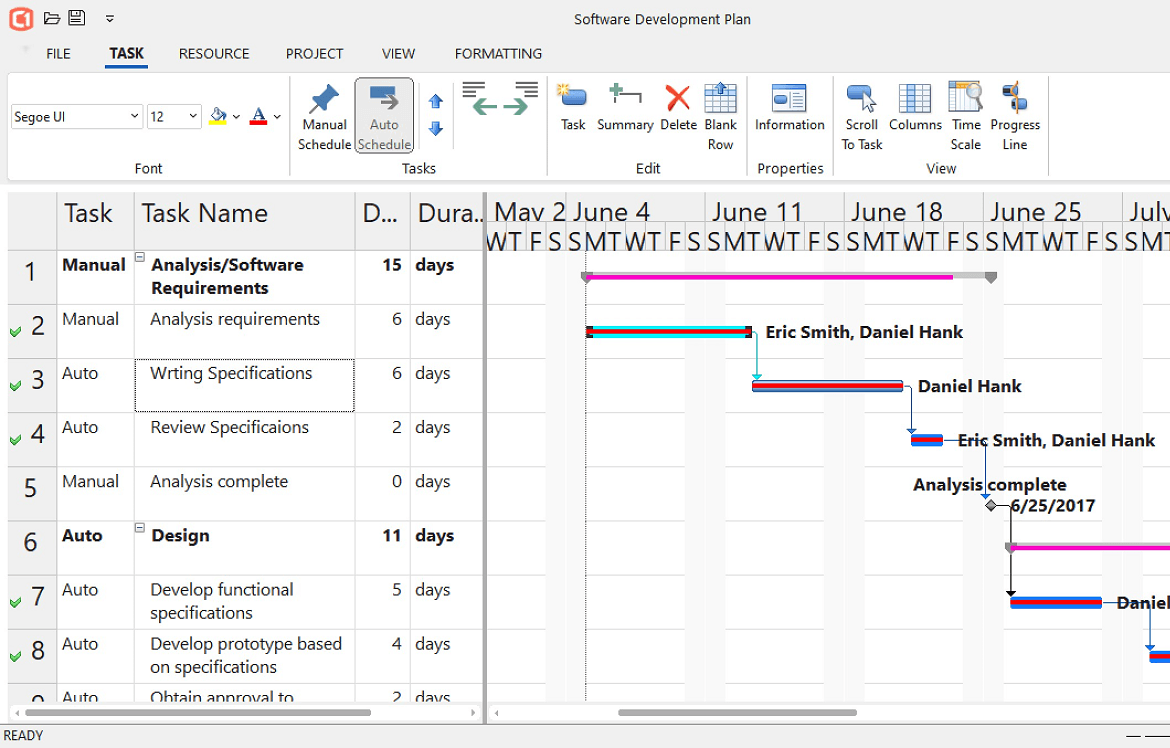
Allows tasks to be scheduled automatically based on duration and constraints or manually adjusted via a data grid, input dialogs, or drag-and-drop interactions within the chart.
Advanced Task Management
Enables setting start and end constraints, defining task dependencies, assigning resources, splitting tasks, and creating task groups with visual cues such as dependency arrows and conflict validation alerts.
Customizable Bar Styles
Provides several default bar styles including auto-scheduled, manual, progress, milestone, and deadline, all of which can be fully customized in shape, pattern, color, and displayed text.
Configurable Timescale
Supports multi-tier timescale formatting with options to create and save custom calendars specifying working times, weeks, and exceptions.
Advanced Filtering and Sorting
Offers runtime toolbar controls that let users filter and sort tasks based on criteria like completion status, milestones, lateness, and task summaries.
Import and Export Functionality
Enables saving and loading project schedules using XML, with support for Microsoft Project file interoperability.
Built-in Toolbar and UI Customization
Includes a default toolbar providing quick access to task insertion, resource management, timescale configuration, and styling options while allowing developers to implement custom user interfaces.
Integrated Printing Support
Provides print functionality with options to set paper orientation, margins, and header/footer text, accompanied by print preview and progress dialogs.
Extensive Design-Time Support
Offers numerous design-time features within Visual Studio enabling developers to configure the GanttView control easily, minimizing the amount of coding needed.
Product Compatibility
Review the details below to ensure this product is supported within your environment.
Component Type
- .NET
.NET Version
- .NET 10 LTS
- .NET 9 STS
- .NET 8 LTS
- .NET 6 LTS
- .NET 4.8 or earlier
.NET Platform
- .NET Assembly
- .NET Class
- .NET WinForms
IDE Support
- Visual Studio
How to Buy
Available as part of ComponentOne WinForms Edition, ComponentOne WinForms Data Services Edition, and ComponentOne Studio Enterprise.

- Included120+ WinForms Controls
- Not included100+ WPF Controls
- Not included30+ WinUI & .NET MAUI Controls
- Not included40+ ASP.NET MVC & Core Controls
- Not included40+ ASP.NET WebForms Controls
- Not included19+ Blazor Components
- Not includedData Services/Web API
- Not included80+ JavaScript Controls
- Enterprise Controls
- Not includedFinancialChart
- Not includedFlexSheet
- Not includedFlexPivot/OLAP
- Not includedFlexReport Designer
- Not includedReportViewer
- Additional Features
- Not includedIntelliSpell
- Not included2200+ Icons/Images

- Included120+ WinForms Controls
- Not included100+ WPF Controls
- Not included30+ WinUI & .NET MAUI Controls
- Not included40+ ASP.NET MVC & Core Controls
- Not included40+ ASP.NET WebForms Controls
- Not included19+ Blazor Components
- IncludedData Services/Web API
- Not included80+ JavaScript Controls
- Enterprise Controls
- Not includedFinancialChart
- Not includedFlexSheet
- Not includedFlexPivot/OLAP
- Not includedFlexReport Designer
- Not includedReportViewer
- Additional Features
- Not includedIntelliSpell
- Not included2200+ Icons/Images

- Included120+ WinForms Controls
- Included100+ WPF Controls
- Included30+ WinUI & .NET MAUI Controls
- Included40+ ASP.NET MVC & Core Controls
- Included40+ ASP.NET WebForms Controls
- Included19+ Blazor Components
- IncludedData Services/Web API
- Included80+ JavaScript Controls
- Enterprise Controls
- IncludedFinancialChart
- IncludedFlexSheet
- IncludedFlexPivot/OLAP
- IncludedFlexReport Designer
- IncludedReportViewer
- Additional Features
- IncludedIntelliSpell
- Included2200+ Icons/Images
About MESCIUS
MESCIUS, formerly known as GrapeCity, is a leading developer-focused brand established in Japan, with a history spanning over 30 years. It is recognized for its extensive suite of software components, including reporting frameworks, spreadsheet libraries, and Japanese market-oriented input controls. Popular products such as ActiveReports, SPREAD, InputMan, and ComponentOne support both .NET and JavaScript ecosystems and are widely used in business-critical applications. MESCIUS offers distinctive advantages such as proven reliability, comprehensive Japanese localization, and strong technical support, making it a trusted choice for IT professionals and software developers building complex and localized systems.

As official and authorized distributors since 1996, ComponentSource supplies you with legitimate licenses directly from MESCIUS.