ComponentOne WinForms Maps
Display and interact with customizable maps in WinForms applications.
- Supports aerial, road, and hybrid map views with Microsoft Bing Maps integration.
- Enables vector shapes, markers, and overlays including GeoJSON and KML files.
- Includes touch-friendly tools for zooming, panning, and distance scaling.

Prices from:
| Available in | |
|---|---|
| ComponentOne Studio WinForms | Loading |
| ComponentOne Studio WinForms Data Services Edition | Loading |
| ComponentOne Studio Enterprise | Loading |
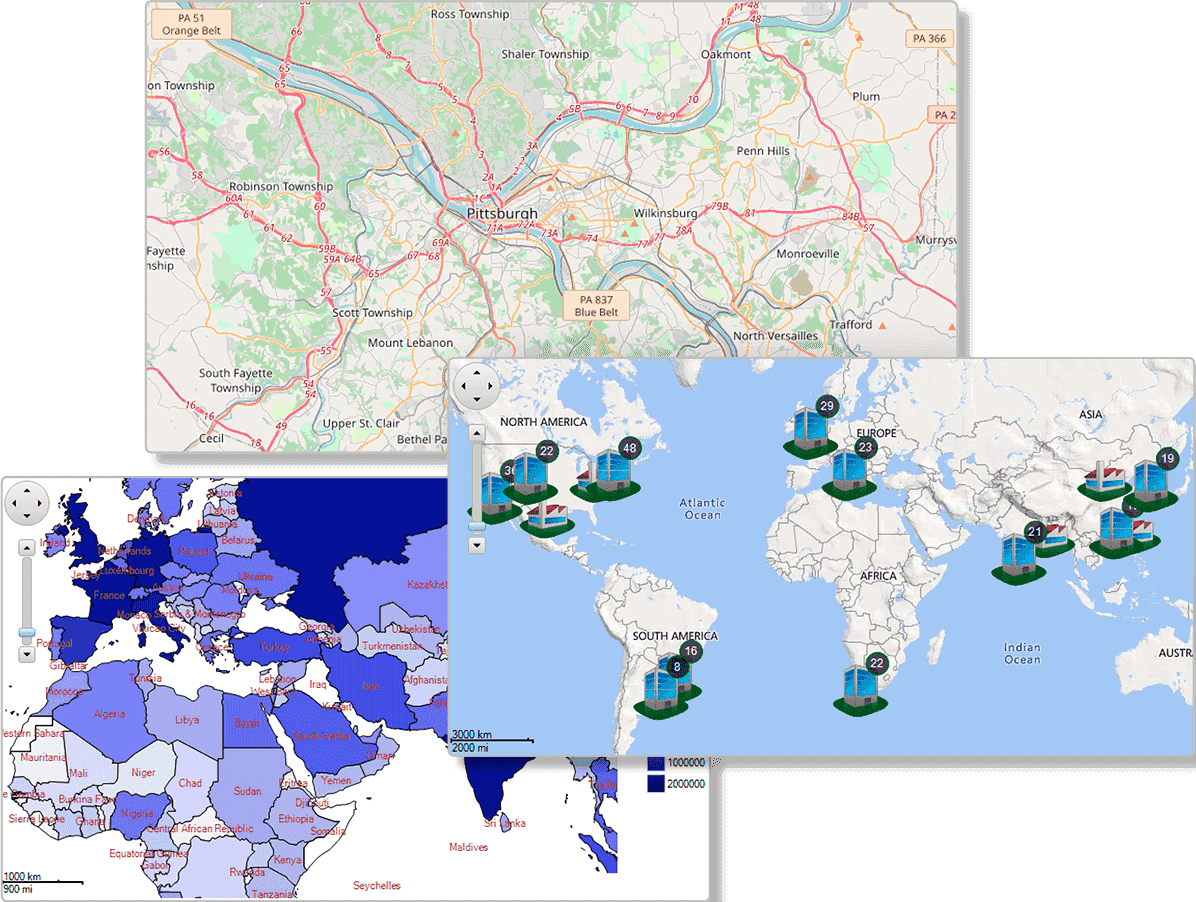
Multiple Built-in and Custom Map Sources
The control comes with built-in aerial, road, and hybrid map sources powered by Microsoft Bing Maps, and supports custom tile sources like Google Maps and Open Street Maps, enabling flexible map display options.
Vector Layer for Geographic Data Visualization
Draw polygons, lines, and points on the map to represent borders, routes, or statistical overlays such as choropleth maps, enhancing the geographic data storytelling capabilities.
GeoJSON and KML File Support
Import GeoJSON data for detailed geographic feature layers and Point information or use KML files for offline mapping needs, broadening the scope of data visualization and interoperability.
User Interaction Tools for Zooming and Panning
Built-in zoom, pan, and distance scaling tools allow intuitive map navigation via touch gestures, mouse, or keyboard input, improving end-user interaction and control.
Customizable Map Tools Positioning
Map tools can be repositioned or resized programmatically to fit any UI layout design, allowing developers to tailor the user interface according to application requirements.
Smooth Multi-touch Gesture Support
Supports double tap to zoom-in, pinch gestures to zoom-out, and stretch actions, making the map control responsive and user-friendly on touch-enabled devices.
Map Looping for Horizontal Pan
Enables endless horizontal scrolling by setting the HorizontalLoop property, allowing seamless east-west navigation across the map beyond the 180-degree longitude.
Distance Scale Tool with Metric and Imperial Units
Displays a scale bar on the map to represent actual distances, aiding users in estimating geographic scales accurately with metric and imperial units shown.
High Performance Virtualization
Efficiently manages large sets of map elements with asynchronous loading, enhancing rendering speed and responsiveness during zooming and panning actions.
Legend Support for Map Symbology
Add legends that explain markers, shapes, and data representation on the map, facilitating user understanding of the geographic information presented.
Product Compatibility
Review the details below to ensure this product is supported within your environment.
Component Type
- .NET
.NET Version
- .NET 10 LTS
- .NET 9 STS
- .NET 8 LTS
- .NET 6 LTS
- .NET 4.8 or earlier
.NET Platform
- .NET Assembly
- .NET Class
- .NET WinForms
IDE Support
- Visual Studio
How to Buy
Available as part of ComponentOne WinForms Edition, ComponentOne WinForms Data Services Edition, and ComponentOne Studio Enterprise.

- Included120+ WinForms Controls
- Not included100+ WPF Controls
- Not included30+ WinUI & .NET MAUI Controls
- Not included40+ ASP.NET MVC & Core Controls
- Not included40+ ASP.NET WebForms Controls
- Not included19+ Blazor Components
- Not includedData Services/Web API
- Not included80+ JavaScript Controls
- Enterprise Controls
- Not includedFinancialChart
- Not includedFlexSheet
- Not includedFlexPivot/OLAP
- Not includedFlexReport Designer
- Not includedReportViewer
- Additional Features
- Not includedIntelliSpell
- Not included2200+ Icons/Images

- Included120+ WinForms Controls
- Not included100+ WPF Controls
- Not included30+ WinUI & .NET MAUI Controls
- Not included40+ ASP.NET MVC & Core Controls
- Not included40+ ASP.NET WebForms Controls
- Not included19+ Blazor Components
- IncludedData Services/Web API
- Not included80+ JavaScript Controls
- Enterprise Controls
- Not includedFinancialChart
- Not includedFlexSheet
- Not includedFlexPivot/OLAP
- Not includedFlexReport Designer
- Not includedReportViewer
- Additional Features
- Not includedIntelliSpell
- Not included2200+ Icons/Images

- Included120+ WinForms Controls
- Included100+ WPF Controls
- Included30+ WinUI & .NET MAUI Controls
- Included40+ ASP.NET MVC & Core Controls
- Included40+ ASP.NET WebForms Controls
- Included19+ Blazor Components
- IncludedData Services/Web API
- Included80+ JavaScript Controls
- Enterprise Controls
- IncludedFinancialChart
- IncludedFlexSheet
- IncludedFlexPivot/OLAP
- IncludedFlexReport Designer
- IncludedReportViewer
- Additional Features
- IncludedIntelliSpell
- Included2200+ Icons/Images
About MESCIUS
MESCIUS, formerly known as GrapeCity, is a leading developer-focused brand established in Japan, with a history spanning over 30 years. It is recognized for its extensive suite of software components, including reporting frameworks, spreadsheet libraries, and Japanese market-oriented input controls. Popular products such as ActiveReports, SPREAD, InputMan, and ComponentOne support both .NET and JavaScript ecosystems and are widely used in business-critical applications. MESCIUS offers distinctive advantages such as proven reliability, comprehensive Japanese localization, and strong technical support, making it a trusted choice for IT professionals and software developers building complex and localized systems.

As official and authorized distributors since 1996, ComponentSource supplies you with legitimate licenses directly from MESCIUS.