ComponentOne WinForms UI Layout and Design Controls
Advanced C# .NET controls for intuitive WinForms UI layout and design.
- Includes 120+ versatile WinForms UI controls for desktop apps.
- Supports dynamic dashboard layouts with customizable panels.
- Features resizable, collapsible multi-panel SplitContainer control.

Prices from:
| Available in | |
|---|---|
| ComponentOne Studio WinForms | Loading |
| ComponentOne Studio WinForms Data Services Edition | Loading |
| ComponentOne Studio Enterprise | Loading |
Comprehensive UI Control Suite
Access over 120 WinForms UI controls covering grids, charts, input elements, navigation, and layout to build feature-rich desktop applications efficiently.
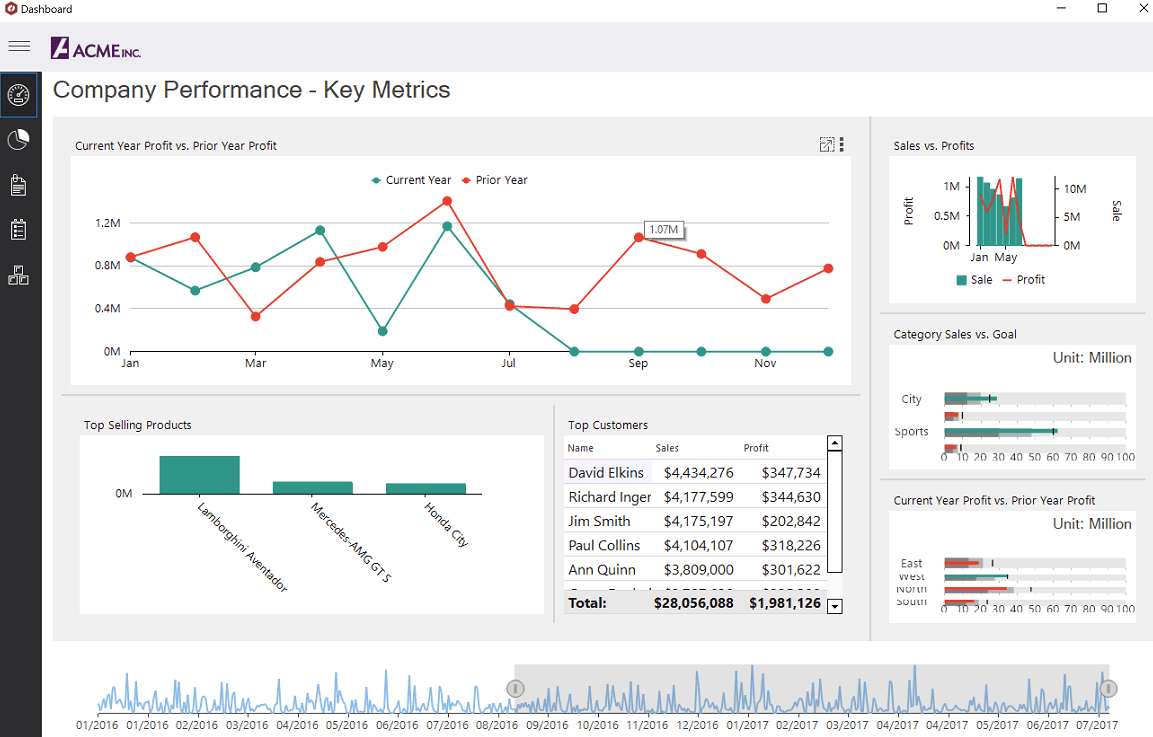
Dynamic Dashboard Layout
Build interactive business intelligence dashboards with flexible layouts including flow, grid, and split modes for optimal data visualization and user experience.
Resizable and Collapsible Panels
Enable end-users to resize and collapse interface panels on the fly, enhancing workspace customization without extensive coding.
Multi-Panel SplitContainer Control
Go beyond the standard split container with support for multiple panels, panel headers, visual styles, and collapsible sections for complex layouts.
Drag-and-Drop Rearrangement
Facilitate intuitive rearrangement of dashboard components through dragging and dropping, with automatic adjustment of adjacent containers.
Maximize and Restore Panels
Allow users to maximize individual dashboard tiles to focus on specific data, then easily restore to the original layout.
Save and Load Custom Layouts
Support serialization of dashboard arrangements to XML, enabling persistent saving and loading of user-customized layouts.
Visual Studio Integration and Theming
Seamlessly integrate with Visual Studio for rapid design-time development and access over 40 professional themes plus a custom Theme Designer.
Touch-First Desktop Applications
Deliver modern UX optimized for touch screens and tablets through a dedicated TouchToolkit supporting gesture interactions.
Flexible API and Licensing
Benefit from a rich API allowing extensive control customization with perpetual, developer-based licensing for unlimited deployment.
Product Compatibility
Review the details below to ensure this product is supported within your environment.
Component Type
- .NET
.NET Version
- .NET 10 LTS
- .NET 9 STS
- .NET 8 LTS
- .NET 6 LTS
- .NET 4.8 or earlier
.NET Platform
- .NET Assembly
- .NET Class
- .NET WinForms
IDE Support
- Visual Studio
How to Buy
Available as part of ComponentOne WinForms Edition, ComponentOne WinForms Data Services Edition, and ComponentOne Studio Enterprise.

- Included120+ WinForms Controls
- Not included100+ WPF Controls
- Not included30+ WinUI & .NET MAUI Controls
- Not included40+ ASP.NET MVC & Core Controls
- Not included40+ ASP.NET WebForms Controls
- Not included19+ Blazor Components
- Not includedData Services/Web API
- Not included80+ JavaScript Controls
- Enterprise Controls
- Not includedFinancialChart
- Not includedFlexSheet
- Not includedFlexPivot/OLAP
- Not includedFlexReport Designer
- Not includedReportViewer
- Additional Features
- Not includedIntelliSpell
- Not included2200+ Icons/Images

- Included120+ WinForms Controls
- Not included100+ WPF Controls
- Not included30+ WinUI & .NET MAUI Controls
- Not included40+ ASP.NET MVC & Core Controls
- Not included40+ ASP.NET WebForms Controls
- Not included19+ Blazor Components
- IncludedData Services/Web API
- Not included80+ JavaScript Controls
- Enterprise Controls
- Not includedFinancialChart
- Not includedFlexSheet
- Not includedFlexPivot/OLAP
- Not includedFlexReport Designer
- Not includedReportViewer
- Additional Features
- Not includedIntelliSpell
- Not included2200+ Icons/Images

- Included120+ WinForms Controls
- Included100+ WPF Controls
- Included30+ WinUI & .NET MAUI Controls
- Included40+ ASP.NET MVC & Core Controls
- Included40+ ASP.NET WebForms Controls
- Included19+ Blazor Components
- IncludedData Services/Web API
- Included80+ JavaScript Controls
- Enterprise Controls
- IncludedFinancialChart
- IncludedFlexSheet
- IncludedFlexPivot/OLAP
- IncludedFlexReport Designer
- IncludedReportViewer
- Additional Features
- IncludedIntelliSpell
- Included2200+ Icons/Images
About MESCIUS
MESCIUS, formerly known as GrapeCity, is a leading developer-focused brand established in Japan, with a history spanning over 30 years. It is recognized for its extensive suite of software components, including reporting frameworks, spreadsheet libraries, and Japanese market-oriented input controls. Popular products such as ActiveReports, SPREAD, InputMan, and ComponentOne support both .NET and JavaScript ecosystems and are widely used in business-critical applications. MESCIUS offers distinctive advantages such as proven reliability, comprehensive Japanese localization, and strong technical support, making it a trusted choice for IT professionals and software developers building complex and localized systems.

As official and authorized distributors since 1996, ComponentSource supplies you with legitimate licenses directly from MESCIUS.