ComponentOne WinForms UI Selection Controls
Build flexible WinForms selection interfaces with configurable input and choice components.
- Capture user input with configurable single and multiple selection controls.
- Display list, drop-down, and multi-column data with flexible presentation options.
- Bind controls to application data sources and customize behavior and appearance.

Prices from:
| Available in | |
|---|---|
| ComponentOne Studio WinForms | Loading |
| ComponentOne Studio WinForms Data Services Edition | Loading |
| ComponentOne Studio Enterprise | Loading |
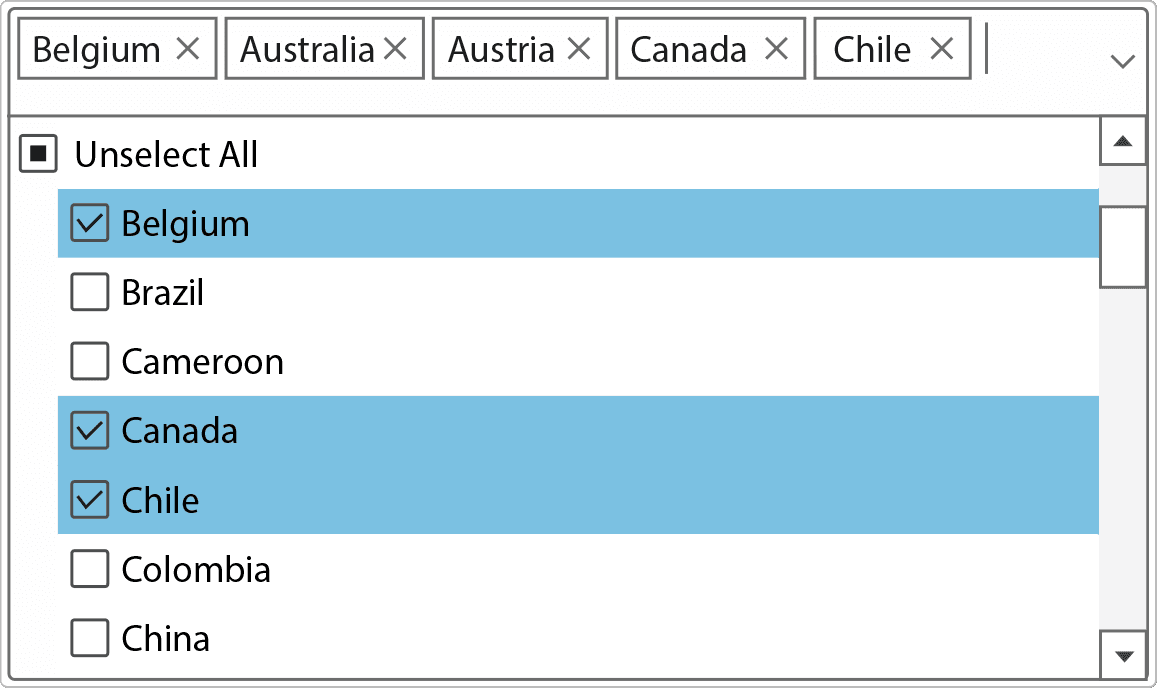
CheckBox Control
Display binary and optional indeterminate states for user input. Configure appearance, captions, alignment, and behavior to match application requirements while integrating with standard Windows Forms events and data binding.
ComboBox Control
Combine text input with selectable lists to help users choose values efficiently. Configure editable or selection-only behavior, customize item presentation, and connect the control to application data sources.
DropDown Control
Present custom content within expandable drop-down panels instead of limiting selection to standard lists. Display user-defined controls and interactive content while maintaining familiar drop-down interaction patterns.
ListBox Control
Display collections of items for single or multiple selection. Configure item rendering, scrolling, selection behavior, and data binding to present information clearly within desktop application interfaces.
MultiColumnCombo Control
Display multiple data fields within a combo box to provide additional context during selection. Show tabular information such as identifiers, descriptions, or categories without requiring separate lookup dialogs.
MultiSelect Support
Allow users to select multiple items where application workflows require more than one choice. Manage selection states efficiently while supporting keyboard and mouse interactions familiar to Windows Forms users.
ToggleSwitch Control
Represent on and off settings with a modern switch-style interface. Customize colors, labels, animations, and visual styles to provide clear status indicators for application options and preferences.
Data Binding Integration
Connect selection controls to application data sources to display dynamic content and synchronize user choices with business objects, collections, or other supported Windows Forms data binding mechanisms.
Appearance Customization
Adjust visual styles, fonts, colors, borders, and layout options to create interfaces that align with application branding while maintaining a consistent user experience across all supported selection controls.
Product Compatibility
Review the details below to ensure this product is supported within your environment.
Component Type
- .NET
.NET Version
- .NET 10 LTS
- .NET 9 STS
- .NET 8 LTS
- .NET 6 LTS
- .NET 4.8 or earlier
.NET Platform
- .NET Assembly
- .NET Class
- .NET WinForms
IDE Support
- Visual Studio
How to Buy
Available as part of ComponentOne WinForms Edition, ComponentOne WinForms Data Services Edition, and ComponentOne Studio Enterprise.

- Included120+ WinForms Controls
- Not included100+ WPF Controls
- Not included30+ WinUI & .NET MAUI Controls
- Not included40+ ASP.NET MVC & Core Controls
- Not included40+ ASP.NET WebForms Controls
- Not included19+ Blazor Components
- Not includedData Services/Web API
- Not included80+ JavaScript Controls
- Enterprise Controls
- Not includedFinancialChart
- Not includedFlexSheet
- Not includedFlexPivot/OLAP
- Not includedFlexReport Designer
- Not includedReportViewer
- Additional Features
- Not includedIntelliSpell
- Not included2200+ Icons/Images

- Included120+ WinForms Controls
- Not included100+ WPF Controls
- Not included30+ WinUI & .NET MAUI Controls
- Not included40+ ASP.NET MVC & Core Controls
- Not included40+ ASP.NET WebForms Controls
- Not included19+ Blazor Components
- IncludedData Services/Web API
- Not included80+ JavaScript Controls
- Enterprise Controls
- Not includedFinancialChart
- Not includedFlexSheet
- Not includedFlexPivot/OLAP
- Not includedFlexReport Designer
- Not includedReportViewer
- Additional Features
- Not includedIntelliSpell
- Not included2200+ Icons/Images

- Included120+ WinForms Controls
- Included100+ WPF Controls
- Included30+ WinUI & .NET MAUI Controls
- Included40+ ASP.NET MVC & Core Controls
- Included40+ ASP.NET WebForms Controls
- Included19+ Blazor Components
- IncludedData Services/Web API
- Included80+ JavaScript Controls
- Enterprise Controls
- IncludedFinancialChart
- IncludedFlexSheet
- IncludedFlexPivot/OLAP
- IncludedFlexReport Designer
- IncludedReportViewer
- Additional Features
- IncludedIntelliSpell
- Included2200+ Icons/Images
About MESCIUS
MESCIUS, formerly known as GrapeCity, is a leading developer-focused brand established in Japan, with a history spanning over 30 years. It is recognized for its extensive suite of software components, including reporting frameworks, spreadsheet libraries, and Japanese market-oriented input controls. Popular products such as ActiveReports, SPREAD, InputMan, and ComponentOne support both .NET and JavaScript ecosystems and are widely used in business-critical applications. MESCIUS offers distinctive advantages such as proven reliability, comprehensive Japanese localization, and strong technical support, making it a trusted choice for IT professionals and software developers building complex and localized systems.

As official and authorized distributors since 1996, ComponentSource supplies you with legitimate licenses directly from MESCIUS.