ComponentOne WinForms Zip
Zip and unzip files securely in .NET applications with encryption support.
- Compress and decompress files, folders, and streams in memory.
- Support password-protected ZIP files with full encryption capabilities.
- Handle large files and serialized objects using Zip64 technology.

Prices from:
| Available in | |
|---|---|
| ComponentOne Studio WinForms | Loading |
| ComponentOne Studio WinForms Data Services Edition | Loading |
| ComponentOne Studio Enterprise | Loading |
Create and Open ZIP Files
Use C1ZipFile class to create new or open existing ZIP files for reading and writing, supporting ZIP archives on disk and in streams.
Add and Remove Entries
Manage archive contents by adding files or serialized objects and removing entries to maintain or update ZIP files programmatically.
Extract and View Files
Extract selected files or the entire archive to disk folders, and view file contents directly in memory without extraction.
Password Encryption Support
Secure ZIP archives with password-based encryption, enabling compression and decompression of protected files for enhanced data security.
Zip64 Large File Support
Handle files exceeding 4GB using Zip64 extensions, allowing the creation and management of very large ZIP archives without limitations.
In-Memory Compression with Low Footprint
Compress and decompress data using a 100% managed C# ZLIB implementation that is memory-efficient and reliable.
Serialization Compression
Compress .NET serializable objects like database tables into ZIP streams, reducing size substantially to save disk space and network bandwidth.
Integrity Testing of ZIP Entries
Verify archive health using CRC32 checksum validation to detect corruption or compatibility problems with ZIP entries.
Comprehensive ZIP File Inspection
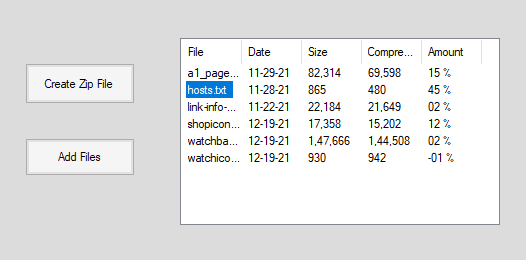
Access detailed ZIP entry information including file names, sizes, compression ratios, modified dates, and global archive comments.
.NET Framework and Core Compatibility
ComponentOne Zip supports all major .NET frameworks, including .NET Framework and .NET Core, ensuring broad applicability in various .NET projects.
Product Compatibility
Review the details below to ensure this product is supported within your environment.
Component Type
- .NET
.NET Version
- .NET 10 LTS
- .NET 9 STS
- .NET 8 LTS
- .NET 6 LTS
- .NET 4.8 or earlier
.NET Platform
- .NET Assembly
- .NET Class
- .NET WinForms
IDE Support
- Visual Studio
How to Buy
Available as part of ComponentOne WinForms Edition, ComponentOne WinForms Data Services Edition, and ComponentOne Studio Enterprise.

- Included120+ WinForms Controls
- Not included100+ WPF Controls
- Not included30+ WinUI & .NET MAUI Controls
- Not included40+ ASP.NET MVC & Core Controls
- Not included40+ ASP.NET WebForms Controls
- Not included19+ Blazor Components
- Not includedData Services/Web API
- Not included80+ JavaScript Controls
- Enterprise Controls
- Not includedFinancialChart
- Not includedFlexSheet
- Not includedFlexPivot/OLAP
- Not includedFlexReport Designer
- Not includedReportViewer
- Additional Features
- Not includedIntelliSpell
- Not included2200+ Icons/Images

- Included120+ WinForms Controls
- Not included100+ WPF Controls
- Not included30+ WinUI & .NET MAUI Controls
- Not included40+ ASP.NET MVC & Core Controls
- Not included40+ ASP.NET WebForms Controls
- Not included19+ Blazor Components
- IncludedData Services/Web API
- Not included80+ JavaScript Controls
- Enterprise Controls
- Not includedFinancialChart
- Not includedFlexSheet
- Not includedFlexPivot/OLAP
- Not includedFlexReport Designer
- Not includedReportViewer
- Additional Features
- Not includedIntelliSpell
- Not included2200+ Icons/Images

- Included120+ WinForms Controls
- Included100+ WPF Controls
- Included30+ WinUI & .NET MAUI Controls
- Included40+ ASP.NET MVC & Core Controls
- Included40+ ASP.NET WebForms Controls
- Included19+ Blazor Components
- IncludedData Services/Web API
- Included80+ JavaScript Controls
- Enterprise Controls
- IncludedFinancialChart
- IncludedFlexSheet
- IncludedFlexPivot/OLAP
- IncludedFlexReport Designer
- IncludedReportViewer
- Additional Features
- IncludedIntelliSpell
- Included2200+ Icons/Images
About MESCIUS
MESCIUS, formerly known as GrapeCity, is a leading developer-focused brand established in Japan, with a history spanning over 30 years. It is recognized for its extensive suite of software components, including reporting frameworks, spreadsheet libraries, and Japanese market-oriented input controls. Popular products such as ActiveReports, SPREAD, InputMan, and ComponentOne support both .NET and JavaScript ecosystems and are widely used in business-critical applications. MESCIUS offers distinctive advantages such as proven reliability, comprehensive Japanese localization, and strong technical support, making it a trusted choice for IT professionals and software developers building complex and localized systems.

As official and authorized distributors since 1996, ComponentSource supplies you with legitimate licenses directly from MESCIUS.