ComponentOne WinUI FlexReport
Create and view interactive reports seamlessly within WinUI applications.
- Cross-platform .NET reporting engine optimized for high performance.
- Design reports code-free using the standalone FlexReport Designer.
- Embed and preview reports with FlexViewer supporting PDFs and SQL Server reports.

Prices from:
| Available in | |
|---|---|
| ComponentOne WinUI and MAUI Edition | Loading |
| ComponentOne Studio Enterprise | Loading |
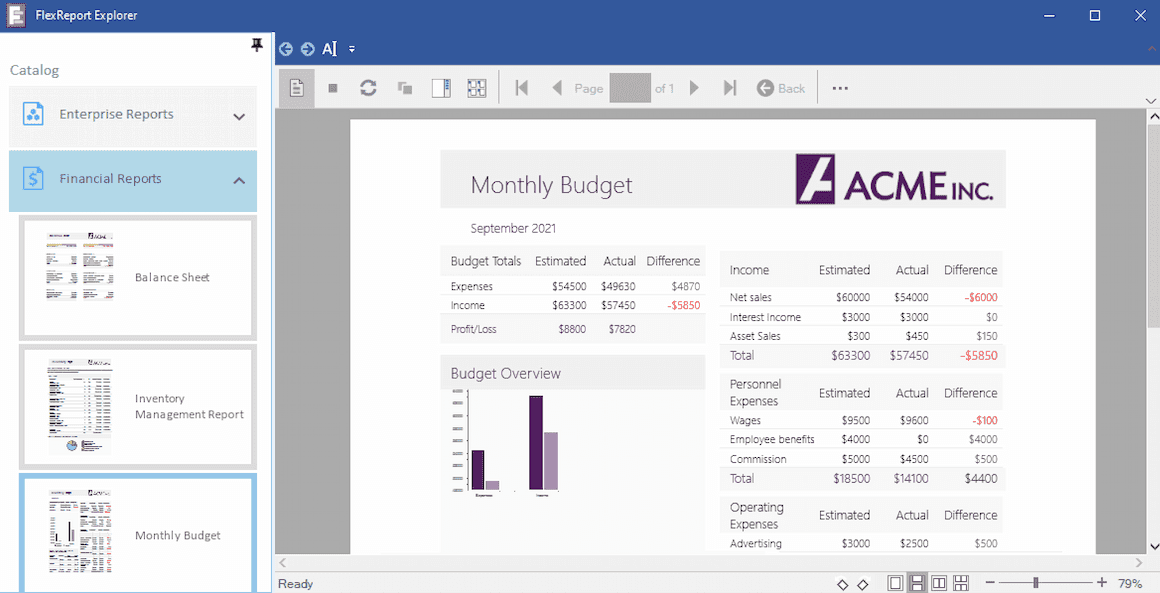
High-Performance Rendering
Utilizes DirectX and scalable vector graphics (SVG) rendering to deliver sharp text and graphics with speeds significantly faster than earlier engines, ensuring responsive report display.
Standalone Report Designer
The WYSIWYG FlexReport Designer allows developers and users to create and customize reports visually without coding, connecting to multiple data sources easily.
Broad Data Source Connectivity
Supports connections to OLEDB, ODBC, XML, SQL Server, SQLite, Oracle, OData, JSON, CSV, Salesforce, and more, enabling versatile data integration in reports.
Advanced Reporting Features
Includes grouping, aggregation, cross-tab reports, calculated fields, subreports, report parameters, and unique fields like barcodes and maps for complex reporting scenarios.
Embed and Preview with FlexViewer
The FlexViewer control enables in-app viewing of FlexReports, PDF documents, and SQL Server Reporting Services (SSRS) reports, offering features like printing, searching, zooming, and exporting.
Code-Free Runtime Customization
Report designers can embed scripts and expressions using VBScript at runtime for dynamic formatting and data-driven behaviors without rewriting application code.
Export to Multiple Formats
Supports exporting reports to DOCX, HTML, XLS, XLSX, RTF, PNG, JPEG, TIFF, PDF, and PDF/A, facilitating flexible distribution and archiving.
Cross-Platform Reporting Engine
FlexReport runs locally within WinForms, WPF, and WinUI apps and supports server-side generation in ASP.NET Core and Blazor, enabling flexible reporting across .NET platforms.
Integration and Deployment
Supports deployment on Azure and can be used within Web API services, enabling scalable, cloud-based report generation and consumption.
Product Compatibility
Review the details below to ensure this product is supported within your environment.
Component Type
- Windows WinUI Control
How to Buy
Available as part of ComponentOne WinUI & MAUI Edition, or ComponentOne Studio Enterprise.

- Included30+ WinUI & .NET MAUI Controls
- Not included120+ WinForms Controls
- Not included100+ WPF Controls
- Not included40+ ASP.NET MVC & Core Controls
- Not included40+ ASP.NET WebForms Controls
- Not included19+ Blazor Components
- Not includedData Services/Web API
- Not included80+ JavaScript Controls
- Enterprise Controls
- Not includedFinancialChart
- Not includedFlexSheet
- Not includedFlexPivot/OLAP
- Not includedFlexReport Designer
- Not includedReportViewer
- Additional Features
- Not includedIntelliSpell
- Not included2200+ Icons/Images

- Included30+ WinUI & .NET MAUI Controls
- Included120+ WinForms Controls
- Included100+ WPF Controls
- Included40+ ASP.NET MVC & Core Controls
- Included40+ ASP.NET WebForms Controls
- Included19+ Blazor Components
- IncludedData Services/Web API
- Included80+ JavaScript Controls
- Enterprise Controls
- IncludedFinancialChart
- IncludedFlexSheet
- IncludedFlexPivot/OLAP
- IncludedFlexReport Designer
- IncludedReportViewer
- Additional Features
- IncludedIntelliSpell
- Included2200+ Icons/Images
About MESCIUS
MESCIUS, formerly known as GrapeCity, is a leading developer-focused brand established in Japan, with a history spanning over 30 years. It is recognized for its extensive suite of software components, including reporting frameworks, spreadsheet libraries, and Japanese market-oriented input controls. Popular products such as ActiveReports, SPREAD, InputMan, and ComponentOne support both .NET and JavaScript ecosystems and are widely used in business-critical applications. MESCIUS offers distinctive advantages such as proven reliability, comprehensive Japanese localization, and strong technical support, making it a trusted choice for IT professionals and software developers building complex and localized systems.

As official and authorized distributors since 1996, ComponentSource supplies you with legitimate licenses directly from MESCIUS.