ComponentOne WinUI UI Input Controls
Versatile input components for building native WinUI applications.
- Includes AutoComplete TextBox, CheckBox, and TextBox controls.
- Supports native user experience with watermark and header features.
- Allows customization of input behavior.

Prices from:
| Available in | |
|---|---|
| ComponentOne WinUI and MAUI Edition | Loading |
| ComponentOne Studio Enterprise | Loading |
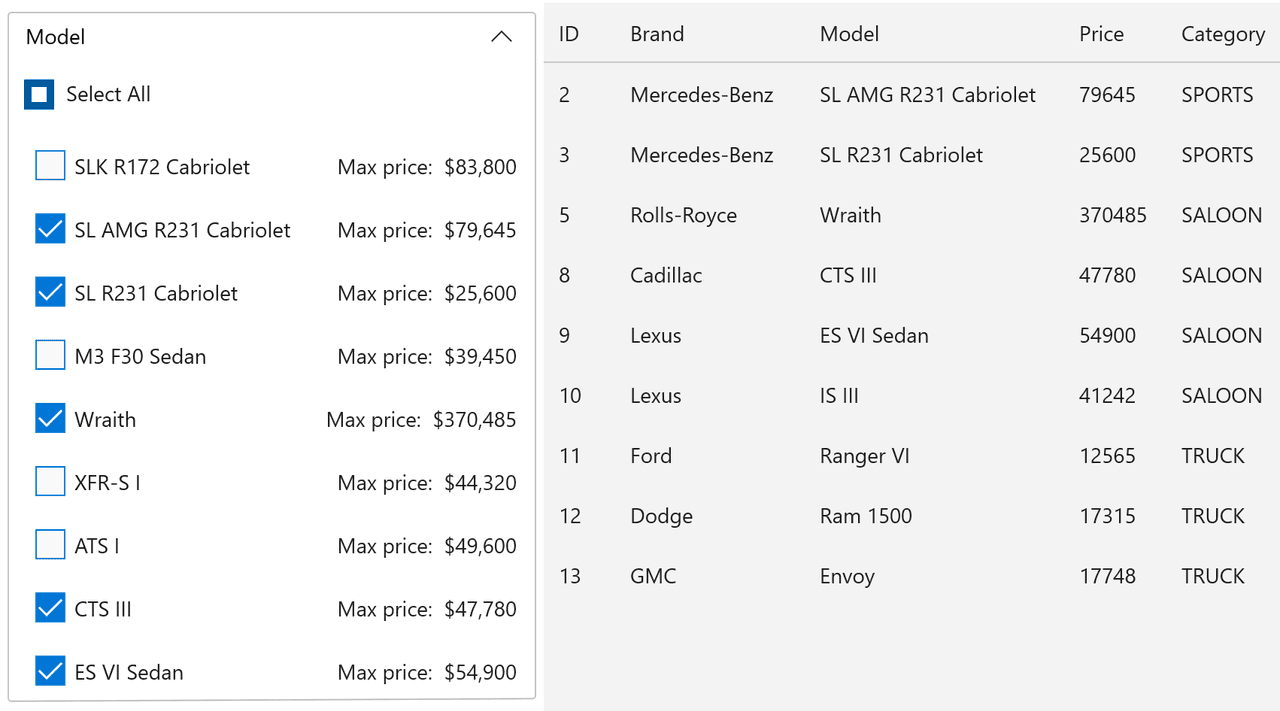
AutoComplete TextBox
Enables text input with autocomplete functionality. It supports watermark text and labeling for clearer user guidance.
CheckBox Control
Allows users to select or deselect options within the application interface. This control provides a familiar binary input mechanism.
TextBox Control
Facilitates plain text input and editing. Used to capture user data efficiently in a standard, editable text field within WinUI applications.
Watermark Support
The controls support watermark text displayed when inputs are empty, guiding users on expected input format or content until interaction occurs.
Header Support
Components feature header properties that display descriptive labels above input fields, enhancing usability by providing contextual information about the input purpose.
Delay Property
Configurable delay between keystrokes and text change events in AutoComplete TextBox to optimize event handling and reduce unnecessary processing, especially useful in filtering scenarios.
Native User Experience
The controls are designed to integrate naturally with WinUI applications, ensuring consistent look and feel along with responsive user interactions.
Data Binding Compatibility
Supports data binding to view models enabling synchronization of user input and application data, facilitating the development of interactive data-driven WinUI applications.
Product Compatibility
Review the details below to ensure this product is supported within your environment.
Component Type
- Windows WinUI Control
How to Buy
Available as part of ComponentOne WinUI & MAUI Edition, or ComponentOne Studio Enterprise.

- Included30+ WinUI & .NET MAUI Controls
- Not included120+ WinForms Controls
- Not included100+ WPF Controls
- Not included40+ ASP.NET MVC & Core Controls
- Not included40+ ASP.NET WebForms Controls
- Not included19+ Blazor Components
- Not includedData Services/Web API
- Not included80+ JavaScript Controls
- Enterprise Controls
- Not includedFinancialChart
- Not includedFlexSheet
- Not includedFlexPivot/OLAP
- Not includedFlexReport Designer
- Not includedReportViewer
- Additional Features
- Not includedIntelliSpell
- Not included2200+ Icons/Images

- Included30+ WinUI & .NET MAUI Controls
- Included120+ WinForms Controls
- Included100+ WPF Controls
- Included40+ ASP.NET MVC & Core Controls
- Included40+ ASP.NET WebForms Controls
- Included19+ Blazor Components
- IncludedData Services/Web API
- Included80+ JavaScript Controls
- Enterprise Controls
- IncludedFinancialChart
- IncludedFlexSheet
- IncludedFlexPivot/OLAP
- IncludedFlexReport Designer
- IncludedReportViewer
- Additional Features
- IncludedIntelliSpell
- Included2200+ Icons/Images
About MESCIUS
MESCIUS, formerly known as GrapeCity, is a leading developer-focused brand established in Japan, with a history spanning over 30 years. It is recognized for its extensive suite of software components, including reporting frameworks, spreadsheet libraries, and Japanese market-oriented input controls. Popular products such as ActiveReports, SPREAD, InputMan, and ComponentOne support both .NET and JavaScript ecosystems and are widely used in business-critical applications. MESCIUS offers distinctive advantages such as proven reliability, comprehensive Japanese localization, and strong technical support, making it a trusted choice for IT professionals and software developers building complex and localized systems.

As official and authorized distributors since 1996, ComponentSource supplies you with legitimate licenses directly from MESCIUS.