EDI Rules Creator Studio
Simplify HIPAA EDI validation and error handling with customizable rules.
- View and validate EDI data for error detection and correction.
- Create and customize EDI rules using RDPScripting EDI Language.
- Split, join, and interpret EDI files including acknowledgments.

Prices from:
| Available individually | Our Price |
|---|---|
| EDI Rules Creator Studio | Loading |
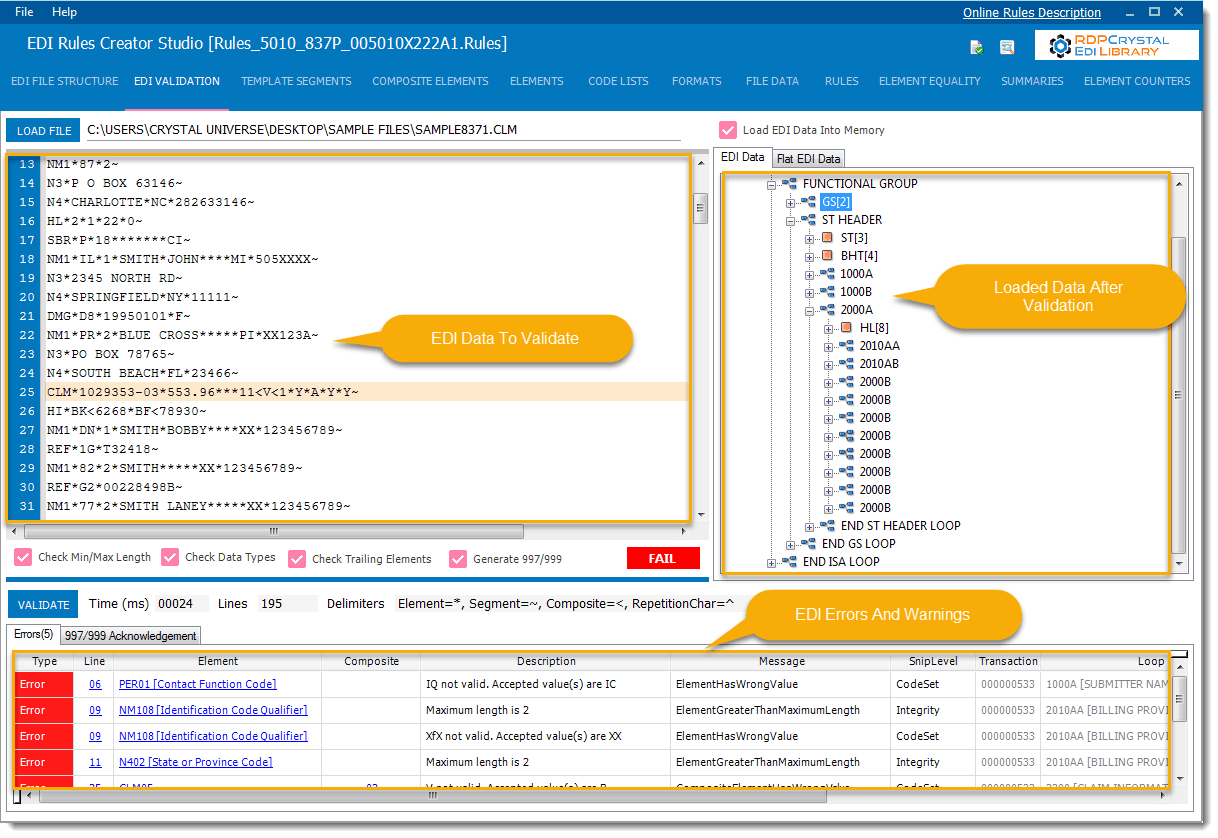
Error Detection and Navigation
Detect errors and warnings in EDI data and navigate directly to the exact line, segment, and composite element to facilitate quick issue resolution.
Custom EDI Rule Creation
Write your own EDI validation rules using the RDPScripting EDI Language, allowing tailored checking beyond preloaded standards.
Code List Configuration
Configure extensive code lists such as states, zip codes, CPT, ICD, and NDC codes to enforce strict data validation within EDI files.
Acknowledgment File Generation
Automatically generate fully compliant 997 and 999 acknowledgment files that correspond to detected errors in EDI transactions.
Acknowledgment File Interpretation
Interpret and analyze 5010 999 and 4010 997 acknowledgment files to assess transaction acceptance and processing status.
File Splitting and Joining
Split large EDI files by interchange, functional group, or transaction, and combine multiple X12 EDI files into one for efficient file handling.
Preloaded HIPAA Implementation Rules
Includes X12 4010 and 5010 HIPAA implementation rules preloaded, enabling immediate application to healthcare EDI files without manual rule setup.
Comprehensive Segment and Element Control
Add loops, segments, elements, and configure segment usages, accepted values, and formats using intuitive mouse actions with detailed control over validation rules.
Product Compatibility
Review the details below to ensure this product is supported within your environment.
Operating System
- Windows Desktop
- Windows Server
Windows Desktop Version
- Windows 10
- Windows 8.1
- Windows 8
- Windows 7
- Windows Vista
- Windows XP
Windows Server Version
- Windows Server 2019
- Windows Server 2016
- Windows Server 2012
- Windows Server 2008
- Windows Server 2003
About Crystal Universe Software
Crystal Universe Software develops reporting, data connectivity, and automation tools focused on SAP Crystal Reports environments. Based in the United States, it is known for products such as RDP Crystal and related utilities that support report scheduling, distribution, exporting, printing, and data integration tasks. The company concentrates on helping organizations expand the functionality of Crystal Reports through desktop, server, and web-based solutions that integrate with existing business systems. With experience in reporting workflows and enterprise reporting requirements, its products assist developers and IT teams in managing, automating, and delivering business reporting processes more effectively.
Learn more about Crystal Universe SoftwareExplore Crystal Universe Software products

As official and authorized distributors since 2015, ComponentSource supplies you with legitimate licenses directly from Crystal Universe Software.