Infragistics Ignite UI for Blazor Pivot Grid
Present and analyze complex data in interactive pivot tables.
- Summarizes large multidimensional data in cross-tabulated format.
- Supports drag-and-drop for pivot table layout customization.
- Includes Excel-style filtering for precise data refinement.

Prices from:
| Available in | |
|---|---|
| Infragistics Ignite UI | Loading |
| Infragistics Professional | Loading |
| Infragistics Ultimate | Loading |
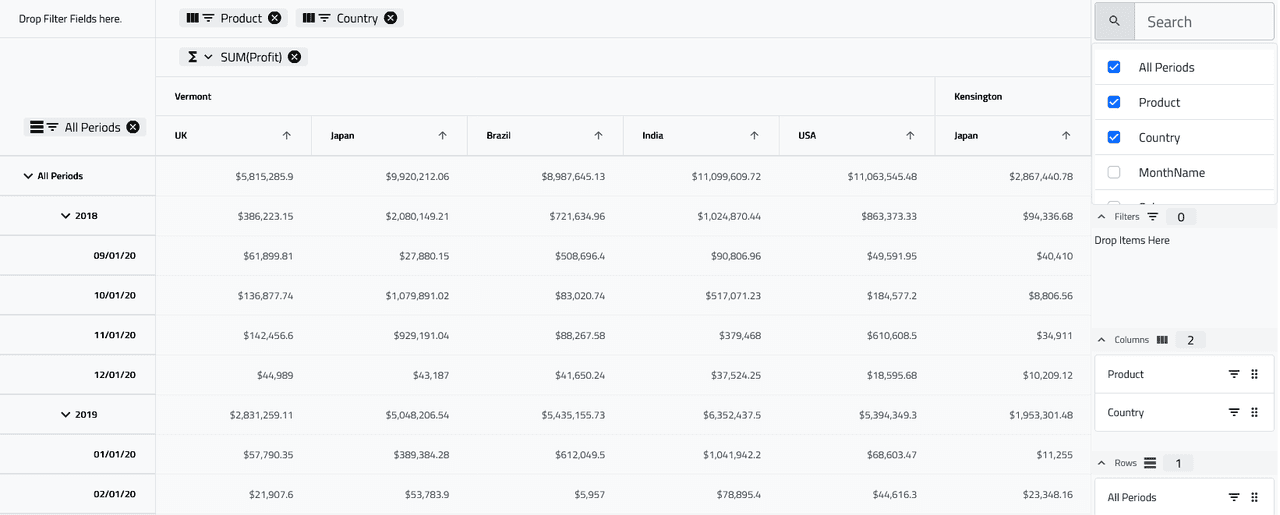
Multidimensional Data Summarization
Organizes data into pivot tables with configurable row and column dimensions for clear cross-tabular presentation and analysis.
Drag-and-Drop Layout Configuration
Allows end-users to reorder and move pivot dimensions and values dynamically through intuitive drag-and-drop chip controls.
Rich Aggregation Functions
Supports predefined aggregations such as sum, average, minimum, maximum, count, earliest, and latest applied on numeric, date, and time data fields.
Hierarchical Dimension Support
Enables expandable hierarchical groupings within dimensions for nested data exploration using child level configurations and expand/collapse functionality.
Excel-Style Filtering
Incorporates an Excel-like filtering UI with search, select/deselect options, and custom expressions for precise data filtering and filtering menu customization.
Dimension Sorting and Resizing
Built-in sorting on dimension chips with API control and resizing options allowing manual and auto-sizing for row and column dimensions.
Single-Selection Interaction
Supports single selection mode for row or column cells, applying selection across grouped cells when multiple dimensions create spanning groups.
Super Compact Mode
Offers a compact display mode to maximize the number of visible cells by minimizing spacing and sizing across the pivot grid and child components.
Auto-Generate Configuration
Automatically creates pivot dimensions and values from data fields, enabling quick setup with sensible defaults and user-driven enablement and reordering.
Customizable Pivot Keys
Allows modification of internal keys used for aggregations and hierarchy management to avoid conflicts with data containing default key names.
Product Compatibility
Review the details below to ensure this product is supported within your environment.
Component Type
- .NET
.NET Version
- .NET 10 LTS
- .NET 9 STS
- .NET 8 LTS
.NET Platform
- .NET Blazor / WebAssembly
IDE Support
- Visual Studio
About Infragistics
Infragistics, founded in 1989 and headquartered in Cranbury, New Jersey, has established itself as a global force in UI/UX development, serving software professionals in over 100 countries. It is widely recognized for its comprehensive libraries and frameworks supporting web, desktop, and mobile platforms, including solutions tailored for .NET, Angular, React, and other leading technologies. With offices spanning Europe, Asia, and South America, Infragistics delivers components that enable efficient application development and rich user experiences. Its commitment to innovation and customer satisfaction positions it as a trusted partner for developers and organizations worldwide seeking quality and flexibility in their digital projects.

As official and authorized distributors since 1996, ComponentSource supplies you with legitimate licenses directly from Infragistics.