Infragistics Ignite UI for React Spreadsheet
Excel-like spreadsheet component for advanced data operations.
- Offers a familiar Excel-like interface with full editing capabilities.
- Supports complex data visualizations and formula calculations.
- Enables seamless Excel and CSV file import and export.

Prices from:
| Available in | |
|---|---|
| Infragistics Ignite UI for React | Loading |
| Infragistics Ignite UI | Loading |
| Infragistics Professional | Loading |
| Infragistics Ultimate | Loading |
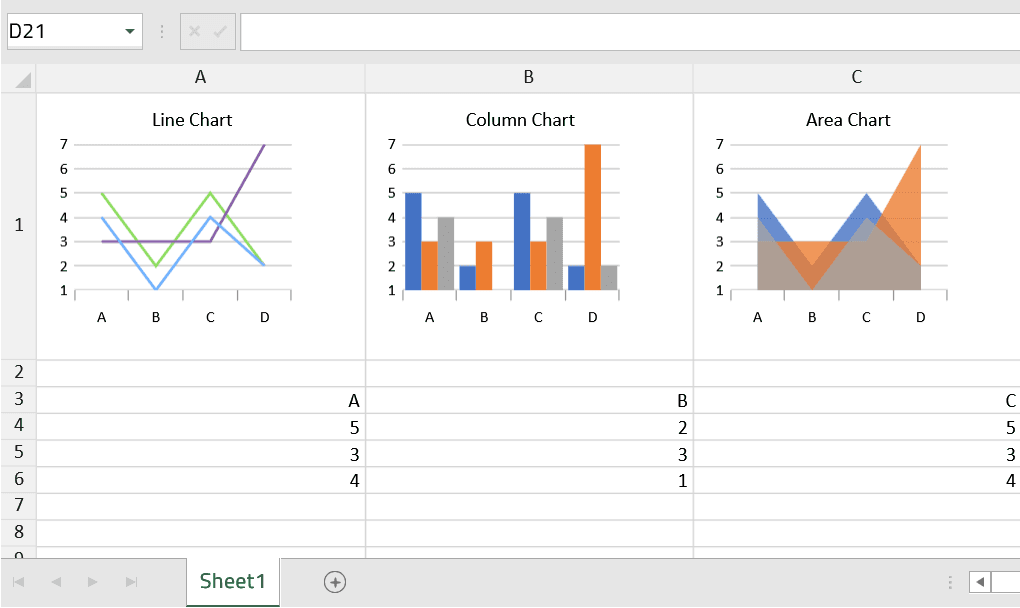
Excel-Like Interface
Provides a user-friendly, familiar interface that supports cell editing, selection, conditional formatting, and clipboard operations such as copy, paste, and cut, allowing users to work efficiently without needing additional training.
Formula and Calculation Support
Includes a powerful calculation engine capable of processing complex formulas, enabling dynamic data analysis and real-time results within the spreadsheet application.
Flexible Data Presentation
Allows users to organize data in tabular formats with support for multiple worksheets, cell styling, sorting, filtering, and resizing of rows and columns to tailor the display to specific needs.
Excel and CSV Import/Export
Enables seamless loading and saving of Excel (.xlsx) and CSV files, preserving data structure and formatting to facilitate data exchange between applications and platforms.
High Performance and Scalability
Optimized for smooth operation on all modern browsers, it handles large and complex spreadsheet models efficiently ensuring responsive user experiences.
Extensive API and Customization Options
Offers comprehensive APIs to customize features on-demand, including enabling or disabling functionalities, applying themes, configuring keyboard shortcuts, and tailoring visibility and formatting to user preferences.
Secure Data Processing
Processes spreadsheet data securely within the application environment, mitigating risks associated with external dependencies or data leaks.
Product Compatibility
Review the details below to ensure this product is supported within your environment.
Component Type
- JavaScript
JavaScript Platform
- React
- Vanilla JavaScript
About Infragistics
Infragistics, founded in 1989 and headquartered in Cranbury, New Jersey, has established itself as a global force in UI/UX development, serving software professionals in over 100 countries. It is widely recognized for its comprehensive libraries and frameworks supporting web, desktop, and mobile platforms, including solutions tailored for .NET, Angular, React, and other leading technologies. With offices spanning Europe, Asia, and South America, Infragistics delivers components that enable efficient application development and rich user experiences. Its commitment to innovation and customer satisfaction positions it as a trusted partner for developers and organizations worldwide seeking quality and flexibility in their digital projects.

As official and authorized distributors since 1996, ComponentSource supplies you with legitimate licenses directly from Infragistics.