Infragistics Ultimate UI for ASP.NET Web Forms Web Upload
Upload single or multiple files with detailed progress tracking.
- Supports large file uploads exceeding default size limits.
- Enables simultaneous multiple file uploads with individual progress bars.
- Offers extensive client-side and server-side configuration options.

Prices from:
| Available in | |
|---|---|
| Infragistics Ultimate UI for ASP.NET Web Forms | Loading |
| Infragistics Ultimate | Loading |
Large File Support
Allows uploading files larger than the default 10 MB limit, constrained only by server capabilities, making it suitable for handling sizeable data transfers.
Single and Multiple Upload Modes
Supports both single file selection and multiple file uploads concurrently, enabling users to add files one at a time or select several files together.
Asynchronous Background Uploads
Uses an HTML iframe element to upload files in the background, maintaining smooth user interaction and page responsiveness during upload operations.
Progress Monitoring
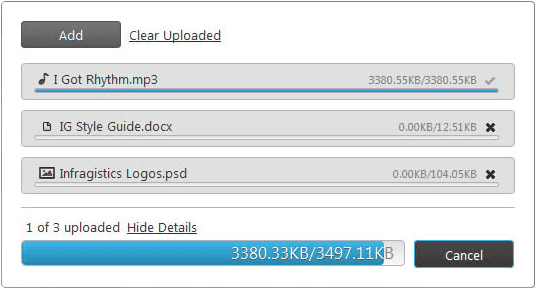
Displays individual progress bars for each file being uploaded, including information on file name, total size, and uploaded size to keep users informed.
Upload Cancellation
Provides cancel buttons allowing users or developers to abort individual file uploads or the entire batch, with graceful UI updates reflecting changes.
File Type and Count Restrictions
Configurable to restrict allowed file extensions, maximum number of files per upload session, and number of concurrent uploads, ensuring compliance with application policies.
Client-Side and Server-Side Event Handling
Exposes rich events on both client and server sides, enabling developers to customize behavior, trigger validations, and handle errors effectively.
Styling and Theme Support
Offers extensive styling options including integration with jQuery UI’s ThemeRoller, allowing developers to customize the control’s appearance to match their applications.
Integration with ASP.NET Frameworks
Provides server-side wrappers compatible with ASP.NET Web Forms and MVC, facilitating easy incorporation into various .NET web application architectures.
Product Compatibility
Review the details below to ensure this product is supported within your environment.
Component Type
- .NET
.NET Version
- .NET 4.8 or earlier
.NET Platform
- ASP.NET
IDE Support
- Visual Studio
About Infragistics
Infragistics, founded in 1989 and headquartered in Cranbury, New Jersey, has established itself as a global force in UI/UX development, serving software professionals in over 100 countries. It is widely recognized for its comprehensive libraries and frameworks supporting web, desktop, and mobile platforms, including solutions tailored for .NET, Angular, React, and other leading technologies. With offices spanning Europe, Asia, and South America, Infragistics delivers components that enable efficient application development and rich user experiences. Its commitment to innovation and customer satisfaction positions it as a trusted partner for developers and organizations worldwide seeking quality and flexibility in their digital projects.

As official and authorized distributors since 1996, ComponentSource supplies you with legitimate licenses directly from Infragistics.