Infragistics Ultimate UI for Windows Forms Flat Data Source
Bind non-OLAP data seamlessly to WinPivotGrid controls.
- Enables display of flat, non-OLAP data collections in pivot grids.
- Supports data binding from IEnumerable .NET collections.
- Includes adapters for SQL Server and OLEDB data sources.

Prices from:
| Available in | |
|---|---|
| Infragistics Ultimate UI for Windows Forms | Loading |
| Infragistics Professional | Loading |
| Infragistics Ultimate | Loading |
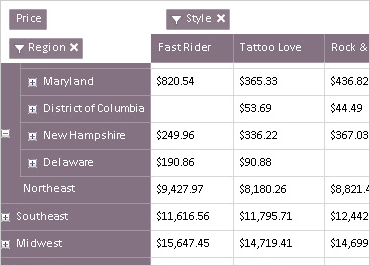
FlatDataSource Class
Allows binding of non-OLAP data to WinPivotGrid by consuming data from any IEnumerable implementation, making presentation of arbitrary object collections straight forward.
Database Adapters
Includes ancillary data adapter classes within Infragistics.Olap.FlatData.Adapters namespace that enable connection and querying of databases using SQL Server or OLEDB.
SQL Server Adapter
Provides facilities to initialize FlatDataSource instances using data obtained from SQL Server databases, streamlining integration with enterprise data stores.
OLEDB Adapter
Enables FlatDataSource to consume data from Microsoft Access and other OLEDB-supported databases, supporting flexible data source options.
High Performance Data Loading
Loads data on demand, optimizing performance when handling millions of data rows in Windows Forms applications to ensure responsiveness.
Simple Integration
Integrates with WinPivotGrid control by configuring source data, rows, columns, and measures axes via settings during FlatDataSource initialization.
Programmable Data Queries
Supports SQL query strings for precise data extraction and aggregation from underlying databases to build complex data views for pivot analysis.
Comprehensive Documentation and Samples
Includes code examples demonstrating how to define connection strings, construct SQL joins, and bind data sources to pivot grids for practical usage scenarios.
Product Compatibility
Review the details below to ensure this product is supported within your environment.
Component Type
- .NET
.NET Version
- .NET 10 LTS
- .NET 9 STS
- .NET 8 LTS
- .NET 4.8 or earlier
.NET Platform
- .NET Assembly
- .NET WinForms
IDE Support
- Visual Studio
About Infragistics
Infragistics, founded in 1989 and headquartered in Cranbury, New Jersey, has established itself as a global force in UI/UX development, serving software professionals in over 100 countries. It is widely recognized for its comprehensive libraries and frameworks supporting web, desktop, and mobile platforms, including solutions tailored for .NET, Angular, React, and other leading technologies. With offices spanning Europe, Asia, and South America, Infragistics delivers components that enable efficient application development and rich user experiences. Its commitment to innovation and customer satisfaction positions it as a trusted partner for developers and organizations worldwide seeking quality and flexibility in their digital projects.

As official and authorized distributors since 1996, ComponentSource supplies you with legitimate licenses directly from Infragistics.