Infragistics Ultimate UI for Windows Forms Grid
Advanced data grid with Excel-like features for Windows Forms applications.
- Supports hierarchical and virtual data for high performance.
- Includes touch input and gesture support for modern interfaces.
- Offers Microsoft Excel operations and custom layout designs.

Prices from:
| Available in | |
|---|---|
| Infragistics Ultimate UI for Windows Forms | Loading |
| Infragistics Professional | Loading |
| Infragistics Ultimate | Loading |
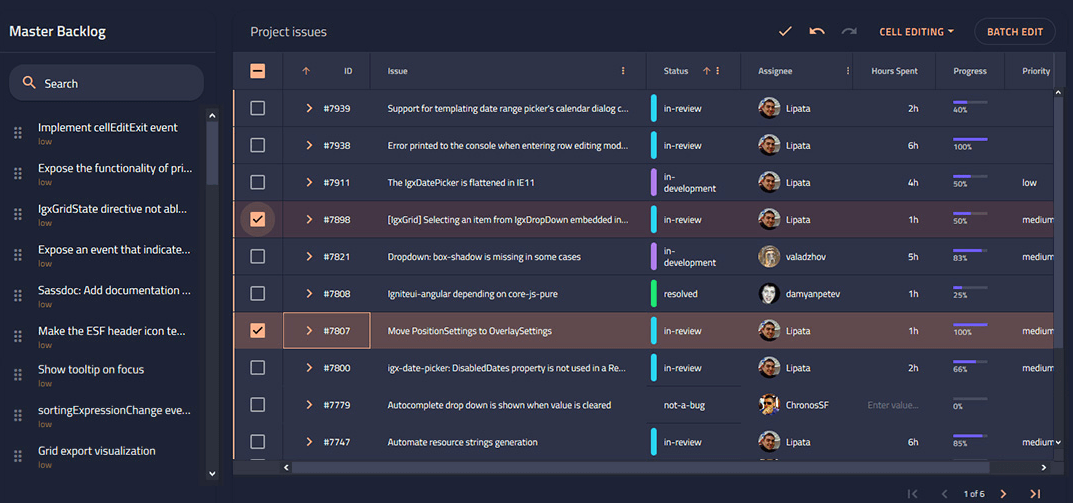
Hierarchical Data Display
Enables the presentation of complex, hierarchical data structures in a flexible grid format, allowing users to view and interact with nested data sets within Windows Forms applications.
Microsoft Excel-Like Features
Includes functionalities such as exporting to Excel, copying and pasting with Excel, supporting Excel-like formulas via WinCalcManager, and features like freeze panes, cell merging, conditional formatting, and multi-column sorting.
Touch and Gesture Support
Optimized for touch-enabled devices with support for resizing UI elements, vertical and multidirectional panning, flicking, tap, double tap, tap and drag, and tap and hold gestures to enhance user experience.
High-Speed Data Entry
Facilitates fast and accurate data input using templates with custom editors matched to column data types, along with real-time validation and the ability to add or delete rows within the grid.
Custom Layouts and Views
Provides unlimited display configurations with CardView and Row Layout designers, including support for split rows and column regions for tailored user interfaces.
Virtual Data Handling
Supports virtualized data loading to display an unlimited number of rows and columns efficiently, leveraging WinDataSource to load data on demand and improve performance.
Data Binding Support
Simplifies the integration of various data sources by supporting data binding, facilitating seamless connection between grid data and underlying data models or databases.
Advanced Filtering and Sorting
Offers built-in Excel-like column filtering dialogs, single and multi-column sorting, enabling users to analyze and view data subsets according to specific criteria.
Real-Time Validations
Incorporates validations directly within grid cells to ensure data integrity as users input or modify data, improving accuracy and reliability of information captured.
Product Compatibility
Review the details below to ensure this product is supported within your environment.
Component Type
- .NET
.NET Version
- .NET 10 LTS
- .NET 9 STS
- .NET 8 LTS
- .NET 4.8 or earlier
.NET Platform
- .NET Assembly
- .NET WinForms
IDE Support
- Visual Studio
About Infragistics
Infragistics, founded in 1989 and headquartered in Cranbury, New Jersey, has established itself as a global force in UI/UX development, serving software professionals in over 100 countries. It is widely recognized for its comprehensive libraries and frameworks supporting web, desktop, and mobile platforms, including solutions tailored for .NET, Angular, React, and other leading technologies. With offices spanning Europe, Asia, and South America, Infragistics delivers components that enable efficient application development and rich user experiences. Its commitment to innovation and customer satisfaction positions it as a trusted partner for developers and organizations worldwide seeking quality and flexibility in their digital projects.

As official and authorized distributors since 1996, ComponentSource supplies you with legitimate licenses directly from Infragistics.