Infragistics Ultimate UI for WPF Gauges
Create and customize radial gauges for interactive WPF dashboards.
- Fully customizable radial scales with adjustable sweep and ticks.
- Configurable needle shapes, colors, and sizes.
- Integrated visual configurator for code-free design and data binding.

Prices from:
| Available in | |
|---|---|
| Infragistics Ultimate UI for WPF | Loading |
| Infragistics Professional | Loading |
| Infragistics Ultimate | Loading |
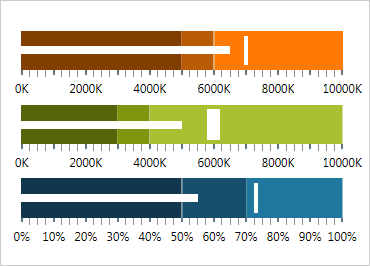
Fully Configurable Radial Scale
Adjust start and end positions, major and minor ticks, labels, color ranges, and sweep directions to create custom scales. Construct full-circle or partial gauges with degrees tailored to your application needs.
Customizable Needle Design
Choose from multiple built-in shapes such as needle, triangle, trapezoid, and variations with bulb attachments. Customize needle color, length, base, and cap to match your design and data presentation style.
Visual Backing Configuration
Modify background colors, shape contours, corner radius, and oversweep options to control the gauge's appearance around its edges, creating polished visuals that blend seamlessly in your application.
Motion Framework Animation Support
Enable smooth animated transitions between control states including needle moves, scale changes, and color updates. Control animation speed to enhance interactivity and user experience.
Gauge Configurator Tool
Use an intuitive WYSIWYG configurator accessible from the XAML editor to visually style and configure gauges. It provides property editing, style galleries, and immediate visual feedback for faster development.
Two-Way XAML Parsing
The configurator can read manual changes in XAML and sync them with its interface, allowing seamless round-trip editing between code and visual designer without loss of settings.
Range and Color Customization
Define multiple scale ranges with individual brush, outline, thickness, and start/end values. Select and apply changes to multiple ranges simultaneously to maintain consistent styling.
Data Binding Simplified
Bind gauges dynamically to your data sources using the binding editor. It supports binding modes, converters, and formatting to display real-time values accurately in your dashboard.
Resource Integration
Easily apply project or page-level style resources through the resource picker, ensuring your gauges adhere to overall application themes and design standards.
Product Compatibility
Review the details below to ensure this product is supported within your environment.
Component Type
- .NET
.NET Version
- .NET 10 LTS
- .NET 9 STS
- .NET 8 LTS
- .NET 4.8 or earlier
.NET Platform
- .NET Assembly
- .NET WPF
IDE Support
- Visual Studio
About Infragistics
Infragistics, founded in 1989 and headquartered in Cranbury, New Jersey, has established itself as a global force in UI/UX development, serving software professionals in over 100 countries. It is widely recognized for its comprehensive libraries and frameworks supporting web, desktop, and mobile platforms, including solutions tailored for .NET, Angular, React, and other leading technologies. With offices spanning Europe, Asia, and South America, Infragistics delivers components that enable efficient application development and rich user experiences. Its commitment to innovation and customer satisfaction positions it as a trusted partner for developers and organizations worldwide seeking quality and flexibility in their digital projects.

As official and authorized distributors since 1996, ComponentSource supplies you with legitimate licenses directly from Infragistics.