Infragistics Ultimate UI for WPF Org Chart
Create high-performance, customizable WPF organization charts visually.
- Visualize complex company or departmental hierarchies easily.
- Supports data binding to large datasets with over 5,000 entities.
- Offers multiple layouts and interactive features for enhanced navigation.

Prices from:
| Available in | |
|---|---|
| Infragistics Ultimate UI for WPF | Loading |
| Infragistics Professional | Loading |
| Infragistics Ultimate | Loading |
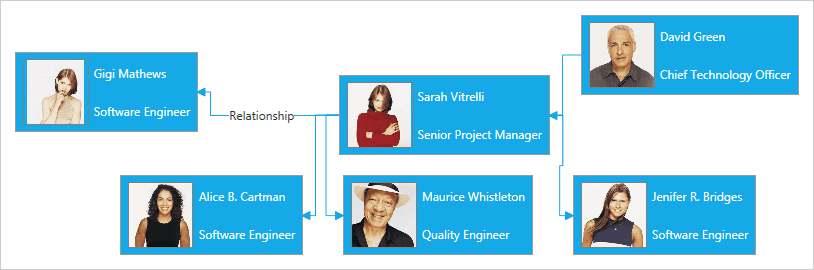
Data Binding to Large Hierarchies
The component efficiently binds and renders organization charts for datasets exceeding 5,000 entities, ensuring smooth performance even with extensive hierarchical information.
Multiple Layouts
Customize child node arrangements using staggered or orthogonal layouts to best represent organizational structures visually and suit user preferences.
Expand and Collapse Children Nodes
Users can interactively expand or collapse child nodes to focus on relevant portions of the hierarchy, reducing visual clutter in complex charts.
Search Support
The chart supports user-initiated searches that highlight connections between two employees or nodes, helping users trace relationships quickly within the organization.
Line Cap and Line Styling
Customize connection lines between nodes with adjustable size, thickness, visual effects, and diverse line start and end cap styles for enhanced clarity and style.
Custom Expansion Indicators
Modify the visuals of expansion indicators at various hierarchy levels to align with application design guidelines or to improve usability.
Maximum Depth Control
Control the number of hierarchy levels displayed by adjusting a MaxDepth slider, allowing users to focus on specific layers of the organizational structure.
High Performance Rendering
Optimized for real-time interaction and navigation, the component delivers quick and efficient rendering even with complex and large organizational charts.
Product Compatibility
Review the details below to ensure this product is supported within your environment.
Component Type
- .NET
.NET Version
- .NET 10 LTS
- .NET 9 STS
- .NET 8 LTS
- .NET 4.8 or earlier
.NET Platform
- .NET Assembly
- .NET WPF
IDE Support
- Visual Studio
About Infragistics
Infragistics, founded in 1989 and headquartered in Cranbury, New Jersey, has established itself as a global force in UI/UX development, serving software professionals in over 100 countries. It is widely recognized for its comprehensive libraries and frameworks supporting web, desktop, and mobile platforms, including solutions tailored for .NET, Angular, React, and other leading technologies. With offices spanning Europe, Asia, and South America, Infragistics delivers components that enable efficient application development and rich user experiences. Its commitment to innovation and customer satisfaction positions it as a trusted partner for developers and organizations worldwide seeking quality and flexibility in their digital projects.

As official and authorized distributors since 1996, ComponentSource supplies you with legitimate licenses directly from Infragistics.