Infragistics Ultimate UI for WPF Syntax Editor
Developer-focused syntax highlighting and editing for WPF apps.
- Supports multiple predefined programming languages for accurate code colorization.
- Highlights syntax errors with visual cues to improve code quality.
- Integrates seamlessly with WPF projects for rich text editing experiences.

Prices from:
| Available in | |
|---|---|
| Infragistics Ultimate UI for WPF | Loading |
| Infragistics Professional | Loading |
| Infragistics Ultimate | Loading |
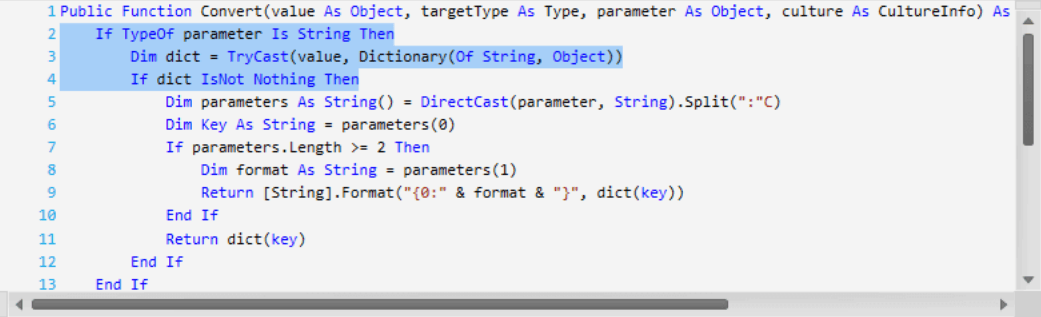
Syntax Highlighting
The Syntax Editor offers visual colorization of code based on the associated programming language set in the TextDocument property. It highlights comments, keywords, and other code elements distinctly for enhanced readability.
Error Reporting
Detects and visually marks code syntax errors with highlights and squiggly underlines, helping developers quickly identify and resolve issues within their code directly in the editor.
Multiple Language Support
Includes predefined language support for Plain Text, C#, Visual Basic, and T-SQL, enabling accurate parsing and colorization across common programming scenarios.
TextDocument Integration
Utilizes the TextDocument model to manage the text content and language properties, enabling seamless interaction and extensibility within WPF applications.
Customization Capabilities
Allows customization of syntax highlighting styles and colors for different language elements, enabling developers to tailor the editor’s appearance and behavior to their preferences.
Rich Editing Features
Supports standard text editing capabilities alongside syntax-aware functionalities, facilitating efficient code writing and modification within WPF applications.
Visual Studio Inspired Experience
Delivers a familiar code editing interface similar to professional development environments, improving user comfort and productivity when working within business and developer applications.
Extensible Framework
Built with extensibility in mind, allowing developers to add support for additional languages or integrate custom parsing and syntax rules to suit specific project needs.
Product Compatibility
Review the details below to ensure this product is supported within your environment.
Component Type
- .NET
.NET Version
- .NET 10 LTS
- .NET 9 STS
- .NET 8 LTS
- .NET 4.8 or earlier
.NET Platform
- .NET Assembly
- .NET WPF
IDE Support
- Visual Studio
About Infragistics
Infragistics, founded in 1989 and headquartered in Cranbury, New Jersey, has established itself as a global force in UI/UX development, serving software professionals in over 100 countries. It is widely recognized for its comprehensive libraries and frameworks supporting web, desktop, and mobile platforms, including solutions tailored for .NET, Angular, React, and other leading technologies. With offices spanning Europe, Asia, and South America, Infragistics delivers components that enable efficient application development and rich user experiences. Its commitment to innovation and customer satisfaction positions it as a trusted partner for developers and organizations worldwide seeking quality and flexibility in their digital projects.

As official and authorized distributors since 1996, ComponentSource supplies you with legitimate licenses directly from Infragistics.