Neodynamic ZPLServer
Convert Zebra label commands into previews, images, and PDF files.
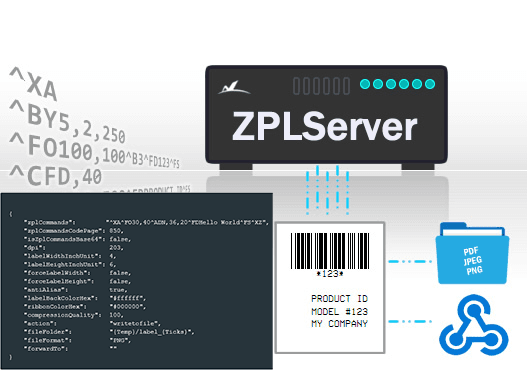
- Render raw Zebra Programming Language (ZPL) commands as images or PDF.
- Receive label jobs through web requests or raw network sockets.
- Save rendered labels to disk or forward them to another service.
Prices from:
| Available individually | Our Price |
|---|---|
| Neodynamic ZPLServer | Loading |
Background Service Deployment
Run ZPLServer as a background service on Windows, macOS, or Linux. The service can start at boot and accept label jobs without a user signing in. Use the browser-based settings page to configure default rendering options and choose how to handle output.
Web Request Integration
Submit ZPL commands in a JSON payload to the /render endpoint using HTTP POST. Set the output format and rendering options for each job. The endpoint returns the rendered output and can package multi-label jobs as a ZIP archive. It also returns the output when the job saves it to disk or forwards it to a webhook.
Raw Socket and Virtual Printer Input
Send raw ZPL commands or a JSON payload over a Transmission Control Protocol (TCP) socket. Applications that already send ZPL to a network label printer can use a virtual printer queue to route those jobs to ZPLServer for rendering.
Label Conversion and Preview
Convert raw label commands to PNG, JPG, or PCX images or to PDF documents. Use the rendered output to check label layouts, text placement, and barcode positioning before printing. The server also supports printer-oriented formats, including HP Printer Command Language (PCL).
Font and Barcode Rendering
Reproduce built-in and resident ZPL fonts when rendering label text, with support for custom Zebra Intellifont fonts. Render a range of linear, postal, composite, stacked, and two-dimensional barcodes to review how they fit alongside other elements on the label.
Label Dimensions, Resolution, and Encoding
Set the label width, height, and resolution in dots per inch. Use service-wide defaults or override them in a request for a specific label job. Choose the input code page to match the character encoding used by the sending application.
Ribbon and Background Color Simulation
Set the simulated ribbon color and label background color when rendering to PNG, JPG, or PDF. Use these settings to preview how a design will look on colored label stock. PCX output also supports monochrome rendering.
File Output and Webhook Forwarding
Save rendered labels to a designated folder for archiving or processing by another application. You can also forward the rendered file to a webhook so a receiving service can attach it to an order record or process it automatically.
Product Compatibility
Review the details below to ensure this product is supported within your environment.
Operating System
- Windows Desktop
- Windows Server
- macOS
- Linux
Linux Variant
- RedHat
- Ubuntu
Windows Desktop Version
- Windows 11
- Windows 10
Windows Server Version
- Windows Server 2025
- Windows Server 2022
- Windows Server 2019
- Windows Server 2016
About Neodynamic
Neodynamic, established in 2004, focuses on designing and developing components for barcode generation, labeling, printing, and imaging. Based on deep expertise in .NET, ASP.NET, SSRS, PHP, and web technologies, it supports developers worldwide with libraries and SDKs for a wide array of barcode standards and printing solutions. Its components are trusted by thousands of customers in more than 100 countries, including prominent companies, government agencies, and educational institutions. By choosing Neodynamic, IT professionals benefit from advanced, developer-centric features and direct support from knowledgeable staff.

As official and authorized distributors since 2005, ComponentSource supplies you with legitimate licenses directly from Neodynamic.