ResizeKit2.NET
Automatically resize forms, controls, and fonts as windows change size.
- Keeps controls and fonts proportional when forms are resized.
- Adds configurable limits, exclusions, and resize behavior with minimal code.
- Supports custom handling for controls needing manual resize logic.

Prices from:
| Available individually | Our Price |
|---|---|
| ResizeKit2.NET | Loading |
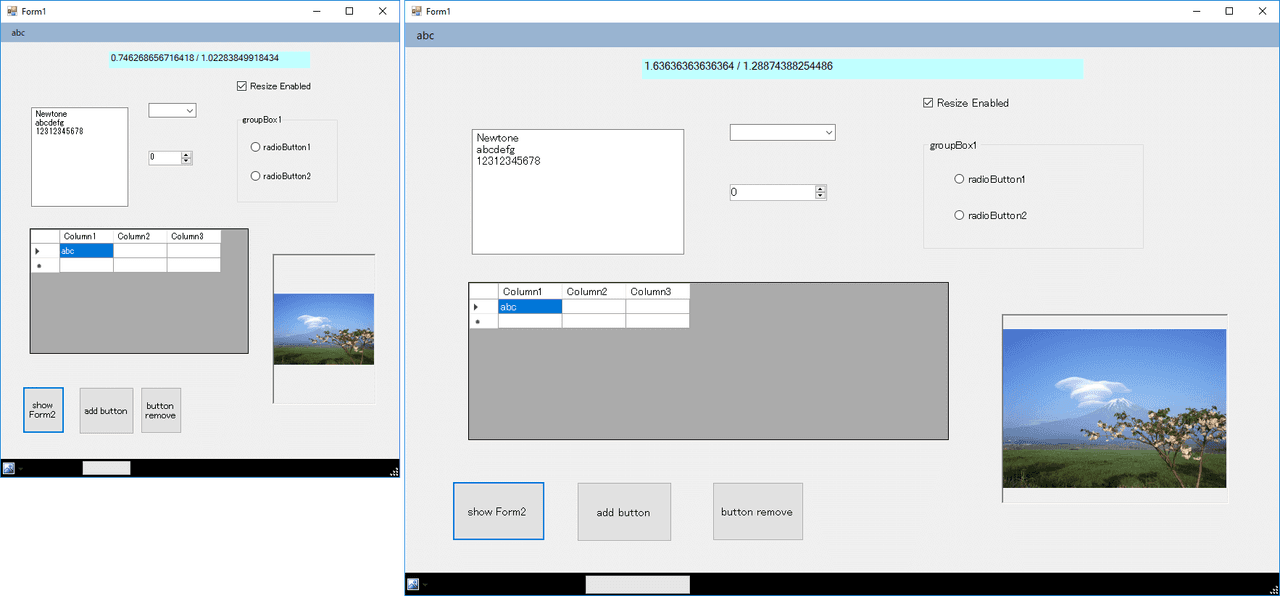
Automatic Form Layout Adjustment
Monitors changes to form dimensions and resizes interface elements to match. This helps applications keep controls visible and proportionate instead of leaving parts of the interface clipped or pushed outside the form when the window size changes.
Control And Font Resizing
Adjusts both control dimensions and font sizes so the interface scales together as a unit. This preserves the relationship between labels, inputs, buttons, and other elements, which helps maintain readability and layout balance during resizing.
Design-Time Component Integration
Works as a component added to a form during design time, allowing developers to introduce resizing behavior directly in the form designer. This makes it practical for both new projects and existing applications that need responsive form behavior.
Minimal Code Implementation
Provides default behavior that can be used immediately after placing the component on a form. In many cases, developers can add automatic resizing without rewriting the form layout logic or making extensive changes to existing application code.
Response To Runtime Size Changes
Handles user-driven form resizing during execution and can also react when display changes force the form to resize. This helps maintain a consistent interface even when the runtime environment affects the application window dimensions.
Configurable Resize Rules
Includes settings that control how resizing is applied, such as whether fonts should scale and what maximum or minimum form dimensions are allowed. These options help developers tailor behavior to the needs of each form.
Selective Control Exclusion
Lets developers exclude selected controls from automatic resizing. This is useful when certain interface elements need to remain fixed in size or position, or when a specific control behaves better with separate layout handling.
Custom Resize Event Handling
Supports event-based customization for situations where automatic resizing is not sufficient. Developers can use the resize event flow to define dimensions explicitly for controls or fonts that require manual updates during form size changes.
Support For Standard And Specialized Controls
Resizes most controls whose position and size properties are accessible, and it can also accommodate some specialized or third-party controls through custom handling. This broadens its usefulness across a wide range of Windows application interfaces.
Product Compatibility
Review the details below to ensure this product is supported within your environment.
Component Type
- .NET
.NET Version
- .NET 10 LTS
- .NET 9 STS
- .NET 8 LTS
- .NET 7 STS
- .NET 6 LTS
- .NET 5 / .NET Core 3.1
- .NET 4.8 or earlier
.NET Platform
- .NET WinForms
IDE Support
- Visual Studio
About Newtone
Newtone Corporation, founded in Japan in 1989, develops custom software solutions and software development components for individuals and corporations worldwide. Alongside creating and distributing its own products, it localizes and distributes selected software products for the Japanese market, drawing on long-standing experience in developer tools and application-focused software technologies.

As official and authorized distributors since 2003, ComponentSource supplies you with legitimate licenses directly from Newtone.