SharePoint Collection Column
Manage and calculate related items within a single SharePoint column.
- Display and edit related list items in one SharePoint list column.
- Perform calculations like sum, average, and custom formulas on related items.
- Bulk manage associated items without navigating to the source list.
Prices from:
| Available individually | Our Price |
|---|---|
| SharePoint Collection Column | Loading |
Create Collection Columns
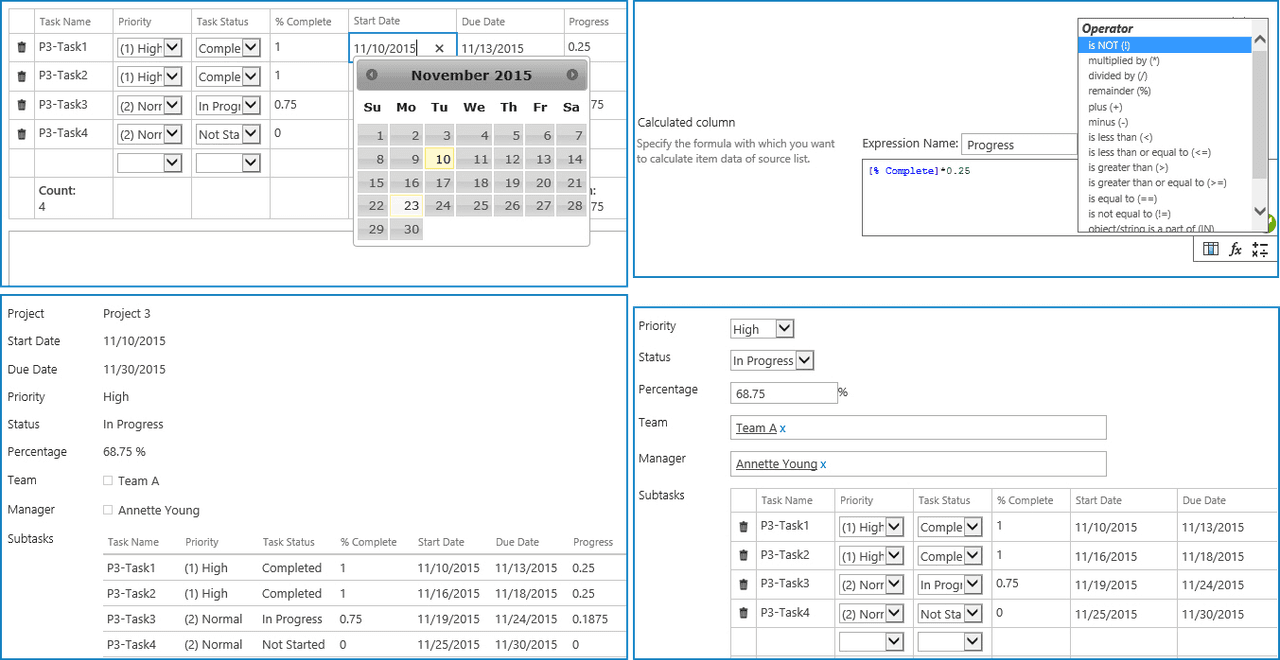
Define columns in a SharePoint list that pull data from related source lists, allowing selected columns to be editable or view-only within the current list to maintain data consistency and control.
View and Manage Related Items
Users can create, edit, or delete related items within the list form itself, with edits saved back to the source list, streamlining data management without leaving the current context.
Calculated Columns and Formulas
Design and apply custom formulas using columns from the source list with support for advanced functions and operators, enabling complex calculations and dynamic data expression inside the column.
Total Settings and Aggregations
Display aggregate values such as sum, average, minimum, maximum, and count of related columns directly in the form, with options to save these totals back to the current list for reporting and analysis.
Support for Multiple Column Types
Editable related columns support various SharePoint column types including single line text, number, currency, choice, and date/time, ensuring flexibility in handling diverse data.
User-Friendly Interface
Provides intuitive forms with editable and read-only columns arranged clearly, facilitating straightforward manipulation of related list items from a single view.
Real-Time Data Synchronization
Any modifications made to related items are instantaneously saved and reflected in the source list, maintaining data accuracy and synchronization across lists.
Product Compatibility
Review the details below to ensure this product is supported within your environment.
Host Application
- SharePoint
About BoostSolutions
BoostSolutions, founded in 2007, develops software components and add-ons for Microsoft SharePoint environments. Its product portfolio focuses on extending SharePoint functionality through tools for data management, workflow customization, navigation, permissions, and collaboration. Serving customers in more than 90 countries, BoostSolutions provides configurable solutions for organizations seeking additional capabilities for SharePoint deployment and administration. The company focuses on creating tools designed to integrate with SharePoint environments across business and enterprise applications.
Learn more about BoostSolutionsExplore BoostSolutions products

As official and authorized distributors since 2009, ComponentSource supplies you with legitimate licenses directly from BoostSolutions.