Studio Controls .NET Core
Build feature-rich Windows interfaces with flexible .NET Core controls.
- Create scheduling, appointment and resource allocation interfaces for Windows applications.
- Present data using gauges, meters, dials and digital displays.
- Add calendars, navigation, tabs and interactive interface elements.

Prices from:
| Available individually | Our Price |
|---|---|
| Studio Controls .NET Core | Loading |
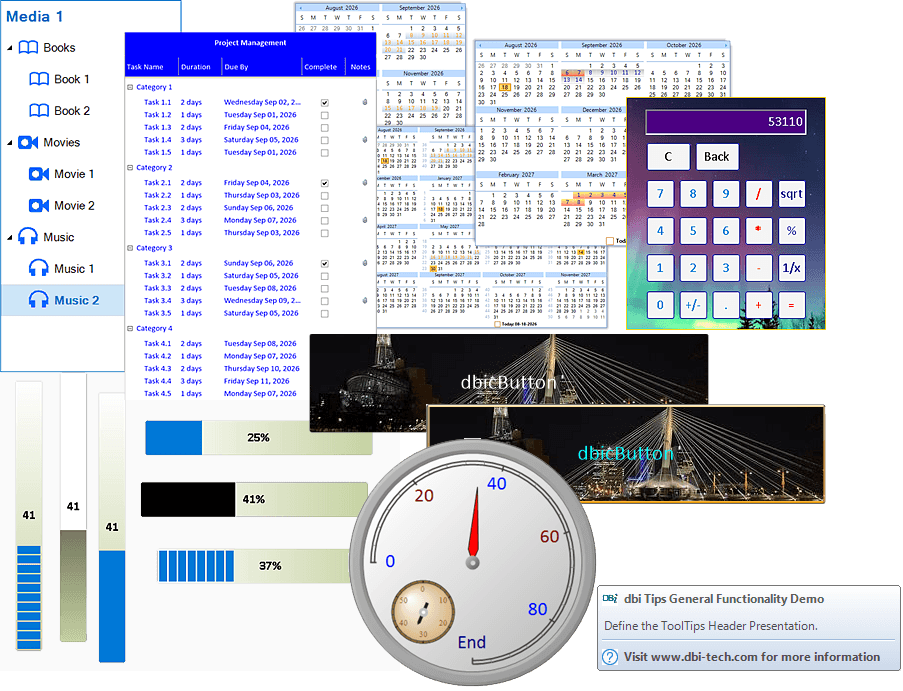
Build Scheduling and Appointment Interfaces
Create scheduling and appointment presentations using calendar, month, week and day-oriented controls. Developers can build familiar Windows scheduling experiences for applications that manage appointments, daily plans, calendars and enterprise resource allocation.
Present Calendar and Date Information
Display dates and calendar months in different formats using dedicated date controls. Applications can support date selection, drop-down date editing, multi-calendar presentations and animated calendar interfaces with fade, zoom, horizontal and vertical transition options.
Create Resource Allocation Experiences
Develop interfaces for presenting and managing enterprise resources alongside appointments and schedules. Day planning and scheduling components support application scenarios where users need clear visual representations of activities, time allocations and associated resources.
Visualize Data and Activity Progress
Represent application data using gauges, dials, meters and digital displays. These components support dashboards, monitoring systems, testing applications and data acquisition interfaces where users need graphical or textual representations of values, signals and activity progress.
Add Interactive Value Selection Controls
Provide horizontal or vertical interfaces for selecting and displaying ranges of values. Slider controls can form part of interactive application experiences where users adjust settings, select values or view information represented along a defined range.
Design Application Navigation Interfaces
Create Windows navigation experiences using Explorer-style navigation and configurable tab controls. Developers can organize application areas, content and commands through navigation bars, tab strips and folder-style interfaces with customizable presentation options.
Display Structured Lists and Hierarchical Data
Present information through combined List View and Tree View functionality. The component supports multiple display modes, direct editing and structured data presentation, helping developers create interfaces for navigating, viewing and working with hierarchical or list-based application content.
Add Contextual Interface Information
Communicate contextual information through customizable tooltips, labels and application titles. Developers can adapt these interface elements to suit application designs, including built-in and user-drawn tooltip presentations for providing additional information within Windows application workflows.
Integrate Calculator and Button Controls
Add configurable buttons and calculator functionality to Windows applications. Button controls support skinnable presentations, masked images and color properties, while the calculator component supports custom branding and programmable function buttons for application-specific calculation experiences.
Product Compatibility
Review the details below to ensure this product is supported within your environment.
Component Type
- .NET
.NET Version
- .NET 10 LTS
- .NET 9 STS
- .NET 8 LTS
.NET Platform
- .NET Assembly
IDE Support
- Visual Studio
About DBI Technologies
DBI Technologies, established in 1996 and headquartered in Winnipeg, Canada, delivers component-based software for enterprise developers seeking advanced data visualization and scheduling capabilities. Its widely used components and frameworks support environments such as .NET, ActiveX, COM, and WPF, making it a consistent choice for developers focused on resource planning, scheduling, and user interface controls. DBI’s offerings, including Solutions Schedule and Studio Controls, are recognized for adherence to industry standards, compatibility across development platforms, and reliability in demanding enterprise applications. The brand’s longevity and ongoing industry recognition reflect its commitment to quality and developer productivity.
Learn more about DBI TechnologiesExplore DBI Technologies products

As official and authorized distributors since 2002, ComponentSource supplies you with legitimate licenses directly from DBI Technologies.