Telerik UI for WPF WebCam
Display, record, and capture live video from webcams.
- Stream live video from connected web cameras in your WPF applications.
- Capture snapshots and record video streams to local files easily.
- Customize commands, handle errors, and control camera settings.

Prices from:
| Available in | |
|---|---|
| Telerik UI for WPF | Loading |
| Telerik DevCraft | Loading |
Real-Time Video Streaming
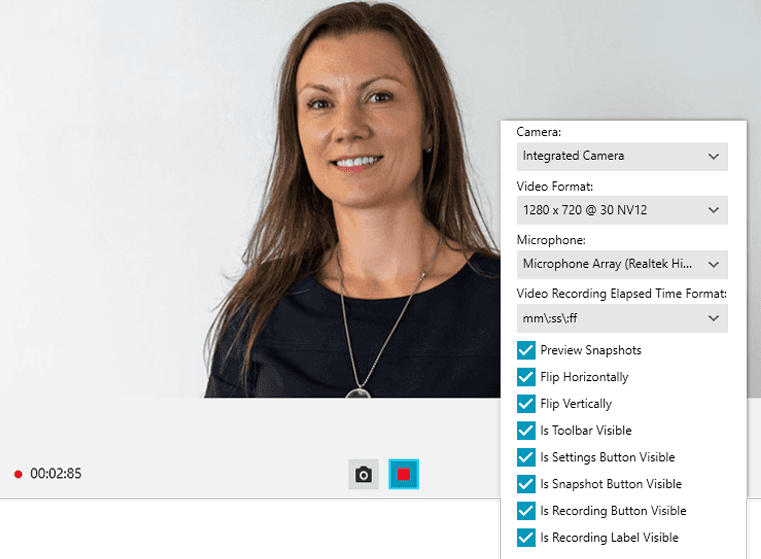
The RadWebCam control displays live video streams from connected web or USB cameras within WPF desktop applications.
Video Recording to File
Users can record the webcam video stream to local storage by setting the recording file path and initiating recording through the control's API or UI commands.
Snapshot Capture
The control allows capturing still images from the video stream at any moment, raising an event with a BitmapSource, which can be saved or used within the application.
Customizable Commands and UI
Developers can tailor available commands such as start, stop, snapshot, and record to fit specific application needs, adjusting the control’s behavior and interface.
Camera Settings Control
The component provides a settings dialog and standalone CameraSettingsControl to adjust camera parameters like video and audio options, with applied settings persisting to the device.
Error Handling and Notifications
Built-in mechanisms handle common camera errors such as unavailability or access denial, allowing developers to customize error content and respond via events.
Audio Support
When supported by the device, the control includes audio streaming alongside video, automatically detecting microphones and enabling audio capture.
Device and Codec Management
RadWebCam exposes APIs to enumerate available video and audio devices and select compatible video formats and codecs.
AutoStart and Manual Control
By default, the control auto-starts streaming from the first detected camera but supports disabling auto-start and manual camera initialization and control.
Touch, Localization, and Styling Support
The control supports touch input, Right-To-Left layouts, localization providers for multiple languages, and theming.
Product Compatibility
Review the details below to ensure this product is supported within your environment.
Component Type
- .NET
.NET Version
- .NET 10 LTS
- .NET 9 STS
- .NET 8 LTS
- .NET 4.8 or earlier
.NET Platform
- .NET Assembly
- .NET Class
- .NET WPF
IDE Support
- Visual Studio
About Telerik
Telerik, founded in 2002 and headquartered in Sofia, Bulgaria, develops UI component libraries, reporting tools, and testing solutions for .NET and JavaScript application development. Its flagship products include Telerik DevCraft, a collection of UI, reporting, testing, and productivity tools for Microsoft development platforms, and Kendo UI, a suite of JavaScript UI libraries for frameworks including Angular, React, and Vue. Telerik also provides document processing, reporting, and automated testing technologies designed for web, desktop, and mobile software development environments.

As official and authorized distributors since 2018, ComponentSource supplies you with legitimate licenses directly from Telerik.