Wijmo Angular VSCode Designer
Visual design surface for Angular Wijmo controls in VS Code.
- Enables WYSIWYG editing of Wijmo control markup.
- Integrates with Visual Studio Code for Angular development.
- Supports creating and customizing control properties and collections.

Prices from:
| Available in | |
|---|---|
| Wijmo | Loading |
| ComponentOne Studio Enterprise | Loading |
Integration in VS Code
Adds actionable links above Wijmo Angular components in HTML files, enabling direct access to the visual designer from markup tags within the editor.
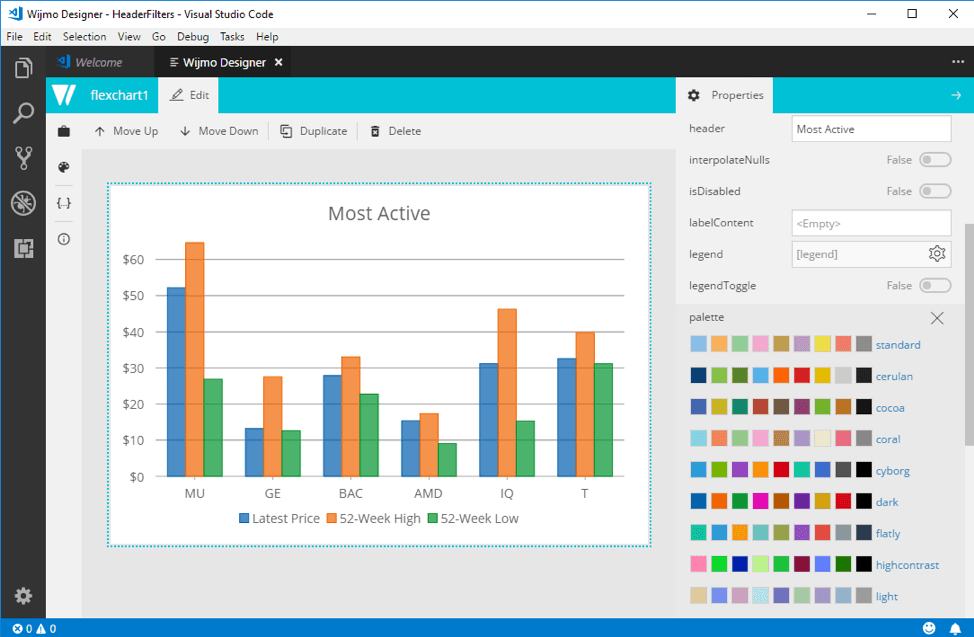
Visual Design Surface
Opens controls in a WYSIWYG design mode where users configure properties through a property grid, instantly seeing updates without scrolling or resizing controls.
Markup Synchronization
After editing in the designer, changes are saved back into the original Angular HTML template, updating Wijmo control tags automatically.
Standalone Design Surface Command
Provides a separate design tab to create new Wijmo Angular controls with sample data, customizable properties, and the ability to generate markup for insertion into projects.
Property and Collection Editors
Supports editing complex control properties and collections like grid columns and chart series, including adding, deleting, and configuring individual items.
Theme Previewing
Includes the ability to preview different Wijmo themes applied to controls in the designer, allowing assessment of visual styles without impacting code generation.
Binding Preservation
Recognizes data bindings in Angular markup as read-only to avoid accidental changes while preserving them when updating source files.
Integration with IntelliSense Extensions
Works alongside IntelliSense tools to aid in control tag generation before visual editing, enhancing code authoring efficiency in Angular projects.
Session Persistence
Maintains the state of open designers during VS Code sessions for continued work without losing context after switching files or tabs.
Product Compatibility
Review the details below to ensure this product is supported within your environment.
Component Type
- JavaScript
JavaScript Platform
- Angular
How to Buy
Available as part of Wijmo Enterprise, or ComponentOne Studio Enterprise.

- Included80+ JavaScript Controls
- Not included120+ WinForms Controls
- Not included100+ WPF Controls
- Not included30+ WinUI & .NET MAUI Controls
- Not included40+ ASP.NET MVC & Core Controls
- Not included40+ ASP.NET WebForms Controls
- Not included19+ Blazor Components
- Not includedData Services/Web API
- Enterprise Controls
- Not includedFinancialChart
- Not includedFlexSheet
- Not includedFlexPivot/OLAP
- Not includedFlexReport Designer
- Not includedReportViewer
- Additional Features
- Not includedIntelliSpell
- Not included2200+ Icons/Images

- Included80+ JavaScript Controls
- Included120+ WinForms Controls
- Included100+ WPF Controls
- Included30+ WinUI & .NET MAUI Controls
- Included40+ ASP.NET MVC & Core Controls
- Included40+ ASP.NET WebForms Controls
- Included19+ Blazor Components
- IncludedData Services/Web API
- Enterprise Controls
- IncludedFinancialChart
- IncludedFlexSheet
- IncludedFlexPivot/OLAP
- IncludedFlexReport Designer
- IncludedReportViewer
- Additional Features
- IncludedIntelliSpell
- Included2200+ Icons/Images
About MESCIUS
MESCIUS, formerly known as GrapeCity, is a leading developer-focused brand established in Japan, with a history spanning over 30 years. It is recognized for its extensive suite of software components, including reporting frameworks, spreadsheet libraries, and Japanese market-oriented input controls. Popular products such as ActiveReports, SPREAD, InputMan, and ComponentOne support both .NET and JavaScript ecosystems and are widely used in business-critical applications. MESCIUS offers distinctive advantages such as proven reliability, comprehensive Japanese localization, and strong technical support, making it a trusted choice for IT professionals and software developers building complex and localized systems.

As official and authorized distributors since 1996, ComponentSource supplies you with legitimate licenses directly from MESCIUS.