Wijmo React PDF
Create dynamic PDF documents directly from React code.
- Generate PDFs programmatically within React applications.
- Draw text, graphics, and images with precise control.
- Build multi-page documents entirely in the browser.

Prices from:
| Available in | |
|---|---|
| Wijmo | Loading |
| ComponentOne Studio Enterprise | Loading |
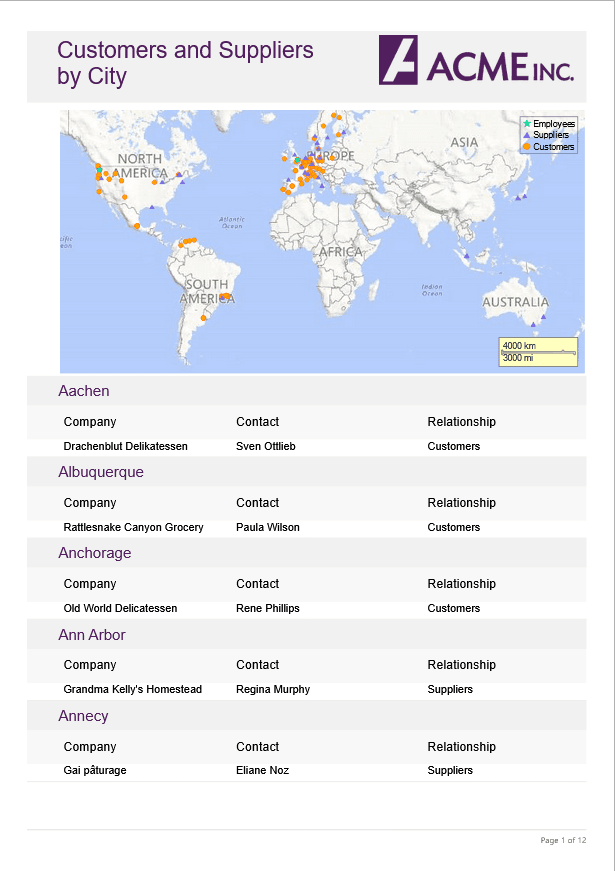
Programmatic PDF Generation
Create PDF documents entirely through code using the PdfDocument API. Define structure, content, and formatting within your React application logic, enabling dynamic generation of reports, invoices, statements, and other document types driven by runtime data.
Text Rendering with Formatting Control
Add text to documents with control over fonts, sizes, alignment, and positioning. The API allows precise placement of text elements on the page.
Vector Graphics Drawing
Draw lines, rectangles, paths, and other vector shapes directly into the PDF canvas. This low-level drawing model provides granular control over visual elements.
Image Embedding Capabilities
Insert images into generated documents and control their size and coordinates. This enables inclusion of logos, diagrams, charts, or other graphical assets as part of dynamically created PDF output.
Coordinate-Based Layout Model
Position content using explicit coordinates within the page context. The API follows a drawing-oriented approach, giving developers detailed control over placement and layout rather than relying on a predefined visual designer.
Multi-Page Document Support
Create documents that span multiple pages by adding content sequentially and inserting new pages as required. This supports longer outputs such as detailed reports, transactional documents, and technical documentation.
Client-Side Document Output
Generate PDF files directly in the browser and provide them to users for download or further handling. This enables document creation without requiring external desktop applications or separate document generation services.
Product Compatibility
Review the details below to ensure this product is supported within your environment.
Component Type
- JavaScript
JavaScript Platform
- React
How to Buy
Available as part of Wijmo Enterprise, or ComponentOne Studio Enterprise.

- Included80+ JavaScript Controls
- Not included120+ WinForms Controls
- Not included100+ WPF Controls
- Not included30+ WinUI & .NET MAUI Controls
- Not included40+ ASP.NET MVC & Core Controls
- Not included40+ ASP.NET WebForms Controls
- Not included19+ Blazor Components
- Not includedData Services/Web API
- Enterprise Controls
- Not includedFinancialChart
- Not includedFlexSheet
- Not includedFlexPivot/OLAP
- Not includedFlexReport Designer
- Not includedReportViewer
- Additional Features
- Not includedIntelliSpell
- Not included2200+ Icons/Images

- Included80+ JavaScript Controls
- Included120+ WinForms Controls
- Included100+ WPF Controls
- Included30+ WinUI & .NET MAUI Controls
- Included40+ ASP.NET MVC & Core Controls
- Included40+ ASP.NET WebForms Controls
- Included19+ Blazor Components
- IncludedData Services/Web API
- Enterprise Controls
- IncludedFinancialChart
- IncludedFlexSheet
- IncludedFlexPivot/OLAP
- IncludedFlexReport Designer
- IncludedReportViewer
- Additional Features
- IncludedIntelliSpell
- Included2200+ Icons/Images
About MESCIUS
MESCIUS, formerly known as GrapeCity, is a leading developer-focused brand established in Japan, with a history spanning over 30 years. It is recognized for its extensive suite of software components, including reporting frameworks, spreadsheet libraries, and Japanese market-oriented input controls. Popular products such as ActiveReports, SPREAD, InputMan, and ComponentOne support both .NET and JavaScript ecosystems and are widely used in business-critical applications. MESCIUS offers distinctive advantages such as proven reliability, comprehensive Japanese localization, and strong technical support, making it a trusted choice for IT professionals and software developers building complex and localized systems.

As official and authorized distributors since 1996, ComponentSource supplies you with legitimate licenses directly from MESCIUS.