Wijmo Vue Data Editors
Customizable Excel-like data editing components for Vue apps.
- Supports in-cell editing with familiar Excel-like UI.
- Offers multiple editor types: dropdown, autocomplete, radio buttons, menu.
- Enables declarative creation of custom cell editors using Vue templates.

Prices from:
| Available in | |
|---|---|
| Wijmo | Loading |
| ComponentOne Studio Enterprise | Loading |
Built-in Quick Editing
FlexGrid supports Excel-like quick editing where users can easily enter edit mode, use keyboard navigation, and seamlessly edit multiple cells with arrow keys for a smooth data entry experience.
Multiple Editor Types
Choose from several editor types for data-mapped columns including dropdown lists with autocomplete and validation, standalone autocomplete inputs, radio button groups showing all options, and menu-based command lists. This flexibility meets varied UI requirements.
Declarative Custom Editors
Create tailored cell editors using Vue's template syntax, allowing the inclusion of advanced input controls like InputNumber or InputDate. Developers can build complex editing interfaces declaratively without writing imperative JavaScript.
Data Validation Support
Integrate validation into the editing process using event-based or CollectionView-based validation to ensure data integrity and provide immediate feedback to users during data entry.
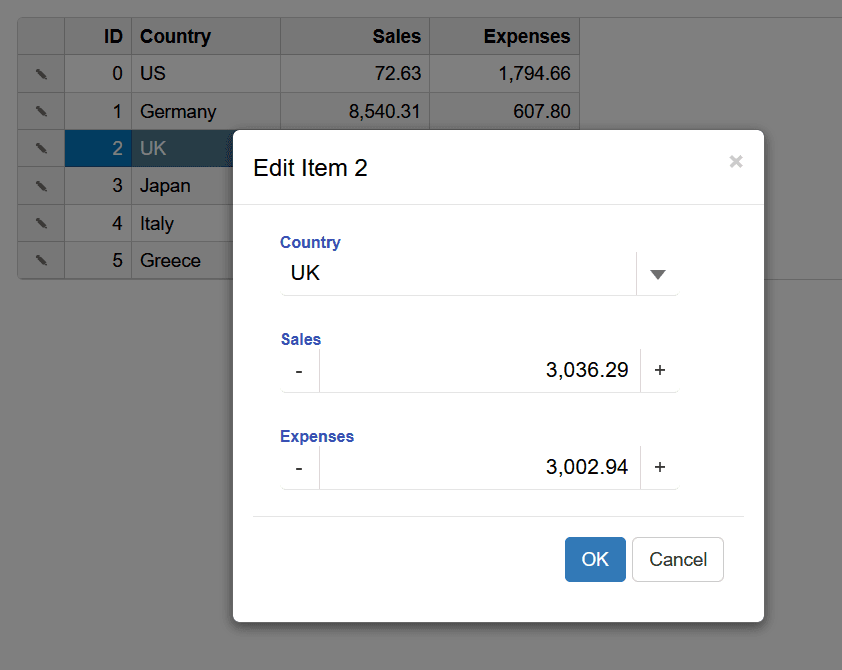
Pop-up and Inline Editing
Support for both inline cell editors and pop-up editor dialogs allows developers to customize editing workflows to suit application UX, ranging from simple edits to complex multi-field forms.
IME Support
Input Method Editor (IME) support enables users to input data efficiently in languages requiring complex input methods such as Japanese, Chinese, and Korean, ensuring global usability.
Seamless FlexGrid Integration
Editors are fully integrated within FlexGrid, providing consistent interaction patterns and compatible cell template use, enabling advanced customization of grid cells and editors.
Vue-Specific API and Binding
Editors leverage Vue's reactive binding and scoped slots to ensure dynamic data updates and smooth interaction, enhancing developer productivity and application responsiveness.
Product Compatibility
Review the details below to ensure this product is supported within your environment.
Component Type
- JavaScript
JavaScript Platform
- Vue.js
How to Buy
Available as part of Wijmo Enterprise, or ComponentOne Studio Enterprise.

- Included80+ JavaScript Controls
- Not included120+ WinForms Controls
- Not included100+ WPF Controls
- Not included30+ WinUI & .NET MAUI Controls
- Not included40+ ASP.NET MVC & Core Controls
- Not included40+ ASP.NET WebForms Controls
- Not included19+ Blazor Components
- Not includedData Services/Web API
- Enterprise Controls
- Not includedFinancialChart
- Not includedFlexSheet
- Not includedFlexPivot/OLAP
- Not includedFlexReport Designer
- Not includedReportViewer
- Additional Features
- Not includedIntelliSpell
- Not included2200+ Icons/Images

- Included80+ JavaScript Controls
- Included120+ WinForms Controls
- Included100+ WPF Controls
- Included30+ WinUI & .NET MAUI Controls
- Included40+ ASP.NET MVC & Core Controls
- Included40+ ASP.NET WebForms Controls
- Included19+ Blazor Components
- IncludedData Services/Web API
- Enterprise Controls
- IncludedFinancialChart
- IncludedFlexSheet
- IncludedFlexPivot/OLAP
- IncludedFlexReport Designer
- IncludedReportViewer
- Additional Features
- IncludedIntelliSpell
- Included2200+ Icons/Images
About MESCIUS
MESCIUS, formerly known as GrapeCity, is a leading developer-focused brand established in Japan, with a history spanning over 30 years. It is recognized for its extensive suite of software components, including reporting frameworks, spreadsheet libraries, and Japanese market-oriented input controls. Popular products such as ActiveReports, SPREAD, InputMan, and ComponentOne support both .NET and JavaScript ecosystems and are widely used in business-critical applications. MESCIUS offers distinctive advantages such as proven reliability, comprehensive Japanese localization, and strong technical support, making it a trusted choice for IT professionals and software developers building complex and localized systems.

As official and authorized distributors since 1996, ComponentSource supplies you with legitimate licenses directly from MESCIUS.