Wijmo Vue MultiRow
Display multiple rows per item with customizable layouts in Vue.
- Extends FlexGrid to support multiple rows per data item.
- Defines custom row layouts via layoutDefinition property.
- Supports paging through IPagedCollectionView interface.

Prices from:
| Available in | |
|---|---|
| Wijmo | Loading |
| ComponentOne Studio Enterprise | Loading |
Multiple Rows Per Data Item
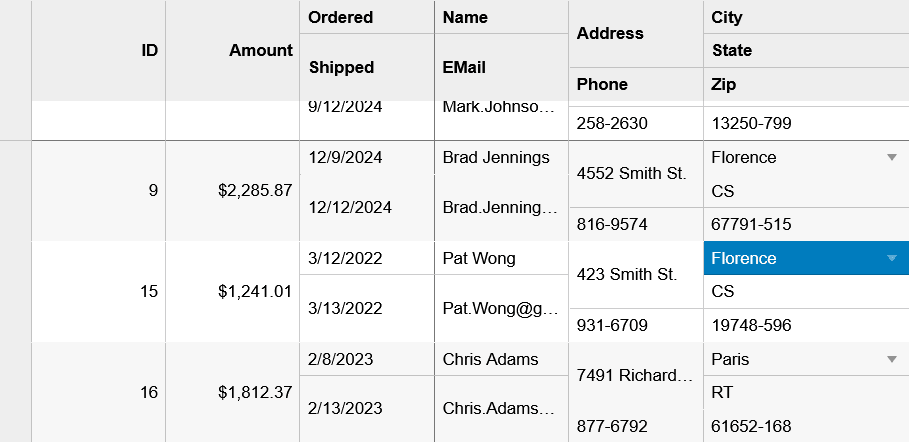
MultiRow extends the FlexGrid control to display several rows for each item, allowing detailed layouts that reduce horizontal scrolling and improve data clarity.
Custom Layout Definition
The layoutDefinition property lets you define groups and arrangements of cells within each item, controlling row spans and column layouts precisely for tailored UI.
Paging Support
Supports paging through the IPagedCollectionView interface, facilitating efficient data navigation in large datasets identical to the .NET implementation.
Disabled FlexGrid Features
Certain FlexGrid features like allowMerging, autoGenerateColumns, and allowDragging are disabled in MultiRow to maintain layout integrity.
Cell Templates Integration
Compatible with Vue cell templates for defining custom content in cells, including data cells, headers, and editors, allowing fully customizable grid appearance and behavior.
Selection and Editing
Inherits selection modes and editing behaviors from FlexGrid, including adding, deleting, and editing rows within a multi-row layout context.
Performance Optimization
Supports virtualization to efficiently handle large data volumes, updating only visible cells to maintain smooth performance.
Product Compatibility
Review the details below to ensure this product is supported within your environment.
Component Type
- JavaScript
JavaScript Platform
- Vue.js
How to Buy
Available as part of Wijmo Enterprise, or ComponentOne Studio Enterprise.

- Included80+ JavaScript Controls
- Not included120+ WinForms Controls
- Not included100+ WPF Controls
- Not included30+ WinUI & .NET MAUI Controls
- Not included40+ ASP.NET MVC & Core Controls
- Not included40+ ASP.NET WebForms Controls
- Not included19+ Blazor Components
- Not includedData Services/Web API
- Enterprise Controls
- Not includedFinancialChart
- Not includedFlexSheet
- Not includedFlexPivot/OLAP
- Not includedFlexReport Designer
- Not includedReportViewer
- Additional Features
- Not includedIntelliSpell
- Not included2200+ Icons/Images

- Included80+ JavaScript Controls
- Included120+ WinForms Controls
- Included100+ WPF Controls
- Included30+ WinUI & .NET MAUI Controls
- Included40+ ASP.NET MVC & Core Controls
- Included40+ ASP.NET WebForms Controls
- Included19+ Blazor Components
- IncludedData Services/Web API
- Enterprise Controls
- IncludedFinancialChart
- IncludedFlexSheet
- IncludedFlexPivot/OLAP
- IncludedFlexReport Designer
- IncludedReportViewer
- Additional Features
- IncludedIntelliSpell
- Included2200+ Icons/Images
About MESCIUS
MESCIUS, formerly known as GrapeCity, is a leading developer-focused brand established in Japan, with a history spanning over 30 years. It is recognized for its extensive suite of software components, including reporting frameworks, spreadsheet libraries, and Japanese market-oriented input controls. Popular products such as ActiveReports, SPREAD, InputMan, and ComponentOne support both .NET and JavaScript ecosystems and are widely used in business-critical applications. MESCIUS offers distinctive advantages such as proven reliability, comprehensive Japanese localization, and strong technical support, making it a trusted choice for IT professionals and software developers building complex and localized systems.

As official and authorized distributors since 1996, ComponentSource supplies you with legitimate licenses directly from MESCIUS.