Wijmo Vue OLAP
High-speed PivotGrid and PivotChart components for Vue applications.
- Process and aggregate large datasets interactively within Vue apps.
- Connect directly with Microsoft SSAS cubes for enhanced data analysis.
- Customize, filter, and export data with Excel-like interfaces.

Prices from:
| Available in | |
|---|---|
| Wijmo | Loading |
| ComponentOne Studio Enterprise | Loading |
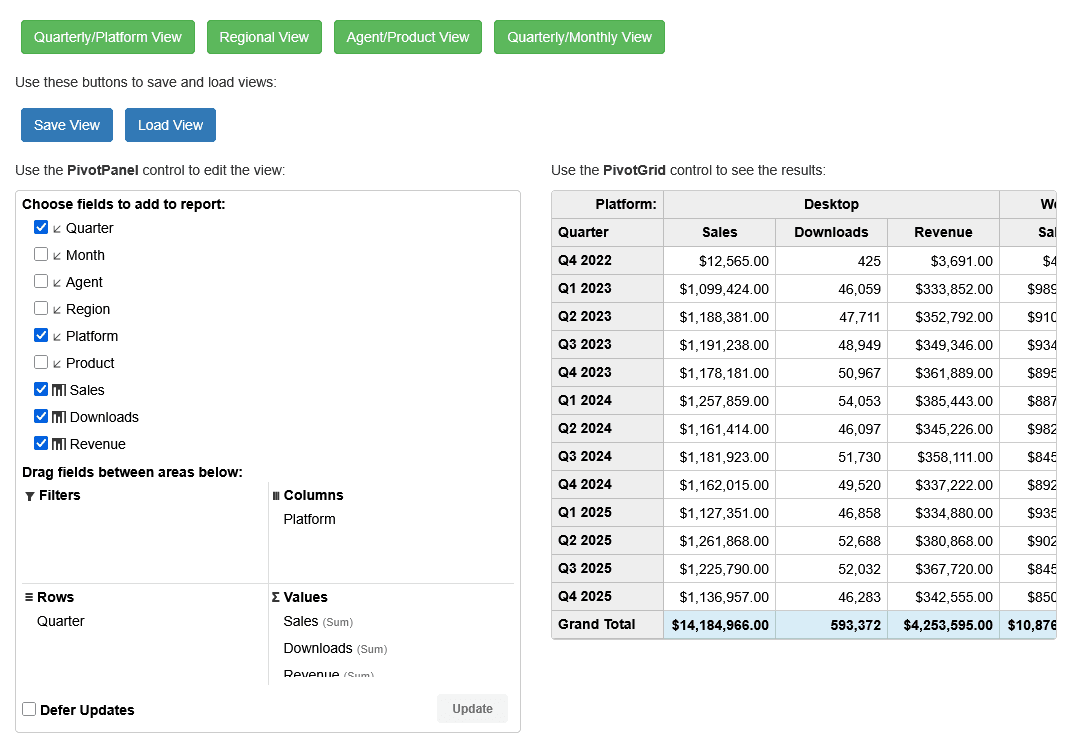
Client-Side Data Processing
Manage and aggregate hundreds of thousands of data rows efficiently using Wijmo's optimized client-side engine allowing real-time interactions without heavy server dependencies.
Server-Side OLAP Support
Optionally connect to a server-side Web API to delegate data sorting and filtering tasks, facilitating analysis of extremely large datasets beyond client capabilities.
Microsoft SSAS Cube Integration
Bind PivotGrid and PivotChart components directly to existing SQL Server Analysis Service cubes without requiring additional server-side APIs, enabling seamless enterprise BI integration.
Excel-Like User Interface
Interact through a familiar PivotPanel interface to drag and drop fields, apply filters, and arrange data into rows and columns similar to Microsoft Excel pivot tables.
Data Visualization with PivotChart
Visualize summarized data via various chart types extending FlexChart and FlexPie components, delivering insightful graphical representations of large data sets.
Interactive Data Filtering with Slicers
Use the Slicer module to visually filter data values, clearly indicating active filters to help users understand the current data context dynamically.
Customizable PivotGrid Cells
Customize appearance and functionality of each pivot table cell, supporting conditional styling, embedded components, sparklines, and dynamic updates.
Content Exporting Capabilities
Export pivot tables to XLSX, CSV, or PDF formats and pivot charts as PNG, JPEG, or SVG images, facilitating data sharing and reporting.
Drag-and-Drop Field Management
Utilize a smart PivotPanel allowing intuitive drag-and-drop operations on fields to quickly update and explore data perspectives.
Outline Mode Display
Render row fields in a compact outline format that reduces screen whitespace and organizes data hierarchically for better readability.
Product Compatibility
Review the details below to ensure this product is supported within your environment.
Component Type
- JavaScript
JavaScript Platform
- Vue.js
How to Buy
Available as part of Wijmo Enterprise, or ComponentOne Studio Enterprise.

- Included80+ JavaScript Controls
- Not included120+ WinForms Controls
- Not included100+ WPF Controls
- Not included30+ WinUI & .NET MAUI Controls
- Not included40+ ASP.NET MVC & Core Controls
- Not included40+ ASP.NET WebForms Controls
- Not included19+ Blazor Components
- Not includedData Services/Web API
- Enterprise Controls
- Not includedFinancialChart
- Not includedFlexSheet
- Not includedFlexPivot/OLAP
- Not includedFlexReport Designer
- Not includedReportViewer
- Additional Features
- Not includedIntelliSpell
- Not included2200+ Icons/Images

- Included80+ JavaScript Controls
- Included120+ WinForms Controls
- Included100+ WPF Controls
- Included30+ WinUI & .NET MAUI Controls
- Included40+ ASP.NET MVC & Core Controls
- Included40+ ASP.NET WebForms Controls
- Included19+ Blazor Components
- IncludedData Services/Web API
- Enterprise Controls
- IncludedFinancialChart
- IncludedFlexSheet
- IncludedFlexPivot/OLAP
- IncludedFlexReport Designer
- IncludedReportViewer
- Additional Features
- IncludedIntelliSpell
- Included2200+ Icons/Images
About MESCIUS
MESCIUS, formerly known as GrapeCity, is a leading developer-focused brand established in Japan, with a history spanning over 30 years. It is recognized for its extensive suite of software components, including reporting frameworks, spreadsheet libraries, and Japanese market-oriented input controls. Popular products such as ActiveReports, SPREAD, InputMan, and ComponentOne support both .NET and JavaScript ecosystems and are widely used in business-critical applications. MESCIUS offers distinctive advantages such as proven reliability, comprehensive Japanese localization, and strong technical support, making it a trusted choice for IT professionals and software developers building complex and localized systems.

As official and authorized distributors since 1996, ComponentSource supplies you with legitimate licenses directly from MESCIUS.