Wijmo Vue Scheduler (FlexScheduler)
Create flexible scheduling experiences with interactive calendars and resource management.
- Display and manage time-based events through customizable calendar views.
- Organize schedules by resources, working hours, and time zones.
- Enable event editing, drag-and-drop interactions, and scheduling conflict detection.

Prices from:
| Available in | |
|---|---|
| Wijmo | Loading |
| ComponentOne Studio Enterprise | Loading |
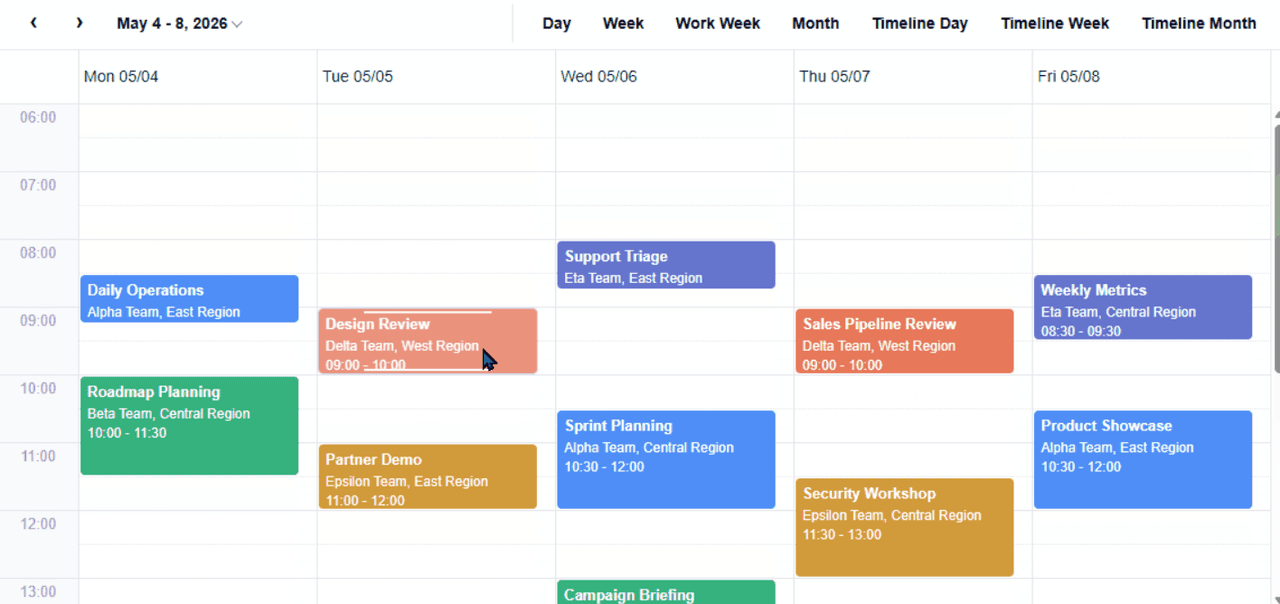
Interactive Calendar Views
Display scheduled events in configurable calendar views that organize information by date, time, and resource. FlexScheduler supports built-in view definitions and custom layouts, allowing developers to present appointments, tasks, and other time-based records in formats suited to their applications.
Event Data Binding and Configuration
Connect scheduling interfaces to application data using configurable event collections and field mappings. Define properties such as event titles, start times, and end times while maintaining a consistent relationship between source records and their visual representations across calendar views.
Resource Scheduling and Organization
Organize scheduled events around resources such as employees, rooms, teams, or equipment. Configure resource dimensions, assignments, and groupings to display availability and scheduled activities in dedicated lanes, helping users understand how resources are allocated across different time periods.
Event Creation and Editing
Enable users to create, modify, and delete scheduled events directly within the calendar interface. FlexScheduler supports configurable event editing operations that allow applications to manage appointments and other time-based records while keeping changes connected to the underlying event data.
Drag-and-Drop Event Management
Provide interactive event management through mouse-based dragging and resizing. Users can reposition scheduled items or adjust their duration within supported calendar layouts, allowing applications to handle schedule changes through direct interaction with the displayed events.
Customizable Calendar Layouts
Define how scheduling information appears using configurable rows, columns, axes, and time intervals. FlexScheduler supports advanced layout definitions that combine time and resource dimensions, allowing developers to construct scheduling interfaces around specific operational requirements and data structures.
Working Hours and Time Zone Configuration
Configure working days, business hours, and nonworking periods to represent operational schedules. FlexScheduler also supports time zone settings that control how event dates and times are interpreted and displayed, helping applications present scheduling information across different geographical regions.
Scheduling Conflict Detection
Identify overlapping events and scheduling conflicts involving unavailable time periods. FlexScheduler provides conflict detection and handling capabilities that developers can incorporate into event validation workflows, supporting applications that need to manage resource availability and prevent incompatible scheduling arrangements.
Custom Event Display and Context Menus
Customize the appearance and content of scheduled events using configurable templates and display settings. Developers can also adapt context menus to provide relevant scheduling actions, creating calendar interfaces that reflect application-specific information and interaction requirements.
Calendar Navigation and Keyboard Interaction
Navigate scheduling information using date selectors, previous and next controls, and configurable view buttons. FlexScheduler also supports keyboard navigation, focus management, and selection behavior, enabling users to move through calendar cells and interact with scheduling content using different input methods.
Product Compatibility
Review the details below to ensure this product is supported within your environment.
Component Type
- JavaScript
JavaScript Platform
- Vue.js
How to Buy
Available as part of Wijmo Enterprise, or ComponentOne Studio Enterprise.

- Included80+ JavaScript Controls
- Not included120+ WinForms Controls
- Not included100+ WPF Controls
- Not included30+ WinUI & .NET MAUI Controls
- Not included40+ ASP.NET MVC & Core Controls
- Not included40+ ASP.NET WebForms Controls
- Not included19+ Blazor Components
- Not includedData Services/Web API
- Enterprise Controls
- Not includedFinancialChart
- Not includedFlexSheet
- Not includedFlexPivot/OLAP
- Not includedFlexReport Designer
- Not includedReportViewer
- Additional Features
- Not includedIntelliSpell
- Not included2200+ Icons/Images

- Included80+ JavaScript Controls
- Included120+ WinForms Controls
- Included100+ WPF Controls
- Included30+ WinUI & .NET MAUI Controls
- Included40+ ASP.NET MVC & Core Controls
- Included40+ ASP.NET WebForms Controls
- Included19+ Blazor Components
- IncludedData Services/Web API
- Enterprise Controls
- IncludedFinancialChart
- IncludedFlexSheet
- IncludedFlexPivot/OLAP
- IncludedFlexReport Designer
- IncludedReportViewer
- Additional Features
- IncludedIntelliSpell
- Included2200+ Icons/Images
About MESCIUS
MESCIUS, formerly known as GrapeCity, is a leading developer-focused brand established in Japan, with a history spanning over 30 years. It is recognized for its extensive suite of software components, including reporting frameworks, spreadsheet libraries, and Japanese market-oriented input controls. Popular products such as ActiveReports, SPREAD, InputMan, and ComponentOne support both .NET and JavaScript ecosystems and are widely used in business-critical applications. MESCIUS offers distinctive advantages such as proven reliability, comprehensive Japanese localization, and strong technical support, making it a trusted choice for IT professionals and software developers building complex and localized systems.

As official and authorized distributors since 1996, ComponentSource supplies you with legitimate licenses directly from MESCIUS.