Wijmo Web Components REST
Create flexible web UI components with REST API data binding.
- Build reusable custom HTML elements with Wijmo Web Components.
- Bind data efficiently with support for any REST API backend.
- Seamlessly use components across Angular, React, Vue, and pure JavaScript.

Prices from:
| Available in | |
|---|---|
| Wijmo | Loading |
| ComponentOne Studio Enterprise | Loading |
Custom Elements for Reusable UI
Wijmo uses the Web Components standard to define custom HTML elements, enabling developers to create reusable and encapsulated UI components declared directly in markup to simplify development and reduce code complexity.
Shadow DOM Encapsulation
Each custom component leverages Shadow DOM technology to isolate styles and DOM structure, ensuring component encapsulation that prevents styling conflicts and enhances maintainability within complex applications.
Extensive, Flexible API
Wijmo provides an easy-to-read and extensive API for all components, offering numerous extensibility points so developers can customize behaviour and integrate components smoothly within their applications.
Effortless REST API Binding
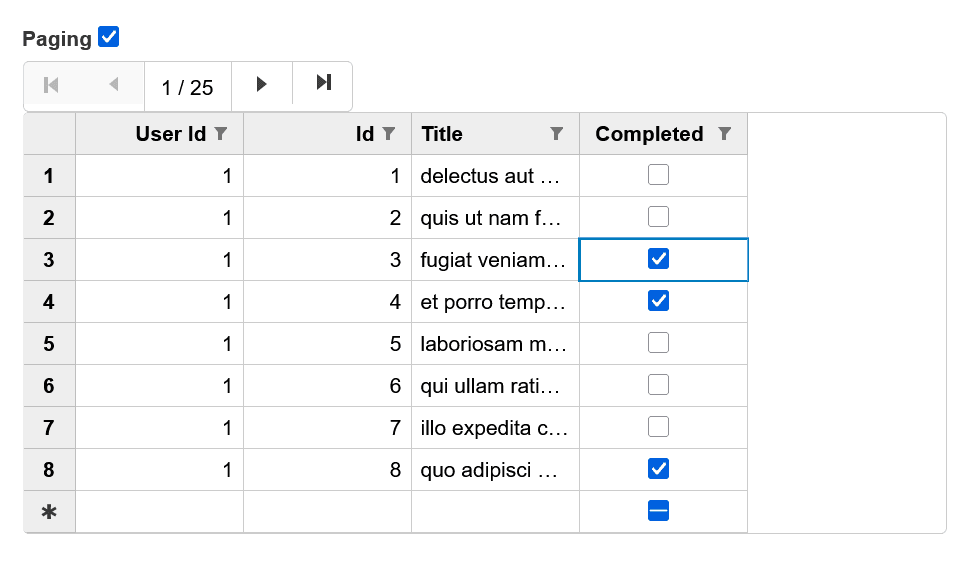
The product includes a RestCollectionView class that binds UI components to any RESTful API, handling CRUD operations automatically and supporting server-side or client-side sorting, paging, and filtering for efficient data management.
Optimized Performance and Modularity
Wijmo components are lightweight and modular, allowing you to include only what you need, resulting in optimized application size, faster loading, and improved responsiveness.
Declarative Markup Usage
Components can be incorporated declaratively within HTML markup without the need for extensive JavaScript coding, enabling faster development cycles and cleaner codebases.
Touch-Enabled and Responsive
Designed with touch interactions and responsive layouts in mind, Wijmo Web Components provide a consistent user experience across desktops, tablets, and mobile devices.
Product Compatibility
Review the details below to ensure this product is supported within your environment.
Component Type
- JavaScript
JavaScript Platform
- Web Component
How to Buy
Available as part of Wijmo Enterprise, or ComponentOne Studio Enterprise.

- Included80+ JavaScript Controls
- Not included120+ WinForms Controls
- Not included100+ WPF Controls
- Not included30+ WinUI & .NET MAUI Controls
- Not included40+ ASP.NET MVC & Core Controls
- Not included40+ ASP.NET WebForms Controls
- Not included19+ Blazor Components
- Not includedData Services/Web API
- Enterprise Controls
- Not includedFinancialChart
- Not includedFlexSheet
- Not includedFlexPivot/OLAP
- Not includedFlexReport Designer
- Not includedReportViewer
- Additional Features
- Not includedIntelliSpell
- Not included2200+ Icons/Images

- Included80+ JavaScript Controls
- Included120+ WinForms Controls
- Included100+ WPF Controls
- Included30+ WinUI & .NET MAUI Controls
- Included40+ ASP.NET MVC & Core Controls
- Included40+ ASP.NET WebForms Controls
- Included19+ Blazor Components
- IncludedData Services/Web API
- Enterprise Controls
- IncludedFinancialChart
- IncludedFlexSheet
- IncludedFlexPivot/OLAP
- IncludedFlexReport Designer
- IncludedReportViewer
- Additional Features
- IncludedIntelliSpell
- Included2200+ Icons/Images
About MESCIUS
MESCIUS, formerly known as GrapeCity, is a leading developer-focused brand established in Japan, with a history spanning over 30 years. It is recognized for its extensive suite of software components, including reporting frameworks, spreadsheet libraries, and Japanese market-oriented input controls. Popular products such as ActiveReports, SPREAD, InputMan, and ComponentOne support both .NET and JavaScript ecosystems and are widely used in business-critical applications. MESCIUS offers distinctive advantages such as proven reliability, comprehensive Japanese localization, and strong technical support, making it a trusted choice for IT professionals and software developers building complex and localized systems.

As official and authorized distributors since 1996, ComponentSource supplies you with legitimate licenses directly from MESCIUS.